





RJT_2k
Members
-
Joined
-
Last visited
-
I made some small tweaks , but really, whatever was going on was solved somewhere in that reboot. Testing on 10GbE , I was able to push 1.09 GB/s for an entire 35.1 GB write operation to either of my two cache pools (disk share). Putting it back to the normal 2.5 GbE link, it can push 283 MB/s solid to either cache pool (user share). So all good. It meets or exceeds my current production NAS, and that was my goal for throughput. I moved everything back over to ZFS (both cache pools, and all of the array HDDs) and will keep testing. Thanks again for everyone's help.
-
correct. I had secondary locations set up originally. Encountered issue. I removed secondary locations, had issue. Set exclusive shares to yes, and rebooted, issue gone. Set exclusive shares to no, but still have no secondary location - still no issue. I'll move it over to 10GbE today and test some larger files to baseline and see where my breakpoints are, then maybe tune a little more zfs / performance options. But as long as nothings regressed, I'm already above my goal on performance. Not sure what the issue was, but thanks for everyone's help in tuning recommendations and general 'how does it work' pointers. It's much appreciated.
-
So, I went and enabled exclusive shares, and rebooted. Testing to cache pools (btrfs and zfs) - 283 MB/s the whole way through on 8GB file. Even two of them back to back (16GB total). Same - 283 MB/s entire copy, all the way on disk2 (zfs array disk). I disabled exclusive shares, rebooted, and still getting 283 MB/s all the way through. I did have my pools shares set to the array as secondary storage early in. Maybe it left a config with fuse involved until the reboot? After disabling exclusive shares, I still had the pool shares set to no secondary storage. No other changes were made other than exclusive shares on then off, and 2 reboots. Odd, but it's cruising along now. I'll do some more testing later this weekend, maybe switch the unraid host over to 10GbE to see where where the different drives/pools choke out. 2.5GbE is my bottleneck right now, which is fine for my needs.
-
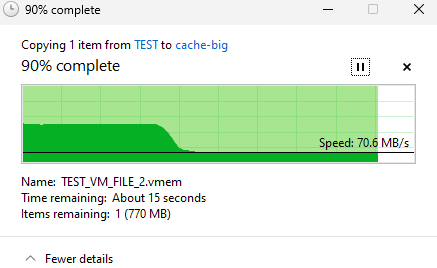
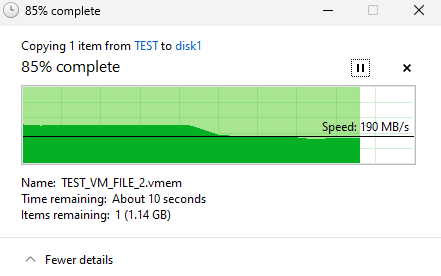
Okay, redoing disk1 as XFS, it behaves very much like the btrfs nvme pool. Starts out at wire speed ( ~280 MB/s) then about 2.5 GB into the 8GB test file, it drops down to 70-80 MB/s for the rest of the xfer. Then enabling reconstructive write - it maintains 280 MB/s longer, about 3.8GB into the transfer, then dips to about 180-190 MB/s for the remainder. That's the fastest yet. I wasn't expecting a single spinning disk - with parity, to outperform the btrfs NVMe 2 slot pool. Is there a big overhead difference between btfrs and xfs? Or COW duties vs parity? My goal is to get the NVMe cache pools to sustain 280 MB/s. The 4 NVMe drives share a PCIe 3.0 x 4 connection, but only hitting one pool at a time I'd think it could hold 280 MB/s. Doing reads (copy from) Unraid to the client sustain 200-230 MB/s indefinitely. I'll go play with ZFS cache and see if I can move the needle any. Is there any tuning that can be done w/ btrfs? . With 64Gb ram and just a few containers to run, I've got some ram to play with I think. Also, here's current disk cache settings: Current Disk Cache Settings vm.dirty_background_ratio = 3% vm.dirty_ratio = 5% vm.dirty_writeback_centisecs = 200 vm.dirty_expire_centisecs = 1000
-
Yeah, network is fine. I've tested the same path to with another NAS device with no issue. All disks/pools are empty except for the files I bounced around for this testing. I'll try one as XFS and post results.
-
To be able to transfer more than 3-4 Gb without it timing out. It's going to do some basic NAS duties, but primarily *arr suite and Plex. Transcoding via A2000 Ada GPU. So I need to be able to get large media files to it reliably.
-
testing Unraid on a ZimaCube Pro (1235U w 64Gb RAM). V7.0.0 beta 4. All drives are new. I have 4 WD Red Plus 8-TB (1 is parity) - formatted ZFS 2 WD_Black SN850x NVMe- 2-TB as a pool, btrfs 2 Samsung 970 Evo Plus NVMe 1-TB as another pool - zfs Lan is single 2.5GbE Client - Windows 11 workstation on 10GbE I've got a few large files I was using as testing. As I send them to either (windows copy, TO Unraid host) of the ZFS destinations (array or pool) - it screams along at 280 MB/s, until I get 4-5GB complete (of 8.0 GB file), then it drops off to 0. It will usually eventually ramp up enough to finish, but I do get timeout with 'unexpected network error' about a third of the time. One of my CPU threads is 100% during the copy . When the ethernet throughput hits the wall, I notice a second thread on the CPU (out of 12) goes to 100%. RAM never gets about 20% utilized. When that thread eases back down , the transfer resumes. I was reading some similar issues with ZFS, so I redid one of the pools as btrfs - this one I get about 2GB into transfer, and then it drops from 280 MB/s to about 60 MB/s. CPU never hits 100%, and it completes - just slowly . I tried locking my workstation ethernet down to from 10GbE to 2.5GbE. Turning on and off NIC offload and flow-control, no change. I see no ethernet errors on the switch at either port. I test this same network path and test files to my production NAS, a little Asustor AS5304T w single RAID-5 array, and no such issues. Solid transfer rate the entire time. While not scientific, I see the NVMe drives in the pool still showing a steady write-speed even when my copy has stalled to 0. Testing same file payload FROM Unraid to Windows host, I get 270-280 MB/s the entire time, no problem. If I use a smaller file, say 2.8 GB - from windows TO unraid ZFS Pool, it is 270-280 MB/s the entire time. Only when I get to about that 4-5 GB mark does it tank. Sooner w/ the btrfs pool (2.5 - 3.5 GB). I've attached diags that are from when the copy speed falls off (one for ZFS, one for btrfs). Am I hitting some cache limit or RAM config? These are user shares, but I've tried it with disk shares - same effect. I also notice its about the same when I test to the ZFS array disks, but they show an active write speed to the disk and parity disk long after I've either completed or gotten unexpected timeout. No docker or VM engines started. zcube1-diagnostics-zfs-20241122-1906.zip zcube1-diagnostics-btrfs-20241122-1903.zip

