wapkaplet
Members
-
Joined
-
Last visited
Everything posted by wapkaplet
-
At this point I feel pretty confident that my problems are being caused by bad RAM. I think this would explain everything I experienced, including the initial circumstances that led to the unclean shutdown. I have swapped the RAM that was in the box for another set, and all the odd behavior seems to have ceased.
-
Hi there, I seem to be having some very odd behavior after an unclean shutdown of Unraid. I'll start with what caused the problematic shutdown in the first place: I was updating a Docker container, and it refused to stop, and refused to remove during the updated process. It also refused to do either manually. At that point I went into Docker settings and attempted to just disable Docker. This caused the whole operating system to hang so badly that I couldn't even trigger a shut down command via a command line with a monitor and keyboard. I had no option but to power-cycle the box. That resulted in a reboot (the system came back) and a full day parity check on the array (no errors). However, I'm now seeing odd behavior in Docker containers (SABNZBd can't complete repairs for instance, even though a local install on another machine works with the same NZB), and I think the root cause is something up with the file system. The most compelling evidence for this is that I'm having trouble with simple copy and move operations on some files. They will start out WAY over any possible speed for the drive (7-800 MB/s) and then proceed well past 100% (150%, 160%, etc) before throwing a variety of rsync errors. I have restarted the array in maintenance mode, run file system checks, and found no errors. Here's an example error: rsync: [sender] read errors mapping "[REMOVED]": Input/output error (5) WARNING: [REMOVED] failed verification -- update discarded (will try again). rsync error: some files/attrs were not transferred (see previous errors) (code 23) at main.c(1338) [sender=3.4.1] I am unsure of how to proceed with correcting this, or even diagnosing it. Can anyone point me in the right direction?
-
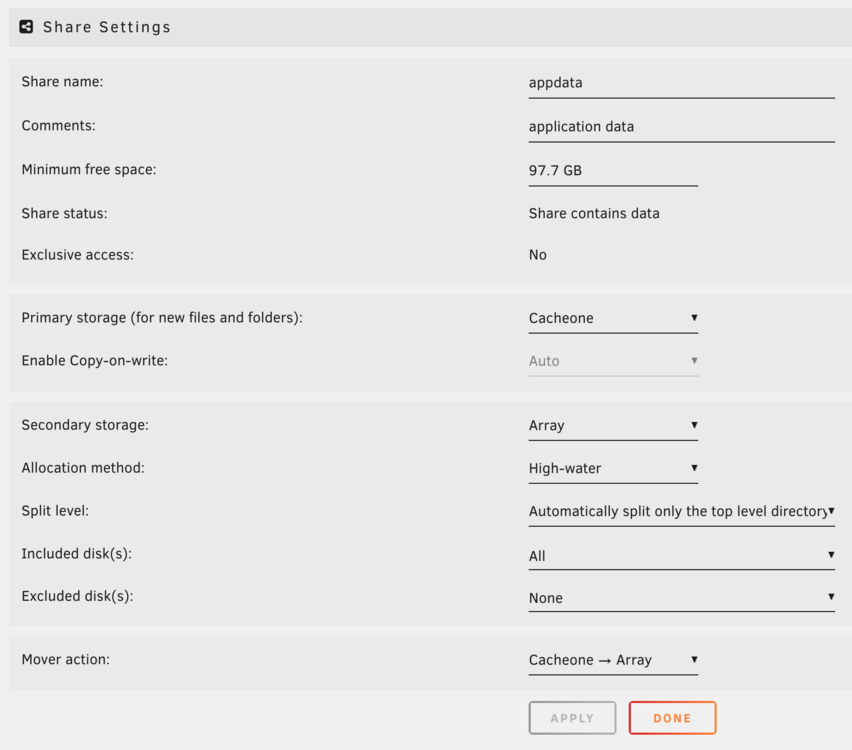
Hi all, My apologies for this post. I feel certain that the info I'm looking for is out there somewhere in a forum post, or a how-to video, or a manual, but I'm struggling to find it. I'm new to Unraid, and setting up my server, and I'd like to cache a few items (like appdata, downloads, etc) so that they run faster in the moment on an nvme cache, and are swept into the Array later. The difficulty I'm having is that a lot of the guides and posts I'm looking at appear to refer to functionality that has since changed in the latest versions of Unraid, so I'm a little lost. My (perhaps incorrect) understanding is that if I have, say, my AppData folder, I should set its primary location to my nvme cache, with the following settings: Primary storage (for new files and folders): Cache Secondary storage: Array Allocation method: High-water Mover action: Cache --> Array However, with these settings, when I go to Shares, I see a warning on appdata that "Some or all files unprotected". Is this expected behaviour simply because the mover doesn't send things to the Array until overnight, and the NVME is not in a RAID1 configuration? Do I understand the current caching functionality properly? And is there a good, current guide I haven't been able to find that will help clarify things for me? Currently on Unraid 6.12.13. Thanks so much for any help!