





optimous
Members
-
Joined
-
Last visited
-
Didn't even think about it being a power supply issue or memory one. I am running an OLD power supply (10+ years old...) and the memory is 7+ years old. Might be time to upgrade those. I will run the mem test and see what it comes back with. Thank you!
-
Had a server freeze/crash. Couldn't manually reboot with a call locally either so had to do a hard button restart. Can't tell if it's a CPU overloaded type thing or there is an issue with one of the docker containers. Attached prev syslog of when the issue happened. syslog-previous11302024.txt
-
Damn. That's what I was afraid of. Is there a thread that has a good list of NICs I should look for if I'm trying to get a 10gig one? Want to make sure not to grab the cheap one like I did here. Thanks for the help!
-
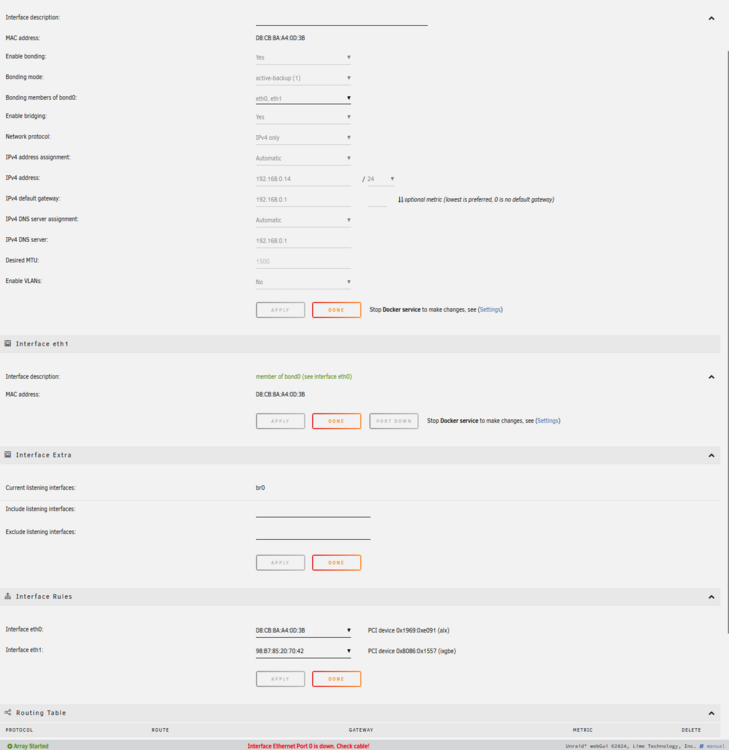
After reading it again I think I know what it's state but not why. I have a network card in my machine so I can get the 5gig I get from my ISP. It's specifically this card: https://www.amazon.com/dp/B01LZRSQM9 Don't know if that matters. Also here is my settings for my internet. I had to setup kinda odd since it has an onboard eth0 but I want to use the card one
-
Hey I have been having a weird issue where unraid dameon dies after a certain amount of time. I think I figured out where in the logs it's happening but I can't understand what's it's trying to state: Nov 26 03:25:22 kernel: ixgbe 0000:02:00.0: Adapter removed Nov 26 03:25:22 kernel: ixgbe 0000:02:00.0: Warning firmware error detected FWSM: 0xFFFFFFFF Nov 26 03:25:24 kernel: bond0: (slave eth1): link status definitely down, disabling slave Nov 26 03:25:24 kernel: device eth1 left promiscuous mode Nov 26 03:25:24 kernel: bond0: now running without any active interface! Nov 26 03:25:24 kernel: br0: port 1(bond0) entered disabled state Nov 26 03:25:25 dhcpcd[1182]: br0: carrier lost Nov 26 03:25:25 dhcpcd[1182]: br0: deleting route to 192.168.0.0/24 Nov 26 03:25:25 dhcpcd[1182]: br0: deleting default route via 192.168.0.1 Nov 26 03:25:25 avahi-daemon[13332]: Withdrawing address record for 192.168.0.14 on br0. Nov 26 03:25:25 avahi-daemon[13332]: Leaving mDNS multicast group on interface br0.IPv4 with address 192.168.0.14. Nov 26 03:25:25 avahi-daemon[13332]: Interface br0.IPv4 no longer relevant for mDNS. Nov 26 03:25:28 ntpd[1350]: Deleting interface #1 br0, 192.168.0.14#123, interface stats: received=43, sent=43, dropped=0, active_time=3420 secs Nov 26 03:25:28 ntpd[1350]: 216.XXX.XXX.4 local addr 192.168.0.14 -> <null> Nov 26 03:47:48 ntpd[1350]: no peer for too long, server running free now I attached the full previous log syslog-previous.txt
