Borosa
Members
-
Joined
-
Last visited
-
Resolved... Just bypassed Unraid altogether and used the other vfio-pci binded NIC for the green interface of the Firewall. Now Unraid can see the Default GW happily and has net access. Would love for Unraid to have the same kind of networking abilities as VMWare, which effectively virtualises all hardware NIC interfaces and makes them fully configurable and available to all hypervisors. It's immensely powerful and minimises the chances of a config mishap creating a potential security issue. The host OS is accessed from a seperate management interface or VLAN, per best practice.
-
Let's put it another way - An ESXi hypervisor is still able to reach the Internet through the assigned Default Gateway, regardless of whether the DG is running as a VM inside it or not. A VM is nothing more than a virtualised physical computer - the networking is the same thing. I've purposely kept it as simple as possible using only IPv4 and a single subnet without any VLANS, etc. The Hypervisor host should be able to present the VM's to the network in such a way that they appear as separate physical devices, hence why I had to run Unraid in MacVLAN mode - to allow the Dockers to appear on the network, each with a unique MAC addresses (this issue didn't affect the VM's). If this seems complicated, then SDN will blow your mind! 😯 I believe that MacVLAN mode has been problematic for some time, and suspect this to be the root cause. 🤷♀️
-
I understand completely where you are coming from, however there are no issues with things coming online and i'm in no hurry. The object of the excercise is to have everything on one box - electricity is expensive, and this is not an enterprise solution, so HA is not an issue and redundancy is only important to the files on the disks. Apart from time to boot, surely there is no issue with running it in this manner. I accept all security issues with giving the host access to the Dockers and VM's, and I have mitigated the creation of a bridged network bypassing my Firewall by using passthrough mode for the Red NIC instead of a VLAN or other Unraid controlled bridge network. Apart from that, I see no issue with how I have this running and believe there is a setting buried somewhere (like the host access to dockers" that is preventing the host from gaining external access. I failed to mention that I also have Tailscale installed, though it's also currently disabled pending resolution of this issue. Once resolved, I will be performing VERY carefull tesing to ensure it is safe to use, otherwise i'll forego it as a "nice to have" but ultimately unnecessary addition. FYI - My host has access to the dockers and VM's. "Host access to custom networks: Enabled" Diagnostics attached. Thank you for the reminder! 😁 Please don't judge me - yes, the hardware is old (4th Gen i7). I scrape by utilising whatever hardware I can afford, with most expenditure going to disks and controllers. She's a hefty unit but runs like a tank, and is rock solid! FYII - You'll see in the diag logs, USB device failures where I had a faulty USB>SATA device for something I was testing in a VM. FYIII - "kernel reports TIME_ERROR: 0x41: Clock Unsynchronized" - this has been resolved and the system time is spot on. 👍 Unraid Diags.zip
-
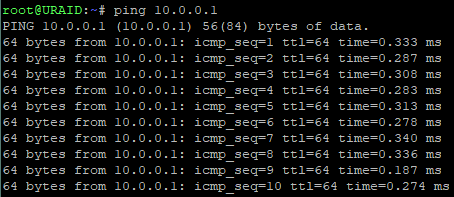
Good afternoon, Having recently migrated from VMWare, I fell in love with Unraid's capabilities after testing it for almost 12 months. Unfortunately, since cutting over to my Prod environment, i'm now in this pedicament and can't seem to find a working solution... (see title for info) Useful information: Unraid v7.0.1 Unraid IP: 10.0.0.2 Unraid address assignment: Static Unraid Default GW: 10.0.0.1 No metric specified. (Endian Community v3.3.28 running as a VM hosted on the Unraid server) Unraid DNS: 10.0.0.6 (PiHole running on a physical RPi) 10.0.0.7 (Technitium v13.4.3 running in a Docker container hosted on the Unraid server - this is also the DHCP server for my network and the primary DNS server for all DHCP enabled network devices) Bridging: Disabled Bonding: Enabled (4 bonded members in Bond0. Was using Mode 6 happily but changed to Mode 1 whilst troubleshooting this issue) Docker custom network type: macvlan Host access to custom networks: Enabled Endian FW uses an e1000 on vhost0 for its Green interface, and a vfio-pci binded NIC for the Red interface. The Red interface connects to my Ubiquiti router using a 192.168.1.0/16 IP assigned via DHCP. Let me know if I missed anything above... Routing table shown below which reflects what I described above. The above setup in terms of IP ranges for the Endian FW is unchanged and has been in operation under VMWare for over 8 years. All devices on my LAN have full, uninterrupted Internet access through the Endian FW's Green interface. I can see the traffic passing through the device on both interfaces happily. Technitium is handling all DHCP and DNS queries like a champion, and logging them all successfully to a Maria DB hosted on a separate Docker container on the same Unraid server. This shows that all VM and Docker devices on my network can happily talk to each other. I chose macVLAN mode to ensure that each Docker container would receive a unique MAC address on the LAN. While I do have the VLAN option enabled in Unraid, there are none specified. I need to do far more testing with my switch hardware prior to going down this route. I first noticed an issue when I was unable to browse any apps in Unraid which was annoying. I can successfully ping the Default GW from Unraid, as well as both DNS servers. DNS resolution also appears to be working, however, all external pings fail. Not sure what else I can do to troubleshoot this issue. 🤷♀️ Any assistance would be greatly appreciated. AB.