




Skip to content
View in the app

A better way to browse. Learn more.

Unraid

A full-screen app on your home screen with push notifications, badges and more.

To install this app on iOS and iPadOS
  1. Tap the Share icon in Safari
  2. Scroll the menu and tap Add to Home Screen.
  3. Tap Add in the top-right corner.
To install this app on Android
  1. Tap the 3-dot menu (⋮) in the top-right corner of the browser.
  2. Tap Add to Home screen or Install app.
  3. Confirm by tapping Install.

Bailey507

Members
  • Joined

  • Last visited

Everything posted by Bailey507

  1. I replied to this thread with the other SMART files
  2. Thank you for your response! The drive is under warranty so just gotta put that in. Here are the other 2 Hdd's no warnings on these that I have seen. Thank you! QY4-2023-12-01 disk2 (sdd).txt V5E-2023-12-01 disk1 (sdc).txt
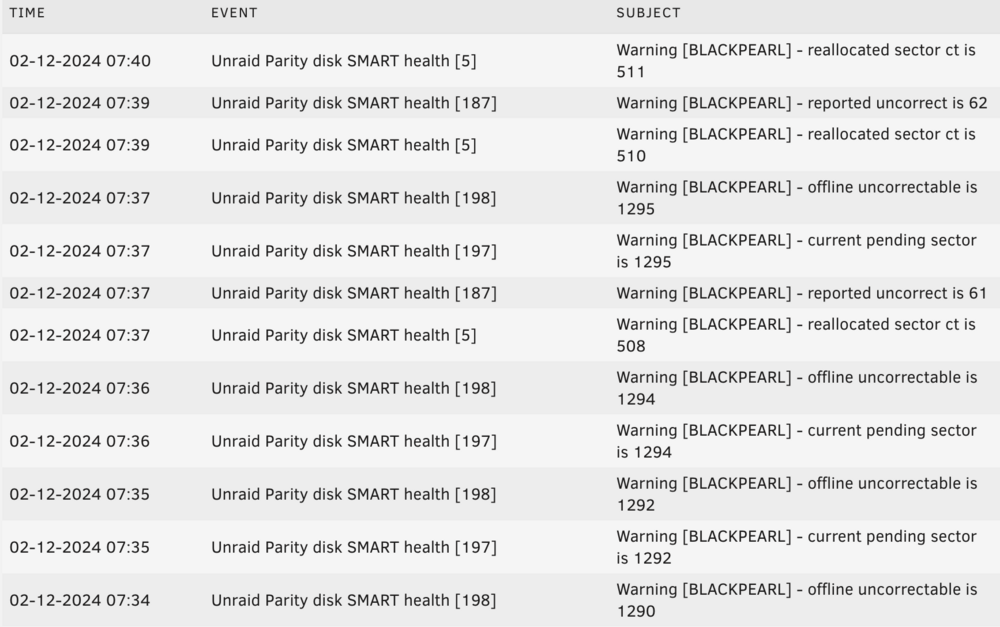
  3. Get warnings for this drive about every couple mins saying what is in the picture. Is this drive done for? New to having a server and uncertain how to interpret the SMART info. Let me know if you need to see anything else from the diagnose folder. Thank you 8FN-2023-12-01 parity (sdb).txt
Account

Navigation

Search

Search

Configure browser push notifications

Chrome (Android)
  1. Tap the lock icon next to the address bar.
  2. Tap Permissions → Notifications.
  3. Adjust your preference.
Chrome (Desktop)
  1. Click the padlock icon in the address bar.
  2. Select Site settings.
  3. Find Notifications and adjust your preference.