mandarin
Members
-
Joined
-
Last visited
-
Thank you @bmartino1 for the long and valuable answer. I ended up with the following setup: - Synology as is, connected to the LAN, mounted on the Unraid with the Unassigned Disk Devices plugin, using SMB - The SSD mounted as a single Array device disk Otherwise I'm using the system "normally". Meaning, I install apps and plugins, start Docker containers etc. Basically, from what I understand, I'm using the SSD as storage for all docker container volumes and as an OS operational storage. Since it's an SSD I imagine it doesn't matter if it's configured as Cache or Array Device. So things like MariaDB should still load/run fast. And I store all of my data on the Synology. Then when I want an app to access my Synology data I mount it as an additional volume in the container and configure it in the app itself. In the case of NextCloud I use the Administration -> External Storage, and then I can see/access my files from NextCloud. So far, from what I can see, everything is working and is fully functional. The only downside is that accessing the Synology data is a bit slow, which is expected. But it is still muuch faster than the Synology Drive app that I used natively on the Synology itself. I will try to buy a second SSD and mount it as cache, just to see if it will work as cache layer on top of the mounted Synology share. In terms of NextCloud it seems to index the files, which makes browsing faster. And I think this is the biggest upside of using a similar app, rather than directly mounting the Synology share on my Android and Windows using SMB. The only downside on NextCloud so far, is that it doesn't automatically reindex, so when I e.g. delete a file or folder directly from the Synology, I can still see it in NextCloud. And the only way to fix this is to run a `occ files:scan` command in the NextCloud shell, which is a bit laughable. I guess they expect that anything that you do with files must happen from NextCloud, period So now I think to give something else a try, like SeaFile. I'm still fighting to start Immich. It turned out to be not that trivial. I will report back with more results, since I hope this thread could be useful as a future reference for other people with a setup similar to mine.
-
mandarin changed their profile photo
-
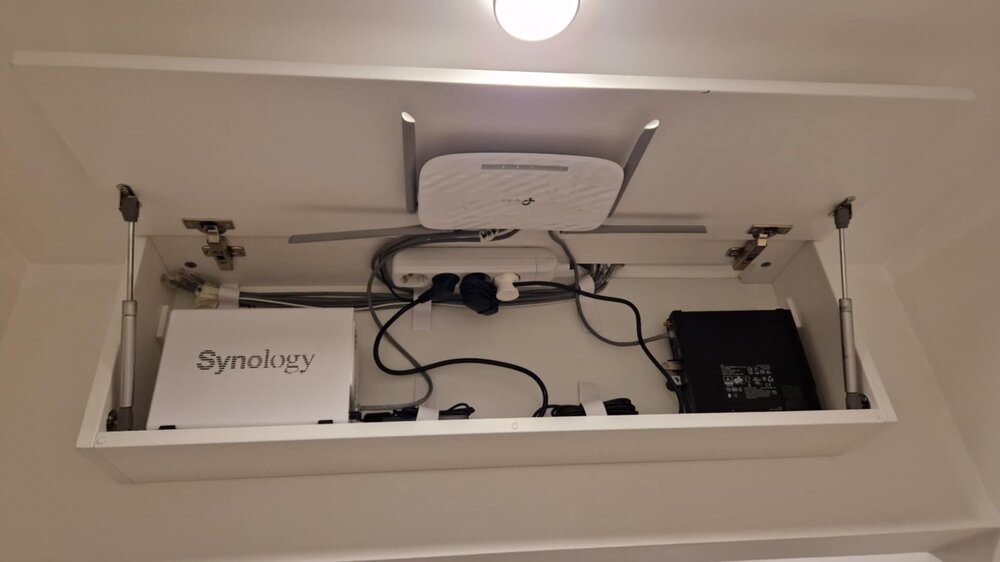
Hi all, first time Unraid user and first post, so thank you in advance for being patient with my noobiness and for the long intro Disclaimer: From my googling around and searching in this forum I've concluded that my setup is a bit unconventional, so I'm still wondering how to configure it properly, and if I'm at all thinking the right way about it. Hence this post! My current setup is a Synology DS223j with 2x4TB IronWolfs + a Dell OptiPlex 3070 Micro with a 256GB NVME Samsung SSD, running Unraid. At this point I expect people to start asking "whaaat", so let me explain. I initially bought the Synology, not having any experience with NASes with the idea to replace my external "backup" HDD with something more robust, given the RAID capabilities. Soon I discovered that I quite like the idea of having apps like Synology Drive, Synology Photos, etc., but then the problem came with the DS223j having just 1 GB RAM and a very slow CPU. So everything is real laggy, it's cannot really be used as a media server. At this point I knew I had screwed myself, but money had been given and I didn't want to deal with teh annoyance of selling the Synology and starting over from scratch. I have a friend who had tried Unraid recently and was very happy, so I thought to myself "okay, instead of fully replacing my Synology, I can just ugrade my setup with a separate machine running Unraid and it can use the Synology as a storage". This way, I thought, I can have the best of both worlds - the Synology's highly reliable hardware RAID support, and Unraid's great media server/self-hosted cloud capabilities, running on a machine with more RAM and a better CPU. Even if I don't use its RAID toolset, that still sounds like a good enough usage of Unraid. And who knows, maybe someday I will upgrade this if needed. So I got an OptiPlex Micro secondhand for a good price. And best of all, everything fit in my very limited space (small cabinet hung on the wall, attached photo). So what's the problem? 1. I'm not quite sure yet how to best utilize this setup. Or if it is a good setup at all. What do you think, does any of this make sense? I really don't want to start over right now. 2. I found how to mount the Synolgy as an SMB share, but I don't know if that has any limitations in terms of functionality, compared to using Array Devices. I.e. would that matter for apps like NextCloud for file management or Immich for photos/albums? 3. My original idea and current setup is that the Synology is to be used as main storage. Do I need any Array HDDs for a fully functioning Unraid OS? 4. I see that the full capabilities of Unraid are unleashed when you pair Array HDDs with Cache SSDs. Can I somehow use the Samsung NVME as Cache for the Synology SMB share, to make it faster? I see that not having Array HDDs, I can't even enable the Cache SSD functionality. My overall goal is to have a safe backup storage for my files (mainly photos). And to top that with a media server that includes: * Some sort of file management like NextCloud, with automatic syncing of files * Some sort of photo management like Immich * Plex and similar, would be a great addition, but I can live without * I like the idea of expandability with docker containers and Unraid apps, so that I am future proof for any ideas that might come to me I am actually a software developer, so I'm fairly technically literate, just not in the NAS, storage, networking space. So you can throw terminology at me, I will handle it And again, thank you very much to anyone who has had the patience to read this monstrosity of a post and to try to answer it!