Jory
Members
-
Joined
-
Last visited
-
Ah sorry for posting in the wrong forum. Thank you for the reply regardless
-
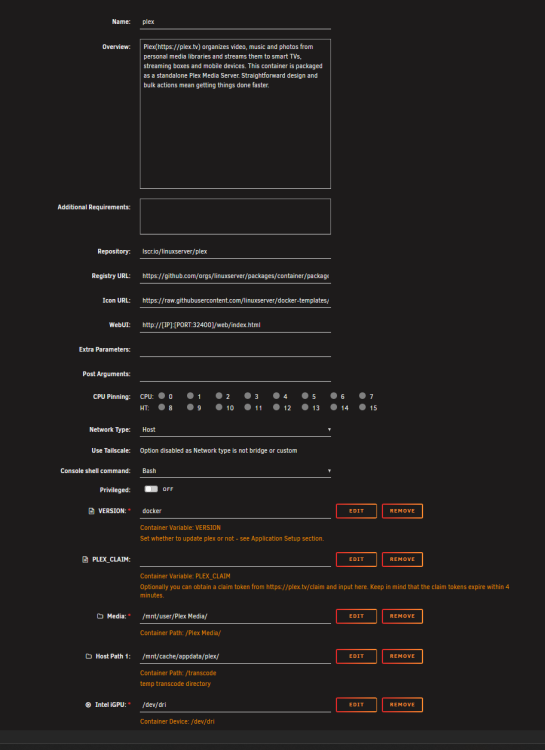
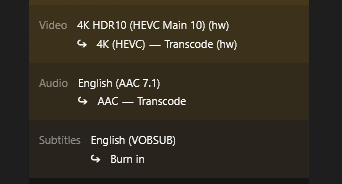
As the title states and can be seen in the photos attached, there is something very weird going on when trying to play HDR content in a browser on Plex. The image looks either very very dark, or the colours are way too bright. and when i turn on subtitles when HDR content is playing, they're almost always green. I have hardware tone mapping enabled in the Plex settings and tried all the different tone mapping algorithms, but nothing seems to make a difference. I've also attached a photo of how Plex is currently set up in Unraid itself. I'm using the iGPU of the Intel i7 10700. Does somebody else have this issue? If so, how can it be resolved and is there anything I need to change?


-
Im VERY new to unraid and wanted to get plex hw transcoding to work, I already installed the nvidia driver from the apps section in unraid, but in all the tutorials that i saw there was an option to write down the Nvidia visible devices when configuring plex wich is nowhere to be seen on my end. and also there was no option to list the path of where my music is, (see image). how do I fix this?