r.iqbal87
Members
-
Joined
-
Last visited
Everything posted by r.iqbal87
-
After attempting to spin down two unassigned drives, and seeing data rebuild speeds increase as a result, I started to consider power being the issue. I went ahead and got a bigger PSU going from 400 to 650 watts, which had more sata power ports resulting in less use of splitters. All drives are connected again, and I am seeing write speeds go back to normal, with no clicking. Thank you for helping route troubleshooting.
-
Apologies, I tried to be as concise as possible and failed to include details on other attempted remediation approaches I took prior to posting. I also tried initiating the rebuild swapping sata data and power cables, also tried by connecting to the motherboard Sata port and through my hba (mini sas to sata) both producing the same unsuccessful result. However, given the clicking noise being made, can that be caused by bad cables?
-
Please refer to the attached file for the requested diagnostics. I appreciate your support. mri-nas-diagnostics-20241216-1852.zip
-
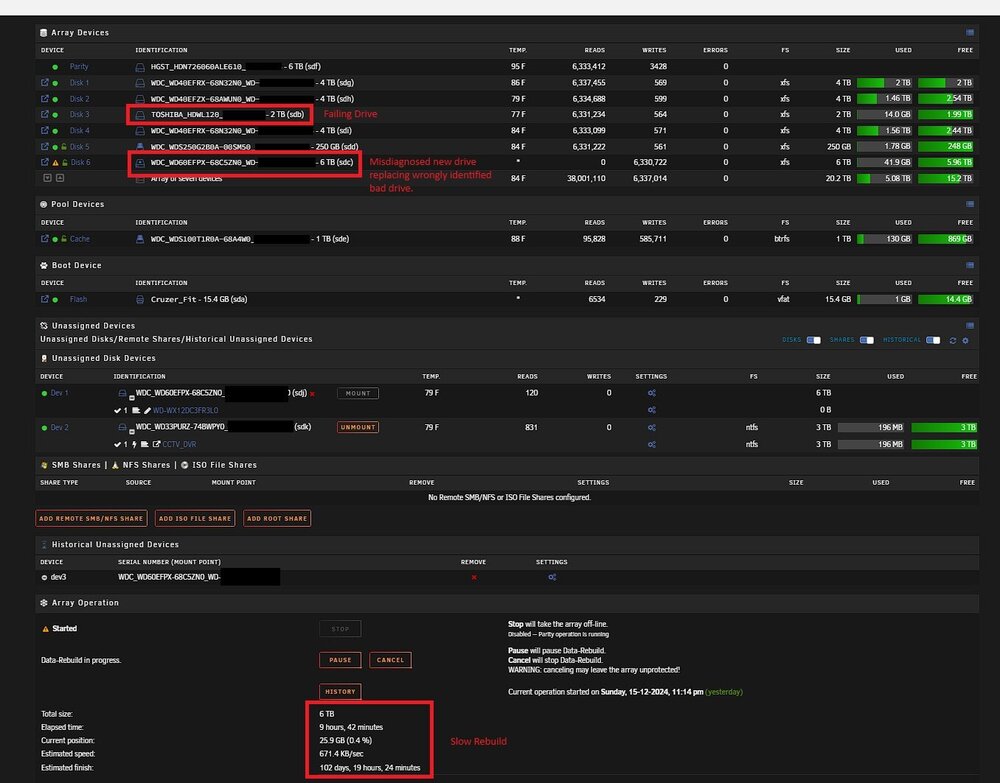
I am attempting to work through a unique situation which I can't seem to identify appropriate next steps for fixing my array. Issue Summary: Successfully added a 6 TB disk as disk 7 to my array with no issues. Began adding another disk as Parity 2 and heard clicking from a drive. Stopped Parity 2 build, mistakenly thought the new disk 7 was faulty, and set disk 7 to "no device". Completed Parity 2 build, with disk 7 being emulated. Installed a replacement drive for disk 7 and started data rebuild but experienced slow speeds. Troubleshooted by swapping Parity 2 with the new drive while leaving disk 7 emulated. Identified an existing drive, disk 3 (added less than 6 months ago), as the cause of errors. Unable to replace the faulty drive because disk 7 is still being emulated, prevented by two disks from being missing simultaneously. Current remediation: I'm trying to let disk 7 continue its slow rebuild, hoping it will speed up once past the data on the bad drive. The faulty drive has no data, but I can't replace it because disk 7 is now part of my array. My goal is to complete disk 7's rebuild, then replace the faulty drive. Request for help: Given the slow rebuild rate and uncertain success, how can I remove disk 7 from the array to first replace the bad drive, then re-add disk 7? Since issues arose after adding disk 7, I can't revert to the previous 6-drive configuration without risking array failure. I'm seeking community advice on the best approach based on this situation. Screenshot of Array and rebuild status attached. Thank you for any help that can be provided!