Pialob
Members
-
Joined
-
Last visited
-
Yes, I now know that the best way to do it is to do the HBA pass through :D. I just bought an HBA from Amazon and will now do it the right way.
-
I've thought about this too, but I don't have a free 4TB drive to try it out of the box. I managed to recreate the directory on Proxmox, unfortunately the GUI didn't anticipate such non-standard options and I had to play around in the console. I've restored the array to its pre-change state and am in the process of copying the necessary files. But what to do next with this sync errors? Do all the drives pass through and create a new Unraid config (as you can see, this change messes up the current array)? Does creating a new config require formatting the drives? Do something in poxmox so that it doesn't throw an IO error? I'm planning to move to Unraid as a standalone platform, but for now I have to agonise over virtualisation on Proxmox.
-
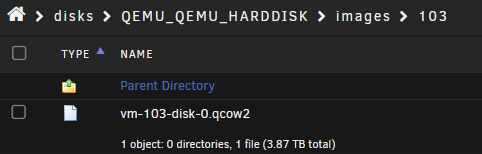
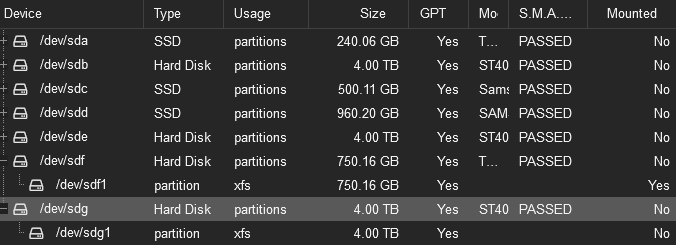
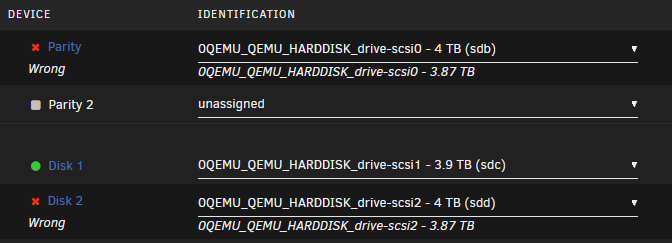
Hi. I am having a problem with my current array configuration. Unraid doesn't recognise my drives, I'm stuck and don't know what to do now to not lose my data. My problem is quite complicated so I'll start at the beginning. My Unraid runs as a VM on Proxmox. Everything was fine until a while ago. A few days ago there were errors in the array, which Unraid started to fix during the partity check. It fixed a few errors, but suddenly Unraid shut down. The culprit was Proxmox, which reported an IO error during error correction and disabled VM..... It does this every time and does not allow Unraid to work. Unfortunately, when I set up Unraid on Proxmox one year ago, I didn't specify the disks as a passthrough (It should be, but I just created a directory and assigned it to the VM), so Unraid doesn't have full access to them and Proxmox manages them. I have found that I will now give 2 of the 4 disks (1 storage, 1 partition) as passthroughs to Unraid for a trial. It sees them, but in different way :(. I arranged them as they were, but Unraid sees problems. I've tried giving them the same name as before, but it doesn't help. Is the problem the size of the disc? Previously, when the disc was not a passthrough, just a directory, it had a size that Unraid saw as 3.87TB, now with passthrough it sees it as 4TB and I can't change that.... I could even make new the array, but how do I copy the data from these drives now? When I set Disk2 to Unassigned device and mounted it to see the files, I don't have the data as normal, just the VM image as qcow2.... I have also tried to re-create a directory in Proxmox from these two disks so that Unraid sees them again in the old way, however after unmounting them form VM, when I want to create a Directory, Proxmox does not see them. It knows there is such a disk (sdg is Disk2) and it is not mounted, but it doesn't see it when I want to create a new Directory.... To sum up, I only have important files on disc1 (I didn't do a pass through from it, it's the old way), I don't want to lose them. Now I have nothing, neither data nor working Unraid.... I've made some mistakes, got stuck with my ideas and don't know what to do. Can you help me?