Scherub
Members
-
Joined
-
Last visited
-
I'm assuming by network problem you mean the router / switch, cable, etc.? For that reason, I've just tested it using the same port and network cable that my diskstation uses. Unfortunately, it still behaves the same. And just to be sure. If I use a different USB-stick for v6, will I invalidate the current stick? If so, then it would make more sense to use the one I'm using right now.
-
Then I'll give v6 a try. Do you have any other ideas what could be the cause for the slow file transfer speed, unless I run another network related task in parallel?
-
Thank you for your reply. I've attached the diagnostics to this post. If I try v6 on a different stick, are the ZFS pools compatible? seraraid-diagnostics-20241217-1617.zip
-
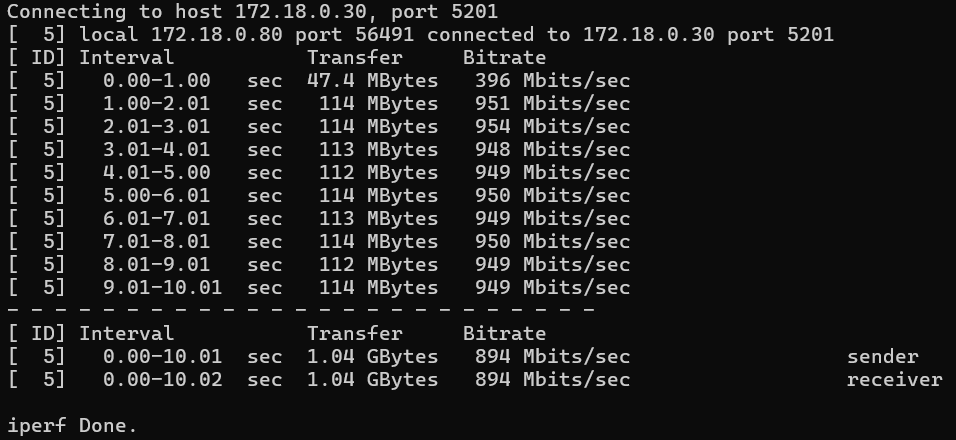
As stated in the title, my primary problem is slow file transfer speeds (25 - 30 MB/s). I've read through various posts here and on Reddit, but wasn't able to solve this. I'm also new to Unraid, having set up the system with new hardware just last week. Soft- and hardware I am using: OS: Unraid 7.0.0-rc1 Hardware: Intel Core Ultra 265K, 32 GB RAM, Z890 mainboard with latest BIOS Storage: 3 NVM as one data pool (ZFS), 2 SSDs as one cache pool, 2 HDDs as Unraid Array Ethernet: 1000 Mbps, full duplex, mtu 1500 I'm trying to copy various files from my old Synology diskstation to the new Unraid server and started this by simply creating a few Unraid shares and copying the files using the Windows explorer, but ended up with just a constant 25-27 MB/s. I have tried the following steps to improve this: Run iperf3 to check the network performance. Most of the time, it reports about 950 Mbit/s. Occasionally, after starting it, it only achieves 150 - 200 Mbit/s for the whole 10 seconds. Instead of an SMB share, created an NFS share. Activated IPv6. Looked into the BIOS for any additional network related settings, but didn't find any. Switched ports on my router and changed network cables. Copied to the NVM ZFS raid instead of the SSD cache. Copied using SCP via command line. Copied using Krusader. Copied using rsync. I can kinda reliably increase the transfer speed by increasing the network traffic, such as running iperf3 at the same time. The following things appear to have no influence, though: Using SMB or NFS. The used transfer tool. The transfer source (either the diskstation or this pc). The transfer target (array, cache or data). I can copy from this machine to my diskstation with constant 112 MB/s. The diskstation is connected to the same router with the same settings: 1000 Mbps, full duplex, mtu 1500. Is this a problem of Unraid 7 (I haven't tried v6) or the trial version? Does the networking need a new driver? Why is it, that when running another network related task in parallel, the speed increases? Any help would be much appreciated.