





badmark
Members
-
Joined
-
Last visited
Everything posted by badmark
-
Old Disk 7 is dead. I planned on adding parity, but did not expect rebuild to take months...
-
I know, it did not three months ago when I began this process, but having only one parity drive I have no options here! So what, I'm screwed and my data is lost? I was convinced by others that Unraid was reliable and I could depend on it, but apparently this is not the case.
-
Diagnostics: tnas-diagnostics-20250223-1344.zip
-
I've disconnected the shares, this is what time I looking to rebuild? Now there is no I/O but the rebuild, and it's going to take two months?!?! How is this in anyway acceptable?

-
I need the data live while I'm doing this. Is there anyway for me to restart the rebuild process after a reboot, a pause?
-
I finally am starting to make progress, I added the following script to cron.daily and just restart the nfs server every 24 hours which has thus far been before it dies, because once it does that nothing will allow me to stop and restart it. I'm currently 21% in with 11 days left. #!/bin/sh /usr/local/etc/rc.d/rc.rpc stop /usr/local/etc/rc.d/rc.nfsd stop killall nfsd sleep 30s /usr/local/etc/rc.d/rc.rpc start /usr/local/etc/rc.d/rc.nfsd start exportfs Regardless of what I do, the rebuild never finishes before NFS just completely dies, I don't know what else to do! I guess I'll lose all of my data thanks to Unraid... Why has NFS always worked for me except for here?
-
I finally am starting to make progress, I added the following script to cron.daily and just restart the nfs server every 24 hours which has thus far been before it dies, because once it does that nothing will allow me to stop and restart it. I'm currently 21% in with 11 days left. #!/bin/sh /usr/local/etc/rc.d/rc.rpc stop /usr/local/etc/rc.d/rc.nfsd stop killall nfsd sleep 30s /usr/local/etc/rc.d/rc.rpc start /usr/local/etc/rc.d/rc.nfsd start exportfs
-
SO I was finally able to finish, then the 7.0.0 update flashed, so I figured it was a safe bet, updated rebooted and the drive now has to be rebuilt again, like it never acknowledge when I first removed the bad drive, as it showed up again! Now on 7.0.0 can't get past 15% rebuilding before NFS dies on me, trying to restart the service via CLI just hangs, can't even kill the process. Not sure what to do now...
-
I'm sorry, I'm all over the place, what questions have I not yet answered?
-
Elapsed time: 1 day, 22 hours, 25 minutes - I had as minimal as possible talking over NFS, I thought I was going to make it, but 13% in and poofd, they're gone! Diagnostics attached. tnas-diagnostics-20241228-1914.zip
-
Restarted in Safe mode, rebuilding the array now. I guess I'll end the year with my entire family hating me...
-
If I don't have access to my NAS, then my entire network is pointless. I've replaced 4 drives while running Unraid, I've never encountered this issue. I kept the same number of services (Proxmox, Docker Swarm and Plex) running while everything rebuilt. This time the server is just flat rebooting and not even throwing an error?!
-
Server just continues to reboot now, this was never an issue before.
-
Server just stopped rebooted. This was dmesg output prior:
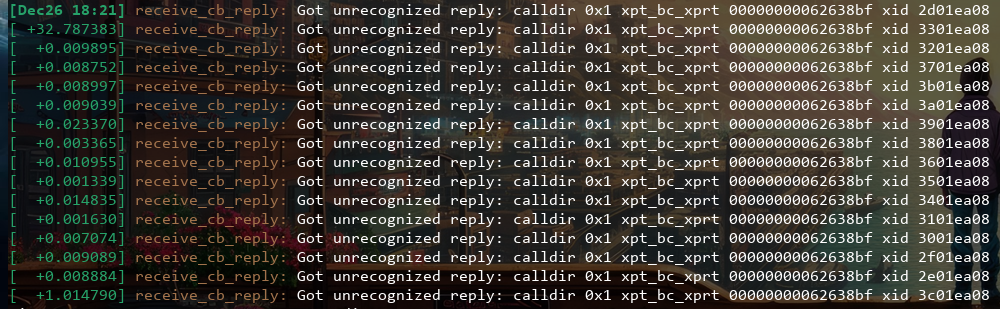
-
I haven't made any changes to Jumbo Frames.
-
As I stated earlier, I was trying o upgrade my ethernet, but that multiple port card is not on the network, only the igb (Intel) onboard 1 Gbps ethernet (eth0) is the only one connected. The MAC points to Asus, the brand of the motherboard: https://macaddress.io/mac-address-lookup/Ekndd7MO2Z
-
Upgraded back to 7.0.0 RC2, running array rebuild and NFS shares are online. shareNOFILE setting has been changed to "655360", previous script disabled. Finger crossed, Estimated finish: 13 days, 11 minutes
-
Not even 3 hours into rebuild and NFS shares are gone. What now? tnas-diagnostics-20241226-1540.zip
-
Downgraded to 6.11.5 rebuilding array now, GUI elements are out of place, but everything seems to be in working order. Estimated finish: 20 days, 4 hours, 57 minutes Finger crossed this finally does it as my only other option is to build an entirely new box with drives to transfer it all over!
-
Nope NFS still dying when rebuilding array on 6.12.9! Which version does not have NFS issues?
-
Rolled back to 6.12.9 Rebuild in progress. Fingers crossed NFS remains active until the rebuild is finished, Estimated finish: 25 days, 14 hours, 41 minutes
-
I have not had time to rollback, but I stopped the array rebuild and the server has been up for two days now without issue. I still need to rebuild the array, but am reporting that NFS is still working because I do not have array rebuild running, could these two be associated? Happy Holidays!
-
Yes, still on 7.0.0 RC2 with the script still enabled - Made it 2625 hours in before NFS shares stopped responding, no error attached, just stopped. Paused the rebuild, then stopped, or tried to, waited almost ~30 minutes then sent a reboot command. I don't have the time to backup and rebuild the USB drive with 6.12.9 until after the holidays, we are three families under one roof and it's non stop; "Fun" or least that what they say. I did take a full diagnostics before I sent a reboot. Happy Holidays everyone that is helping! tnas-diagnostics-20241221-2043.zip
-
25 hours in after adding the shareNOFILE="65536" line to config. Rebuild @ 5..8% with 12 days to go. Finger crossed.
-
Only the System logs (dmesg) is from the new one, the server was hard locked, all I had was a terminal window running dmesg -wH until it was also unusable - this was on RC2.
