fk2705
Members
-
Joined
-
Last visited
Everything posted by fk2705
-
Yes, it is working. Thanks
-
UPDATE: When logging in unRaid WebGUI from another PC, while VM is running and KVM Switch is connected to my unraid setup, it is possible to attach the USB-Hub and Cherry KB/Mouse. -> The problem was, that the KVM USB Hub had to be active and connected to configure the devices in the USB manager plugin...
-
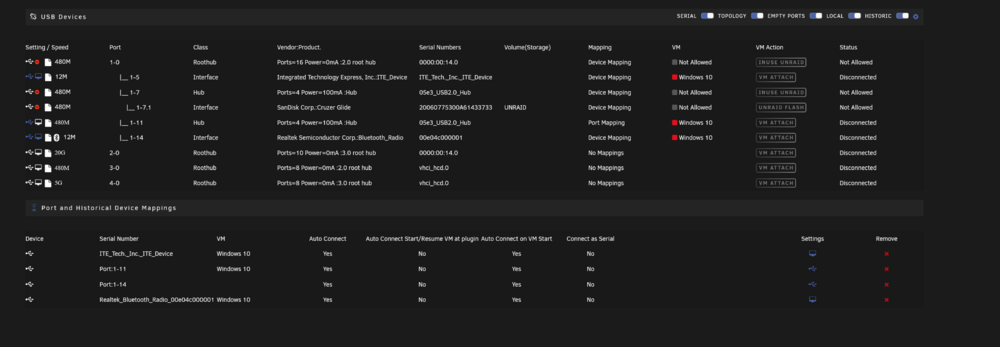
Hi Simon, I disabled this group also and I also set USBs to connect at VM start - but also no recognition of KVM-Switch -> BT-Dongle -> KB/Mouse
-
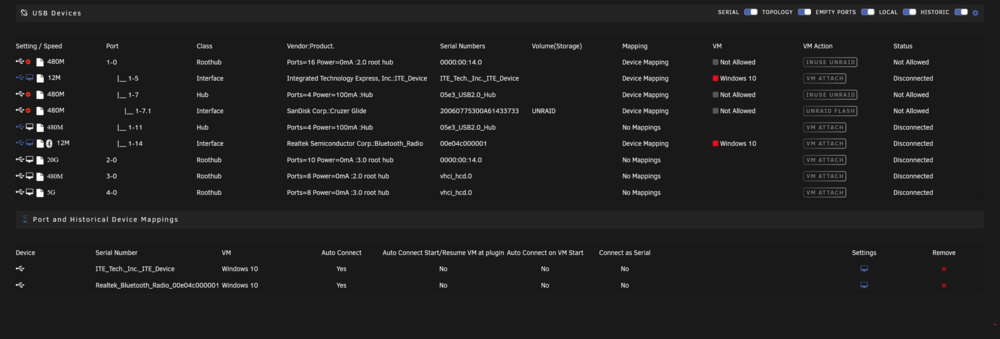
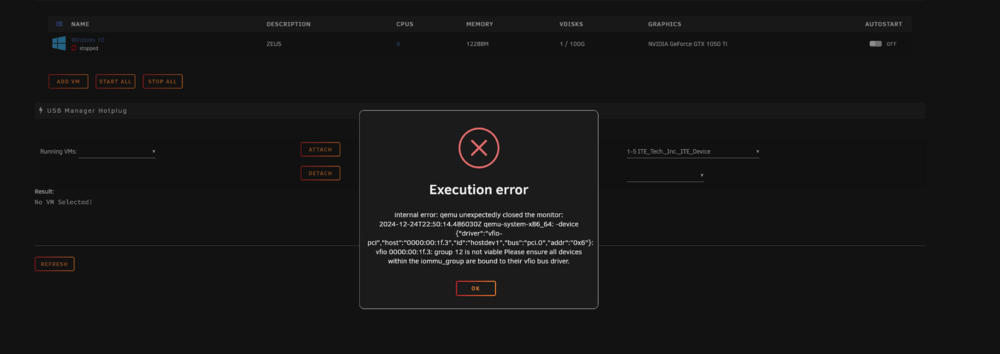
There was a IOMMU Group marked to pass through for the intel onboard audio but not the USB controller. The only passthrough in "systemdevices" now is my graphic card. I tried it with exactly the steps you mentioned and added the devices which I think are for the BT and KB/Mouse. After rebooting and starting the VM, I get this Error: What do you suggest? Thanks!

-
Hi Simon, thanks for the hint - I tried it with your plugin, but it is not working. When plugging in the BT dongle directly in the "unRAID PC" the Cherry KB+Mouse are recognized, but when plugged in the KVM Switch, the KB and Mouse are not seen. Any other idea? Here´s a screenshot from the VM log.

-
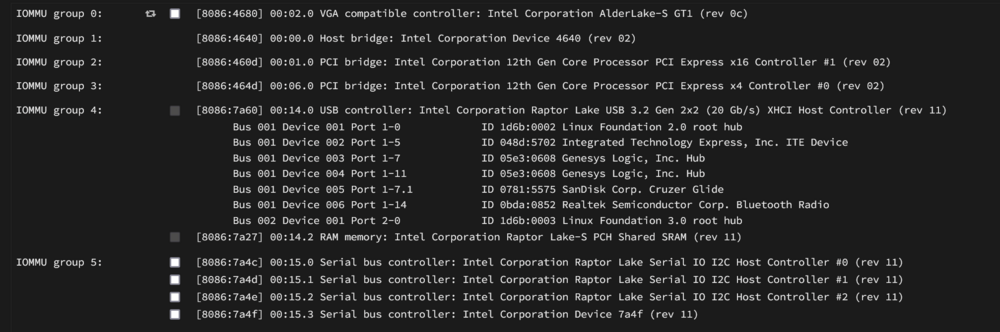
Hi Community! This is my first post - currently setting up unRAID on a self build machine with pc hardware M/B: Gigabyte Technology Co., Ltd. B760M GAMING X AX Version x.x s/n Default string BIOS: American Megatrends International, LLC. Version F11 Dated 09/27/2024 CPU: 13th Gen Intel® Core™ i5-13500 @ 2475 MHz I am trying to set up a Win10 vm to run as my daily PC. I have another Laptop for work which shall share the peripheral devices (Keyboard, Mouse, Monitor), which are set up via an KVM-Switch. The Keyboard Mouse Combo is connected Wireless via USB/BT via the KVM-Switch. Here is my problem. - I don´t know how to pass through the Keyboard/Mouse to the VM. I only have a big IOMMU group for any USB ports. They are all controlled via the Intel Raptor Lake controller. The solution via USB Hotplug / assign to vm does also not work, because of the KVM-Switch? BT dongle has always power, and is not recognized as a new device when switching peripherals... Is it possible to divide the IOMMO group into ports or group of ports? Any other ideas? Thanks