Sarakoth
Members
-
Joined
-
Last visited
-
Thanks for picking that up and the suggestion. I swapped cables from the new and old NAS directly over and now BOTH are running at file copy speeds (for the large files) around 100MB\s!!! Which make no sense if it was cable or port based but I am doing some testing and will also reboot the systems and see if it remains OK. Fingers crossed..
-
Thank you for the tip.. I didn't know about this.. I started a file transfer and run the download, hopefully that is what was needed. If people could have a look at let me know that would be much appreciated. coruscant-diagnostics-20250217-1839.zipOK.. so I was at the point of turning off my old TrueNAS server and I just wanted to confirm a few things before officially migrating over and I was just copying across so archived data and again my new Unraid server is incredible slow.. like 10 times slower at file transfers.. I moved some files off the old server to my PC and they were going at 100MB\s.. copying those files to the new server was only at 10MB\s max.. often less... and I tried individual large movie files, like 900MB each, and got the same results.. this is supposed to be file storage and yet it performs horribly.. googling shows lots of people saying SMB shares are slow, but even then I have seen people complaing about 50MB\s.. which is still 5 times faster.. before I blow this away and start from scratch with TrueNAS are there any obvsious things I can check? I like the general look and feel of the OS, the dockers containers are easy to use comapired with Jails, but end of the day this is a file storage system. I am using user shares, so I had thought that removign them all and using disk shares might help? Anything else I can try? Cheers.So for general documents and photo storage I should use ZFS it seems and setup the shares to bypass FUSE then. My concernis the folder and files example above was a fairly small one... my photo collection is much larger!
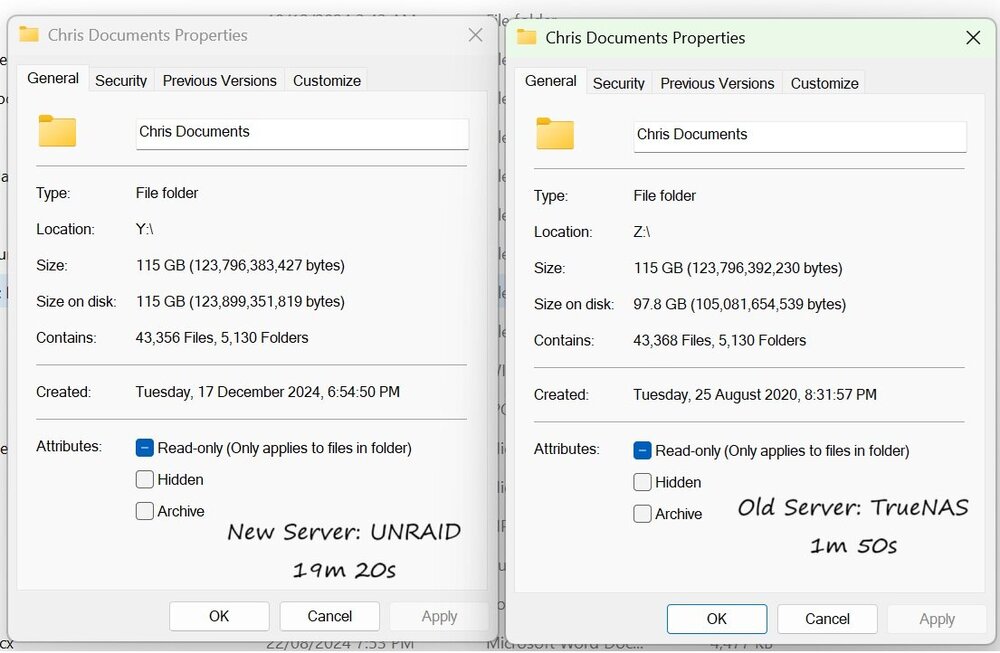
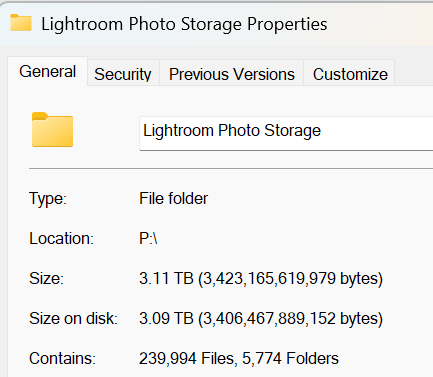 Sarakoth changed their profile photoThanks JorgeB. I have not heard of FUSE, though a quick read shows that might cause a little bit of overhead but not 10 times?? I will look into bypassing FUSE.So I am trying out UNRAID on my new NAS server and despite being nearly 10 years newer hardware, double the ram, etc, when doing a basic folder properties in Windows to compare my old vs new, I am astounded at how badly the new server performs. I was just trying to do a final check that all my files had copied across OK by comparing file numbers and sizes and the NEW server is about 10 times SLOWER than the old one! What have I done wrong or is this expected between TrueNAS and UNRAID? Have I mucked up something with the shares.. I have setup a cache drive though I get that won't help with reading.. this results astounds me and I am not sure if I should blow the server away and start again with TrueNAS like the old one. The screenshot below shows the how long it took to complete the "properties" action for the folder. I am going to see how to test general fiel transfer speeds but based on this I am expecting the worst. Any suggestions. Happy to provide more details of my config if this does seem strange.