





hoogstaddie
Members
-
Joined
-
Last visited
-
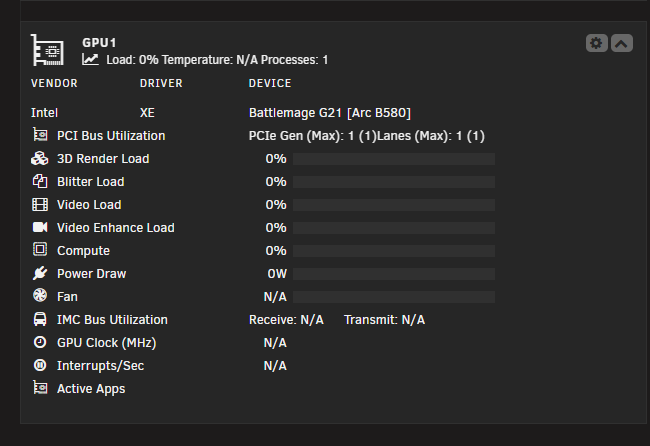
ahh sorry missed that one but that does report usage and vram usagei assume that you mean intel_gpu_top. it doesn;t even detect the cards as it is a xpu device not a i915 device "No device filter specified and no discrete/integrated i915 devices found" sorry for the late reply i was on vacation!{ "period": { "duration": 1000, "unit": "ms" }, "frequency": { "requested": null, "actual": null, "unit": "MHz" }, "interrupts": { "count": null, "unit": "irq\/s" }, "rc6": { "value": 100, "unit": "%" }, "power": { "GPU": null, "Package": null, "unit": "W" }, "engines": { "Render\/3D": { "busy": 0, "sema": 0, "wait": 0, "unit": "%" }, "Blitter": { "busy": 0, "sema": 0, "wait": 0, "unit": "%" }, "Video": { "busy": 0, "sema": 0, "wait": 0, "unit": "%" }, "VideoEnhance": { "busy": 0, "sema": 0, "wait": 0, "unit": "%" } }, "clients": { "1259452": { "name": "python", "pid": "1259452", "gpu_instance_id": "N\/A", "compute_instance_id": "N\/A", "type": "C", "used_memory": "N\/A" } } }, { "period": { "duration": 1000, "unit": "ms" }, "frequency": { "requested": null, "actual": null, "unit": "MHz" }, "interrupts": { "count": null, "unit": "irq\/s" }, "rc6": { "value": 100, "unit": "%" }, "power": { "GPU": null, "Package": null, "unit": "W" }, "engines": { "Render\/3D": { "busy": 0, "sema": 0, "wait": 0, "unit": "%" }, "Blitter": { "busy": 0, "sema": 0, "wait": 0, "unit": "%" }, "Video": { "busy": 0, "sema": 0, "wait": 0, "unit": "%" }, "VideoEnhance": { "busy": 0, "sema": 0, "wait": 0, "unit": "%" } }, "clients": { "1259452": { "name": "python", "pid": "1259452", "gpu_instance_id": "N\/A", "compute_instance_id": "N\/A", "type": "C", "used_memory": "N\/A" } } }the apps ar now being detected but still no actual stats like load (temps are coming in linux kernel 6.15 as far as i know so i am ignoring that)still nothing only shows that 2 processes are being used maybe its bc i pass dev/dri/card0 and dev/dro/renderD128 and not dev/driits an comfui docker container also i am not passing it through with just dev/driv but specificlyi just got the b580 working for comfyui/ipex but i was curious did anyone get the gpu stats working i am only seeing this
 I am trying to get ipex running in a docker container but get a bus error when running actual torch code link to issue at the ipex repo: https://github.com/intel/intel-extension-for-pytorch/issues/841 thought maybe someone got it running and has a solutionwhen would 7.0 stable to come out? if you need to guessHi i just bought a b580 but its not getting detected correctly as its only supported by linux kernel 6.12/6.11 does someone know how i can compile that version with unraid



