





NXIR
Members
-
Joined
-
Last visited
-
Thank you. I run a Ubiquiti EdgeRouter SFP+, TP-Link SG3428 switches and that's about it. No fancy configurations at ALL other than static IP assignment. Everything on CAT6 cables.
-
Thanks for your continued support! Transferring over the network to my MacBook Pro M1 Pro is running at 60MB/s
-
Here's an in-progress and completed transfer screenshot. Thank you!


-
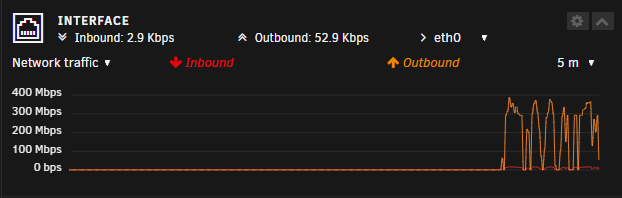
This is transferring FROM the array, to my local PC, over LAN on a 1Gb network. As mentioned in my original post, this used to work at full speed but has slowed down this week. The share in question is array-only, no cache. Interestingly if I look at my network I/O on the Unraid Dashboard page, I'm getting large bursts of 300-400Mbps, and then nothing, and then another burst. Screenshot attached.

-
Thank you @trurland @JorgeBfor your comments. I am, in general, a server noob and this is my first UNRAID server, so I appreciate your help. Would EEC memory errors signal that a RAM stick is dying and that I should therefore do an IDRAC RAM Test to identify if this is the case? I agree that if I am trying to move more than the cache should hold, I should not use the cache. In this case, I am not. I did experiment to see, but no, at the current time I am not using cache. I am trying to move 10TB of data FROM the server, so I'd assume parity wouldn't be written as I'm copying from, not removing or adding files? I have tried using Windows Explorer but tend to use TeraCopy for large transfers for the ability to resume them. Both WE and TC are performing equally, so I'll copy a screenshot of TC as that's what I'm using currently. You'll see minimal dips or bumps - just steady 35MB/s today.

-
I have a DELL T430 tower server running Unraid. I have 4x Seagate EXOS 20TB and 1x cache drive SSD. Server specs: Intel Xeon 22-Core, 192GB RAM No matter how I configure the server, whether it's to write to the cache first then array second, or direct to array, I cannot get any more than 14MB/s on transfers over the past few days. Previously it used to work at 100MB/s (gigabit) All hard drive cables are seated properly, as are the hot swap trays. iperf3 is showing 942Mb/s (so, nearly gigabit). I've done SMART tests on my array and no errors are showing. I've tried setting the share between Cache > Array and just Array Only. Reading and writing from ANY share produces the same speeds. Small or large files, doesn't matter, always low speeds. What could I be missing? Why are my transfers suddenly going so slowly? I have 10TB of data to move this week and it's going to take literally weeks at 14MB/s I've done all the obvious things like reseating cables, restarting the server pdpserver-diagnostics-20250108-1130.zip


