bgstern
Members
-
Joined
-
Last visited
-
I switched to macvlan and everything works now. Not sure this qualifies as a "solution" since it was working with ipvlan before upgrading, but I don't really have any reason to pursue this further since there is no major downside to macvlan for me.
-
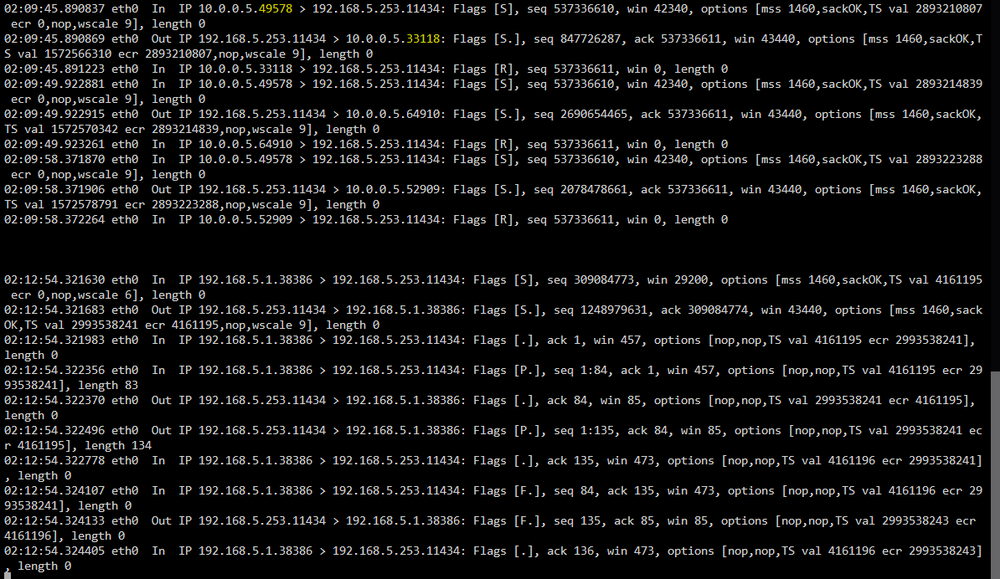
Just an update. I confirmed that I can reach this container just fine from the unraid host itself. Definitely some kind of container networking related issue, but I have no idea what could be wrong. I also tried rolling back a container update I did,but it had no effect. Not surprised since this is happening with multiple containers. Edit: works fine with host networking as well, but not bridged

-
After upgrading to 7.2, I noticed issues with a container using bridged networking being no longer able to query a container on a vlan. Tcpdump on the destination (vlan) container is showing a response on a different port than the original source port (image top section). This does not happen for containers on the same vlan(not pictured, but I could if it is useful), hosts on the same vlan (image bottom section), or hosts on a different vlan (not pictured, but I could if it is useful). What could be causing this? unraid-diagnostics-20251115-1450.zip