sramsram
Members
-
Joined
-
Last visited
-
Thank you. Did that already. I couldn't update if I stopped the array prior to update. Leaving the array started I'd been able to update to 7.1.2.
-
Hello, I tried to upgrade my unraid system. However it hangs, the window telling "Performing actions Please keep this window open while we perform some actions" never vanishes; update doesn't finish. Any advice how to proceed / fix the problem? Thank you in advance! sramsram
-
Thank you very much for the help! You put a lot of effort into solving my problem. I hadn't been able to solve my problem without putting many hours into it. That was great! Is it okay if I remove the attachments from my posts in this forum now?
-
Label: none uuid: 79fead57-d985-4217-a70d-b60b486e986d Total devices 1 FS bytes used 47.99GiB devid 4 size 1.82TiB used 56.06GiB path /dev/nvme0n1p1 Label: none uuid: 22db5fec-3e5d-4d09-8b86-da2803d05119 Total devices 2 FS bytes used 21.42GiB devid 2 size 119.24GiB used 26.03GiB path /dev/sde1 devid 3 size 931.51GiB used 26.03GiB path /dev/sdg1 Label: none uuid: bb50b9a0-e8f4-43cf-8410-62fdf3435002 Total devices 1 FS bytes used 3.92GiB devid 1 size 20.00GiB used 6.52GiB path /dev/loop2 Label: none uuid: 2e4939a6-ee25-486e-a4c1-ab995be64f94 Total devices 1 FS bytes used 412.00KiB devid 1 size 1.00GiB used 126.38MiB path /dev/loop3 Missing device no longer shows up.
-
Confirmed. Yes, exactly. For now just 1 device: the sdg... But first I'd like to have my system back in proper config before changing anything to the worse.
-
Additional info: the original slot 1 drive is still available (sdf) - if this helps in any way?!
-
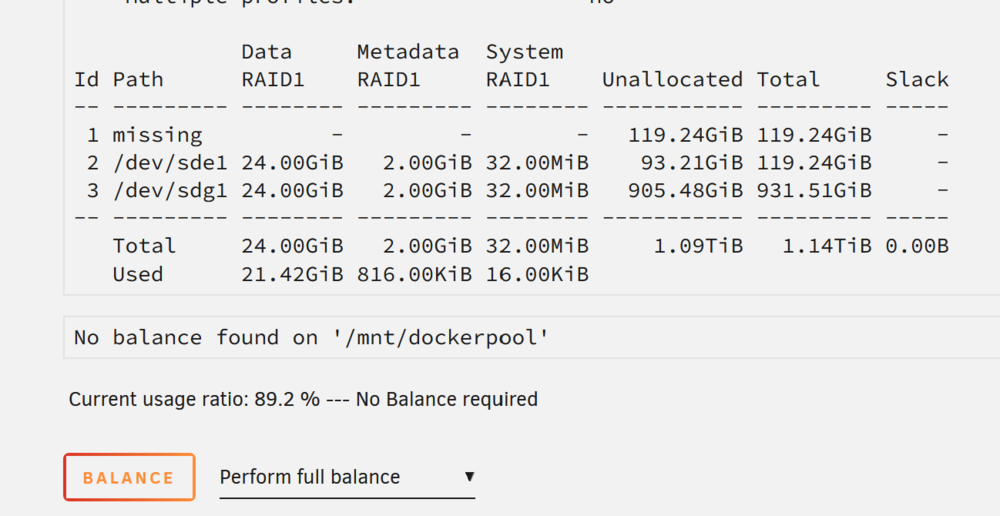
Done. I'm not sure if this will lead to the final result I tried to attempt in the first place: I hoped I'd be able to remove the "old" 128GB SSDs from my pools. In a second step I wanted to add a second 2GB SSD to my cache and a second 1GB to my dockerpool. Diags: Label: none uuid: 79fead57-d985-4217-a70d-b60b486e986d Total devices 1 FS bytes used 47.99GiB devid 4 size 1.82TiB used 56.06GiB path /dev/nvme0n1p1 Label: none uuid: 22db5fec-3e5d-4d09-8b86-da2803d05119 Total devices 3 FS bytes used 21.42GiB devid 1 size 0 used 0 path MISSING devid 2 size 119.24GiB used 26.03GiB path /dev/sde1 devid 3 size 931.51GiB used 26.03GiB path /dev/sdg1 Label: none uuid: bb50b9a0-e8f4-43cf-8410-62fdf3435002 Total devices 1 FS bytes used 3.92GiB devid 1 size 20.00GiB used 6.52GiB path /dev/loop2 Label: none uuid: 2e4939a6-ee25-486e-a4c1-ab995be64f94 Total devices 1 FS bytes used 412.00KiB devid 1 size 1.00GiB used 126.38MiB path /dev/loop3
-
New diags. Label: none uuid: 79fead57-d985-4217-a70d-b60b486e986d Total devices 1 FS bytes used 47.99GiB devid 4 size 1.82TiB used 56.06GiB path /dev/nvme0n1p1 Label: none uuid: 22db5fec-3e5d-4d09-8b86-da2803d05119 Total devices 3 FS bytes used 21.42GiB devid 1 size 0 used 0 path MISSING devid 2 size 119.24GiB used 0.00B path /dev/sde1 devid 3 size 931.51GiB used 26.06GiB path /dev/sdg1 Label: none uuid: bb50b9a0-e8f4-43cf-8410-62fdf3435002 Total devices 1 FS bytes used 3.92GiB devid 1 size 20.00GiB used 6.52GiB path /dev/loop2 Label: none uuid: 2e4939a6-ee25-486e-a4c1-ab995be64f94 Total devices 1 FS bytes used 412.00KiB devid 1 size 1.00GiB used 126.38MiB path /dev/loop3

-
Output is: Label: none uuid: 79fead57-d985-4217-a70d-b60b486e986d Total devices 1 FS bytes used 47.99GiB devid 4 size 1.82TiB used 56.06GiB path /dev/nvme0n1p1 Label: none uuid: 22db5fec-3e5d-4d09-8b86-da2803d05119 Total devices 3 FS bytes used 19.45GiB devid 2 size 119.24GiB used 0.00B path /dev/sde1 devid 3 size 931.51GiB used 25.06GiB path /dev/sdg1 *** Some devices missing
-
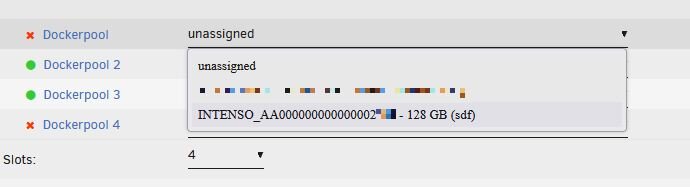
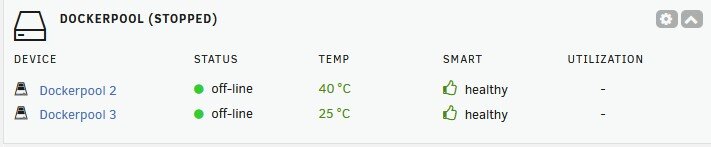
[SOLVED] Hi everyone, when starting with unraid I thought it might be a good idea to have two separate pools: one for file caching, one for docker. However I started with small SSDs. Since then I purchased bigger ones, added them to the pools (one each). I haven't been able to remove the smalle SSDs from my "dockerpool" with 6.12 getting the message "too many wrong or missing devices". I just upgraded to 7.0. I had the array stopped. Then removed the first small 128GB SSD from the dockerpool and moved the third drive (1GB) to the first slot. Since then I cannot start the array: -having now drive 1 (former drive 3) results in the "too many..." error -leaving slot 1 empty and having slot 3 with the former drive 3: same error Any hints what to do to get a running config again? Kind regards, sram