





Thellamafromwinamp
Members
-
Joined
-
Last visited
Everything posted by Thellamafromwinamp
-
So my next question..is why is my home assistant VM spamming these sessions
-
So just an update I was unable to get my backup from unraid connect booting i did however have a 6.12 unraid backup from 3 days ago, testing that I have been able to get my server back up and running. and no longer see any unraid flash device issues. I have also found out that my Home assistant VM was causing the below May 7 14:41:49 Tower sshd-session[6442]: Close session: user root from 192.168.0.130 port 37336 id 0 May 7 14:41:49 Tower sshd-session[6442]: Close session: user root from 192.168.0.130 port 37336 id 1 May 7 14:41:49 Tower sshd-session[6442]: Starting session: command for root from 192.168.0.130 port 37336 id 1 May 7 14:41:49 Tower sshd-session[6442]: Starting session: command for root from 192.168.0.130 port 37336 id 0 May 7 14:41:49 Tower sshd-session[6442]: Starting session: command for root from 192.168.0.130 port 37336 id 2 May 7 14:41:49 Tower sshd-session[6442]: Starting session: command for root from 192.168.0.130 port 37336 id 3 May 7 14:41:49 Tower sshd-session[6442]: Starting session: command for root from 192.168.0.130 port 37336 id 4 May 7 14:41:49 Tower sshd-session[6442]: Starting session: command for root from 192.168.0.130 port 37336 id 5 May 7 14:41:49 Tower sshd-session[6442]: Close session: user root from 192.168.0.130 port 37336 id 1 May 7 14:41:49 Tower sshd-session[6442]: Close session: user root from 192.168.0.130 port 37336 id 2 May 7 14:41:49 Tower sshd-session[6442]: Close session: user root from 192.168.0.130 port 37336 id 0 May 7 14:41:49 Tower sshd-session[6442]: Close session: user root from 192.168.0.130 port 37336 id 3 May 7 14:41:49 Tower sshd-session[6442]: Close session: user root from 192.168.0.130 port 37336 id 4 May 7 14:41:49 Tower sshd-session[6442]: Close session: user root from 192.168.0.130 port 37336 id 5
-
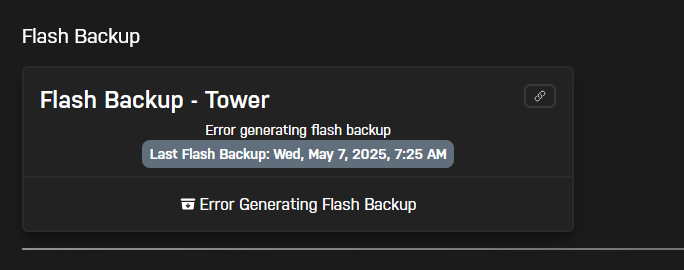
when i first generated a flash backup this was done from the "Flash backup" section in connect.myunraid this resulted in the error posted above. instead i navigated to "Server details" and generated a flash backup from there and that worked. how ever after using unraid USB creator tool to restore the back, my system wont pass the bios screen, it can read that the drive is plugged in , however selecting the drive as a boot option simply returns me to the BIOS screen, and letting the system boot without navigating to the bios screen results in the same behavior. Im going to try again with a new generated backup but i suspect ill have the same behavior.
-
Restore it to the current drive? or would you suggest a new drive? A quick edit.. went to generate my flash backup and i get an error.. Generating a flashbackup from the server details page as worked.
-
SO ran a check disk, this cleared any errors. iv rebooted gotten in and half my plugins are gone including community apps and Fix common problems. i havent risked starting my array latest diagnostics attached. tower-diagnostics-20250507-0856.zip
-
Apologies.. Will do that now and post the results.
-
iv checked the most recent diagnostic logs and cant see that since i stopped my docker containers and virtual machines but unsure if it was just dumb luck. post above, my fix common problem screen shots. what would be the suggestion here? could this be the cause.
-
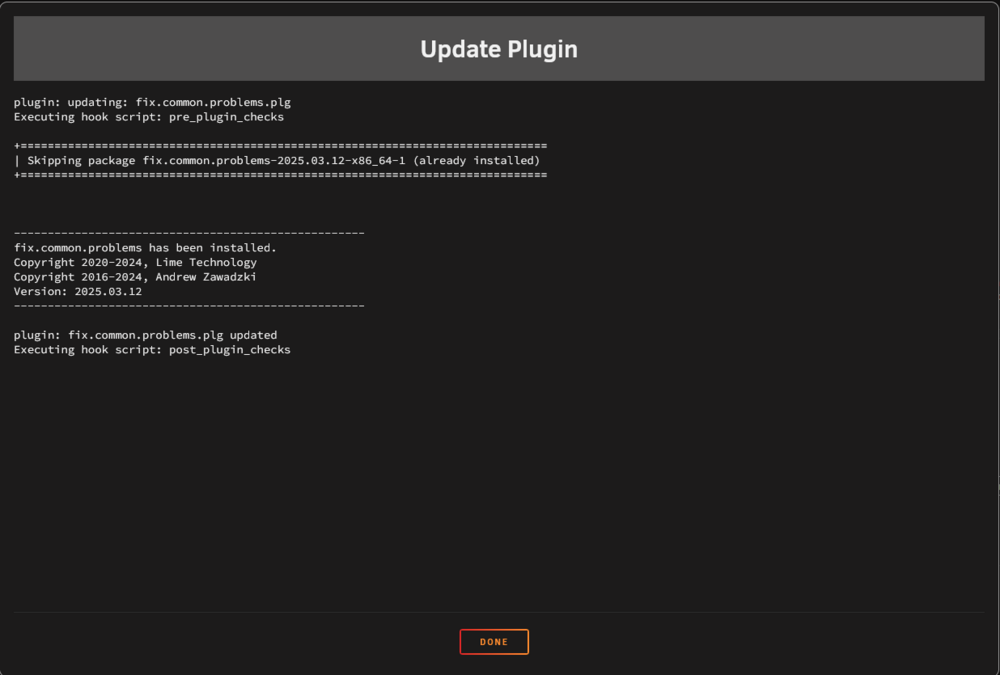
I have attempted to update and reinstall "fix common problems" sadly no go. gets stuck at "executing hook script: Post_plugin_checks" Sys logs May 7 08:00:30 Tower plugin-manager: checking: /boot/config/plugins/fix.common.problems/fix.common.problems-2025.03.12-x86_64-1.txz - MD5 May 7 08:00:30 Tower plugin-manager: skipping: /boot/config/plugins/fix.common.problems/fix.common.problems-2025.03.12-x86_64-1.txz already exists May 7 08:00:30 Tower plugin-manager: running: upgradepkg --install-new /boot/config/plugins/fix.common.problems/fix.common.problems-2025.03.12-x86_64-1.txz May 7 08:00:30 Tower plugin-manager: running: 'anonymous' May 7 08:00:30 Tower plugin-manager: fix.common.problems.plg updated May 7 08:06:00 Tower webgui: File_put_contents_atomic failed to write / rename /boot/config/docker.cfg May 7 08:06:00 Tower ool www[1488601]: /usr/local/emhttp/plugins/dynamix/scripts/emcmd 'cmdStatus=Apply' May 7 08:06:00 Tower emhttpd: Starting services... May 7 08:06:00 Tower emhttpd: shcmd (391): /etc/rc.d/rc.samba reload May 7 08:06:01 Tower emhttpd: shcmd (395): /etc/rc.d/rc.avahidaemon reload May 7 08:06:01 Tower avahi-daemon[9490]: Got SIGHUP, reloading. May 7 08:06:01 Tower unassigned.devices: Updating share settings... May 7 08:06:01 Tower unassigned.devices: Share settings updated. I am just sleep deprived and an idiot. Updated screenshot from fix common problems.. #edit Syslog update May 7 08:09:12 Tower root: Fix Common Problems Version plugin: XML file doesn't exist or xml parse error May 7 08:09:14 Tower root: Fix Common Problems: Warning: Plugin intel-gpu-top.plg is not up to date May 7 08:09:14 Tower root: Fix Common Problems: Warning: Plugin unassigned.devices.preclear.plg is not up to date May 7 08:09:14 Tower root: Fix Common Problems: Warning: Plugin unbalanced.plg is not up to date May 7 08:09:14 Tower root: Fix Common Problems: Warning: Plugin user.scripts.plg is not up to date May 7 08:09:14 Tower root: Fix Common Problems: Warning: Docker Application autobrr has an update available for it May 7 08:09:14 Tower root: Fix Common Problems: Warning: Docker Application Huntarr has an update available for it May 7 08:09:14 Tower root: Fix Common Problems: Warning: Docker Application netdata has an update available for it May 7 08:09:14 Tower root: Fix Common Problems: Warning: Docker Application scrutiny has an update available for it May 7 08:09:22 Tower root: Fix Common Problems: Error: /boot/config/plugins/dockerMan/templates-user/my-Krusader.xml corrupted May 7 08:09:22 Tower root: Fix Common Problems: Error: /boot/config/plugins/dockerMan/templates-user/my-netdata.xml corrupted May 7 08:09:24 Tower root: Fix Common Problems: Warning: The plugin folder.view.plg is not known to Community Applications and is possibly incompatible with your server May 7 08:09:24 Tower root: Fix Common Problems: Error: /boot/config/share.cfg corrupted May 7 08:10:00 Tower rsyslogd: [origin software="rsyslogd" swVersion="8.2102.0" x-pid="1503" x-info="https://www.rsyslog.com"] rsyslogd was HUPe

-
Just waiting for Fix common problems to update and i will re run a scan.. but it seems stuck at "executing hook script" and even after hitting "Done" it still see the plugin is unavaliable.. should i uninstall and reinstall? I did forget to mention.. I updated to unraid 7.0.0 about 2 days ago could this be an issue?
-
I believe there was a power outage as the start of the year could that be it? since seeing this message (50 mins ago) the unraid server has NOT been rebooted.
-
tower-diagnostics-20250507-0747.zip
-
I sadly do not know. i just opened my web terminal and can see it spamming consistently. Could this be another device that I have a terminal open on? say a laptop I created the backup prior to creating this post.
-
HI All! Woke up this morning to find a warning banner on my Unraid GUI, "Your flash drive is corrupted or offline. Post your diagnostics in the forum for help" as a new unraid user i was a little panicked but it seems the server is stable for now, I dont believe there has been any power outages over the night that could cause this.. so I am hoping I could get some assistance on next steps?| #edit, I have a backup on unraid connect! 1. is the USB drive gone/need replacement, or will a chekdisk from a windows pc save me 2. what caused this? new user mistake / bad hardware? 3. if it does need replacement how long do i have until my current USB goes (open question im sure and not something people could tell me but worth a shot) 4. suggestions for a replacement flash driver / boot disk tower-diagnostics-20250507-0723.zip


