TepidWanderer
Members
-
Joined
-
Last visited
Everything posted by TepidWanderer
-
Parity check ran for normal amount of time but returned 3241331 errors. I would assume this be due to previous write errors against Parity 2 caused by the cabling issue. In terms of ensuring the parity data remain correct, would it be better to just rebuild Parity 2 as opposed to using the parity check to write corrections to the parity?
-
Thanks, I was able to successfully run both the short and extended test after changing cables, with no errors for the drive. Currently waiting for the parity check to stabilise its estimate time (currently looking close to previous good parity check estimates), but it looks like it was just a faulty SATA data cable and possibly also a loose SATA power cable.
-
Thank you, I'm going to get some new SATA data cables today and if that doesn't work will look at the power side (currently all of my PSU power cables are in use). However when I try to run the short or extended SMART test on parity 2 it completes within minutes and returns "No self-tests have been logged. [To run self-tests, use: smartctl -t]" in the history with "No Errors Logged". I am able to download a SMART report, but I would expect it's not related to the the extended SMART test I tried to run on it dragon-smart-20250607-0938.zip
-
Controller changed to AHCI dragon-diagnostics-20250605-2210.zip
-
On restart my unRaid 7.0.1 went into parity check, unsure if that aligned with the regular parity check or if it was an unclean shutdown, but relatively normal behaviour so thought nothing of it. It's now 10 hours later and it's only 2.3% of the way through (quoting a 200 day estimated finish) and none of my docker services are accessible. The docker page takes a long time to load, but when it does, it shows the normal expected Dockers on startup are active, however if I try to access them they are clearly not active. I'll either timeout or hit 400 Bad Request. My one VM however is running perfectly fine. When I check dashboard, at times my CPU will list itself at 100% load and then will also drop down to regular use and RAM usage is still within the normal usage of the system, with only 67% listed as in use currently. I'm at a loss to figure out the cause and figured a parity check might slow down the starting of services but not somehow make them unusable, especially since unRaid believes that the dockers have started successfully. The abnormal parity check may also be just a symptom of whatever the issue is as opposed to the cause. dragon-diagnostics-20250605-1834.zip
-
Sorry, never had to do this before and a bit paranoid of destroying everything. So I should stop the array, set both error drives to no device, preclear them, then set them back to their drives and it will rebuild them when I restart the array?
-
Everything looked connected without any noticeable issues with cables, but have reseated everything just in case dragon-diagnostics-20250131-1335.zip
-
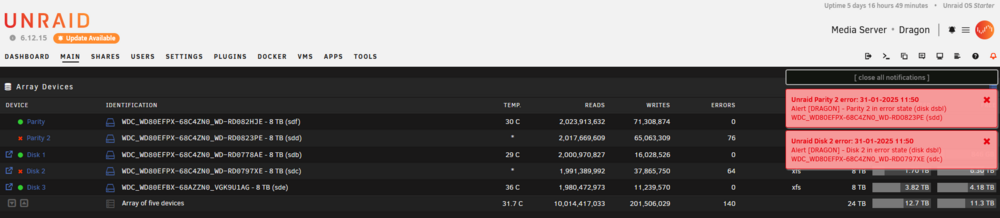
Hi, Firstly sorry if these are dumb questions as I'm relatively new to unRaid. My system is running 6.12.15. I have suddenly had both my Parity 2 drive and a data drive (Disk 2) both report as in error state and Unraid has disabled them. These are relatively new drives (purchased ~8 months ago) and I am not quite sure of what this failure exactly means or the implication for my data is. I assume I need to take action as soon as possible in order to save my data and not corrupt my parity, but am unclear on what action I need to take. I am unsure of things that I should be doing or not be doing during this time to prevent further damage such as restarting the array, disabling weekly parity check or writing anything new to the array. Also would this mean my drives are faulty and something that would even be provable to RMA them or am I essentially stuck with them or it's considered normal operation and unRaid just takes a very cautious approach? Any help and guidance would be greatly appreciated and sorry if there's anything more useful to provide other than the diagnostics.zip that I haven't realised. dragon-diagnostics-20250131-1242.zip