PID
Members
-
Joined
-
Last visited
-
Thanks again! This was indeed the issue. One week stable now!
-
Nice, thanks! Going to try that ASAP!
-
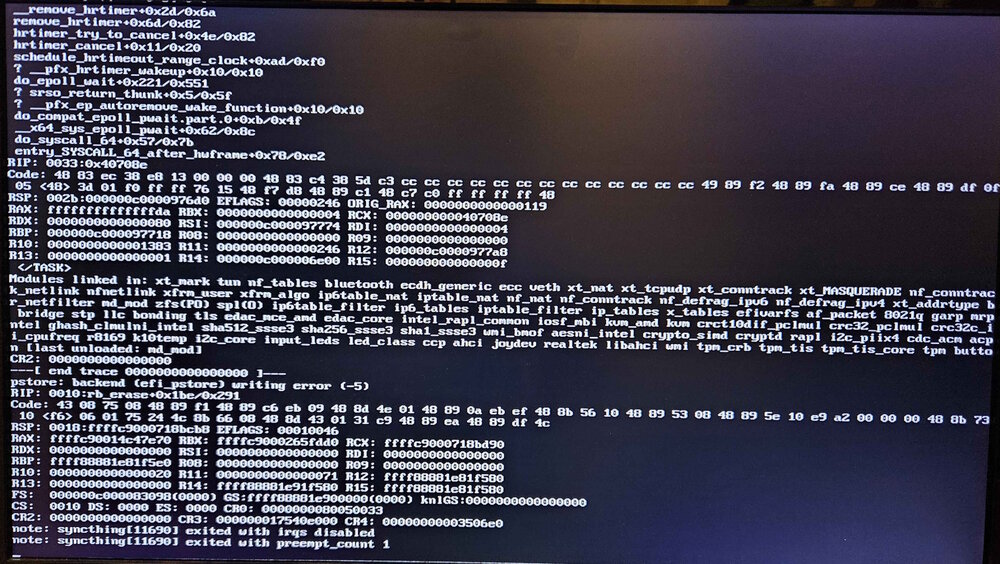
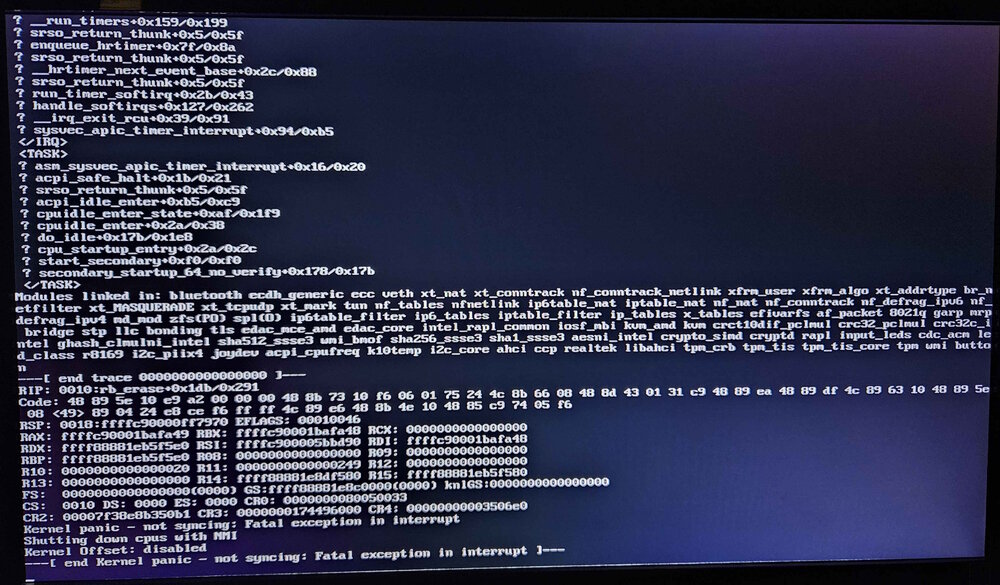
Hi all, First time unRaider here (but long time tech guy). I have 9 days remaining on my free trial. I really love this product so far, and want to stay. However... Since day one (before I installed anything), I've been having kernel panics with a hard crash. The longest I've ever made it without a crash is maybe 20 hours or so. Hardware: Motherboard: MSI A320M-A PRO MAX CPU: AMD Ryzen 1700 RAM: (see below) Hard drives: 2x Seagate Exos 2x14 dual-actuator SATA drives, brand new, shucked from external drive PCIe Google Coral TPU Old GPU for text only (GeForce 8500GT, system refuses to POST without a GPU) My initial suspect was RAM. I started with 2x16GB Corasair Vengence LPX DDR4 3200MHz. These sticks were bought second hand, cheap, because the seller suspected one of them was defective. After ~40hrs of MemText86, sure enough, errors, all clustered around a particular address range. I pulled one stick, and ran MemTest86 again, and again after ~40hrs, errors at the same address range. Swapped sticks and ran for >48 hours with no errors. Cool, problem solved. Nope, unRaid still crashes. Next I tried a single 32GB stick from my main PC that has been rock solid for years. Same thing - crashes every day. I know the early Ryzen's had a pretty bad memory controller which could rarely run RAM at 3200Mhz. While I was already running at 2933Mhz, I kept lowering and lowering just to be sure, and bumped up the RAM voltage a bit too. No luck, still crashes daily. At this point, I'm pretty sure it's not the RAM. The CPU should be fine too as I used it for years without problem until I recently upgraded my main PC. Temperatures are very low, as the machine is in my basement and well ventilated. I've tried removing the PCIe Coral TPU, but that didn't help. I've been monitoring the voltages and they're all fine. It's a name-brand PSU, not some no-name economy model. I've played around with more BIOS settings than I can keep track of, but still the same thing. Most of the time when it crashes, the machine becomes completely unresponsive. Connecting a monitor often just shows a blank screen. Sometimes, if I'm lucky, it will eventually self-reboot but usually it just stays frozen. Very rarely, screen will actually show the tail end of the kernel panic logs (see attached images) Any suggestions?