



Skip to content
View in the app

A better way to browse. Learn more.

Unraid

A full-screen app on your home screen with push notifications, badges and more.

To install this app on iOS and iPadOS
  1. Tap the Share icon in Safari
  2. Scroll the menu and tap Add to Home Screen.
  3. Tap Add in the top-right corner.
To install this app on Android
  1. Tap the 3-dot menu (⋮) in the top-right corner of the browser.
  2. Tap Add to Home screen or Install app.
  3. Confirm by tapping Install.

Sininek2bi

Members
  • Joined

  • Last visited

Everything posted by Sininek2bi

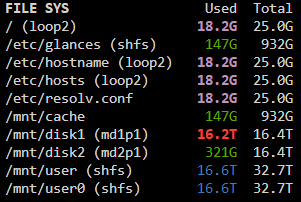
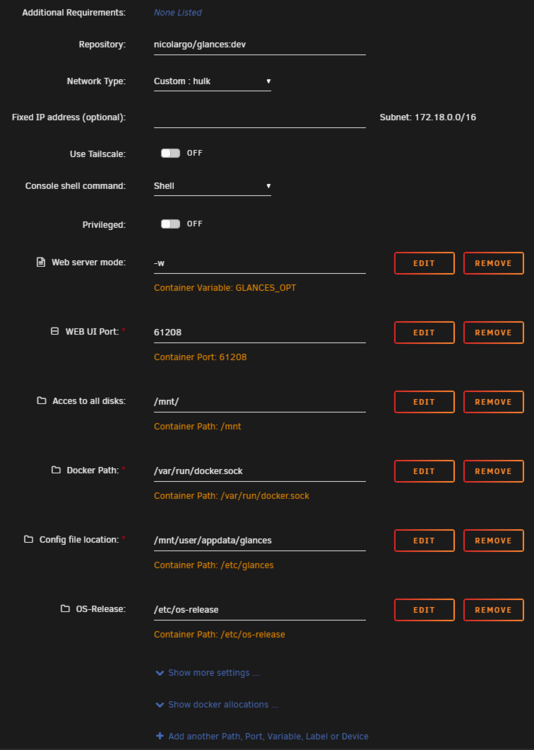
  1. Late answer but hope this helps some out. If you are missing appdata from glances you probably need to do this. Uninstall your current glances docker and install a new one (Right one is with these options). The default container path value for Acces to all disk is rootfs I changed mine back to mnt. After installing go to your appdata/glances and copy this conf file there (https://github.com/nicolargo/glances/blob/develop/conf/glances.conf). Under [fs] section there is a line #allow=shm change this to allow=shfs. After that glances should show you the /mnt/user share
Account

Navigation

Search

Search

Configure browser push notifications

Chrome (Android)
  1. Tap the lock icon next to the address bar.
  2. Tap Permissions → Notifications.
  3. Adjust your preference.
Chrome (Desktop)
  1. Click the padlock icon in the address bar.
  2. Select Site settings.
  3. Find Notifications and adjust your preference.