





ktran320
Members
-
Joined
-
Last visited
-
Dummy me... I accidentally ran rsync with --delete and deleted some important files. FS is xfs. I am looking to use xfs_undelete to hopefully recover files. I installed xfs_undelete from here https://github.com/ianka/xfs_undelete but it looks like I need tcl and tcllib. Looks like it's commonly installed via NerdPack / NerdTools. Unfortunately, I am running Unraid 7 and i don't think NerdTools is supported. I'm pretty new to Unraid and linux in general. Can someone please point me in the right direction? Thank you!
-
It's possible I did something dumb and had incorrect case sensitivity but I'm using the same rsync script from elsewhere that was copy pasta'ed over. The only difference was the name of the remote share. I did find someone with a similar issue. https://www.reddit.com/r/unRAID/comments/1i6sa95/comment/mcb3mkr/?%24deep_link=true For now, I will redo my config from scratch and try it again--starting small first and verify it doesn't double copy. Thanks
-
Great catch! I just checked /mnt/disk1 and /mnt/disk2 and indeed, there are duplicates. I rsync'ed these files from a different computer, so I thought they just took up said space and distributed it across two drives. Any idea why this could happen? It looks like it happened with all of my shares. Still pretty new to unraid and did not know about the diagnostics.zip. Thanks for the info. I'll make sure to share that next time I post an issue. Thanks!
-
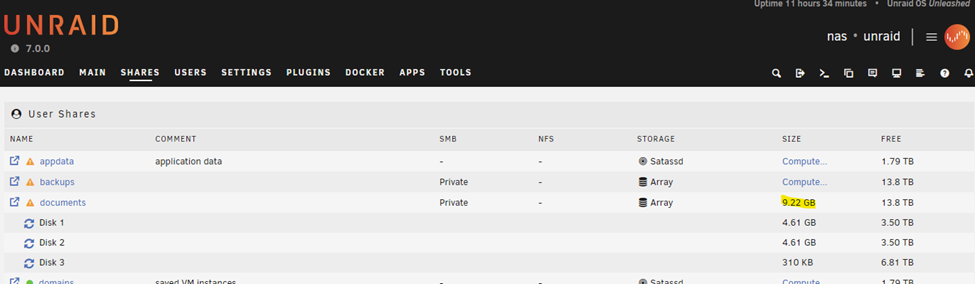
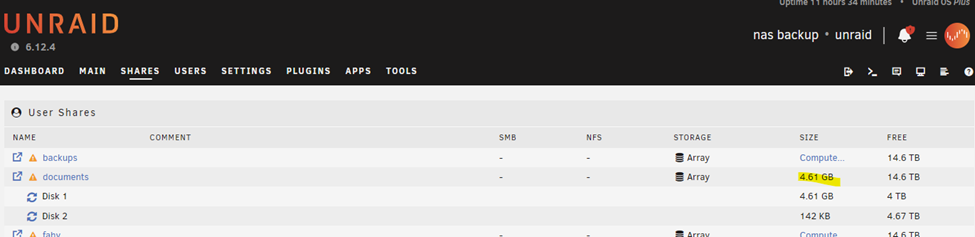
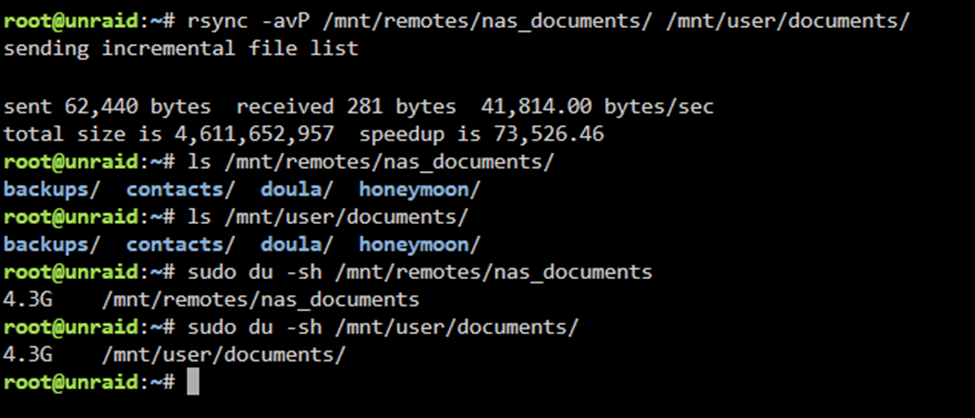
I took some screenshots for more clarity. Main nas running 7.0.0. documents share reads 9.22GB. Backup nas running 6.12.4. I mounted the documents share from the main nas via SMB and labeled it nas_documents. On the backup nas (6.12.4), I rsync the mounted documents share (main nas) to my backup nas under documents. I list contents to compare and also get the directory size and they match. This leads me to believe the calculations / reporting of allocated storage is incorrect in 7.0.0.
-
This is rsyncing xfs to xfs. The size for each share is exactly half at the destination of the size read at the source. The reports are on the main page. Even with overhead of distributing data differently across drives, overhead shouldn't be double. It's a difference of 11TB to 5.5TB across all shares.
-
Thanks for catching that! It was a typo.. I recalled seeing 6 and 12 and thought 6.1.2. The actual version is 6.12.4. Sorry about that.
-
Hi all, I'm still faily new to the unraid / nas world, but am learning so please bear with me. I just scrapped together some aging hardware and installed 7.0.0. Created a few shares. I then moved my files over to one share and it shows 2.68GB used for that share. I can access the files over the network via SMB. Cool, all seems good. I got my hands on another unraid build (6.1.2), started a new config and formatted all drives. I wanted to make a secondary backup to the build above. I create shares with the same names to match the 7.0.0 build. Then I map the shares above and create scripts to rsync to the 6.1.2 build. After the rsync finishes, I noticed total space utilization is a lot lower (~11TB vs ~5.5TB). Checking individual shares, it seems it is taking up half the amount of storage in 6.1.2 as it is in 7.0.0. My share with 2.68GB mentioned above is only 1.34GB in 6.1.2. This seems off so I go and check the space usage on my windows machine where the original files are, and it's showing 1.24GB. Note, I am using XFS for both unraid builds, so I think the 1.24GB in windows might have to do with NTFS filesystem vs XFS. This is a lot closer to the 1.34GB measured in the secondary build (6.1.2). Anyone else seeing this? I'll have to get investigate further after work. Thanks! EDIT: This was a typo! I recalled seeing 6 and 12 and thought 6.1.2. The actual version is 6.12.4. My apologies.
