




Skip to content
View in the app

A better way to browse. Learn more.

Unraid

A full-screen app on your home screen with push notifications, badges and more.

To install this app on iOS and iPadOS
  1. Tap the Share icon in Safari
  2. Scroll the menu and tap Add to Home Screen.
  3. Tap Add in the top-right corner.
To install this app on Android
  1. Tap the 3-dot menu (⋮) in the top-right corner of the browser.
  2. Tap Add to Home screen or Install app.
  3. Confirm by tapping Install.

hxii

Members
  • Joined

  • Last visited

Everything posted by hxii

  1. I just got to this myself, and the solution is fairly simple - just add the config as a bind mount: -v '/mnt/user/appdata/quartz_builder/quartz.config.ts':'/quartz/quartz.config.ts':'ro' So, in essence: Create your `quartz.config.ts` file somewhere. Edit the container in Unraid. Click "Add another Path, Port, Variable, Label or Device" and create a new path. Set `/quartz/quartz.config.ts` as the "Container Path" Set the path where your config file is as the "Host Path", e.g. `/mnt/user/appdata/quartz_builder/quartz.config.ts`. For safety, set "Access Mode" as RO.
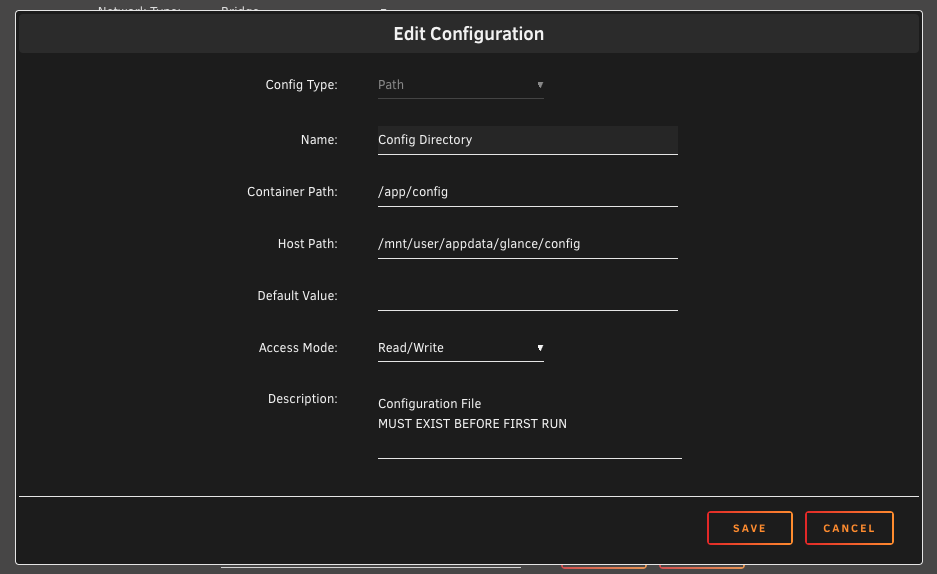
  2. The upgrade worked fine for me. I modified the config argument as follows:
Account

Navigation

Search

Search

Configure browser push notifications

Chrome (Android)
  1. Tap the lock icon next to the address bar.
  2. Tap Permissions → Notifications.
  3. Adjust your preference.
Chrome (Desktop)
  1. Click the padlock icon in the address bar.
  2. Select Site settings.
  3. Find Notifications and adjust your preference.

