pinso
Members
-
Joined
-
Last visited
Everything posted by pinso
-
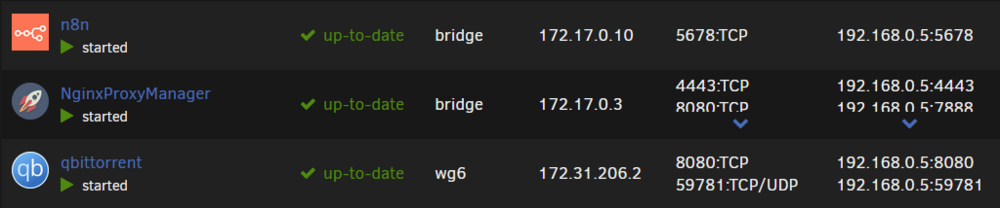
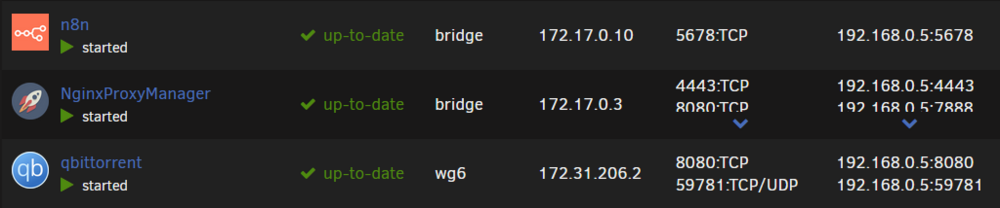
172.31* my bad this is what it looks like in Unraid :
-
I’m running a QBitTorrent container (with a Torguard VPN) on Unraid. The container uses a custom Docker network (wg6), giving it an IP in the 172.31.x.x range. My main LAN is 192.168.0.x, and the ISPBox VPN assigns 192.168.27.x. Although I’ve configured the LAN_NETWORK variable (e.g. 192.168.0.0/24,192.168.27.0/24) to allow access from both networks, I can only reach the QBitTorrent WebUI from the local LAN (192.168.0.x). When I’m on the ISPBox VPN (192.168.27.x), I can’t connect to the QBitTorrent WebUI. BUT when I'm on the ISPBox VPN (192.168.27.x), i can connect on any container who don't use VPN Torguard (n8n, NPM...) I also tried using Nginx Proxy Manager (on a separate “bridge” network) to proxy the QBitTorrent interface, but I get a 502 Bad Gateway error (lol that makes sense) Ideally, I want to keep all torrent traffic going through Torguard (so the container must remain on that custom VPN network), while not exposing QBitTorrent to the internet and still allowing local + ISPBox VPN access. Because my ISPBox doesn’t let me add a static route, I’m stuck. Any tips would be greatly appreciated. Thank you!