





jlgaardvark
Members
-
Joined
-
Last visited
-
This worked flawlessly, thank you!
-
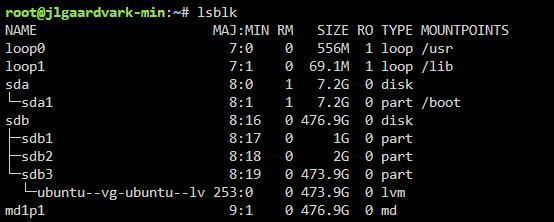
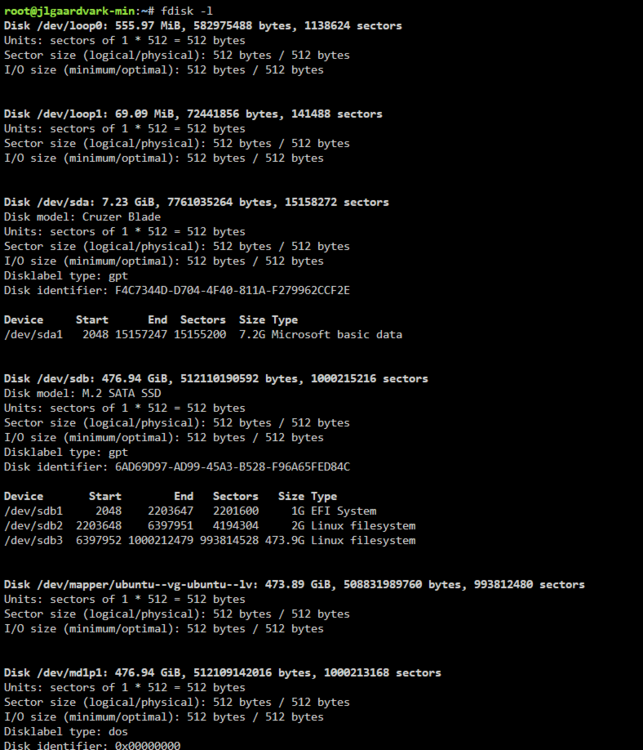
The attached images show the results of those.
-
Unraid version 7.0.0. I am a brand new user of Unraid, trying it out for the first time. I have a basic mini pc that I am working on turning into a home server. I am not worried at all about any data loss, it's brand new. I installed Ubunutu on the system, then decided I wanted to try out Unraid, so I created the boot USB, and updated my BIOS to boot from USB. All that said, After booting into Unraid, installing my trial key, and attempting to assign my device, it tells me it is unmountable. I try to format it, and for a brief second, it attempts to format, then goes back to being unmountable. I have searched through the forums, and saw several mentions of the unassigned devices Plus, but because I do not have an array set up currently, I cannot install any other plugins so it tells me. Any help would be appreciated, I'm sure I'm just missing something obvious, but I'm relatively new to Home Lab projects. jlgaardvark-min-diagnostics-20250220-1126.zip

