





viratogen
Members
-
Joined
-
Last visited
-
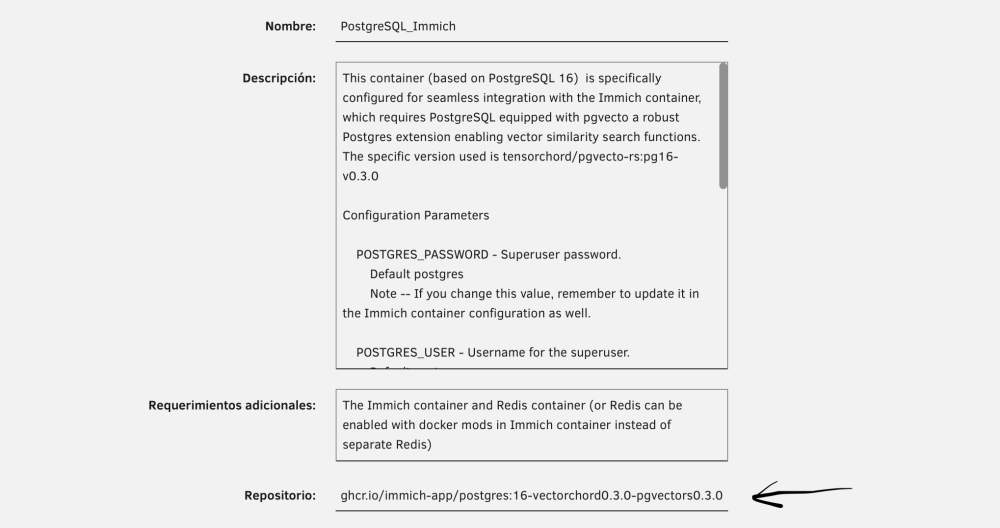
For newbies like me who ran into the same issue, this is what I did to get Immich working again: Stopped both the Immich and PostgreSQL_Immich containers. Changed the image of the PostgreSQL_Immich container to ghcr.io/immich-app/postgres:16-vectorchord0.3.0-pgvectors0.3.0, keeping the same container name. To do that, I edited the container in Unraid and pasted ghcr.io/immich-app/postgres:16-vectorchord0.3.0-pgvectors0.3.0 in the Repository field Then I clicked Apply and the container updated. I didn’t touch the container port or any of the volume paths (/mnt/user/appdata/PostgreSQL_Immich → /var/lib/postgresql/data ) In Immich, leave these as they are, as I don't use a Redis container but Redis inside Immich Container: DOCKER_MODS=imagegenius/mods:universal-redis REDIS_HOSTNAME=localhost After that: Start the PostgreSQL_Immich container first. Then start the Immich container. For a while the Immich container was busy reindexing all the vector indexes, and after a few minutes it was accessible again through the web UI. The Immich logs no longer show any errors and I’ve got access to all my photos and videos back. To avoid this happening again in the future, I’ve disabled automatic updates for both the Immich and PostgreSQL containers In the future I’ll look into doing updates via Docker Compose, like Immich officially recommends, but for now my setup is working again. For anyone running into the same issue: don’t panic. Your photo files are not lost; they just need to be reindexed, and you have to switch the Postgres image to a newer version that’s compatible with Immich 3.0 and above. Thanks a lot to everyone who replied in the forum and shared their input
-
Thank you very much for your post. I use Redis included in the Immich container with the variable DOCKER_MODS=imagegenius/mods:universal-redis and REDIS_HOSTNAME=localhost. I didn't have to install another container with Redis, just changing the repository of PostgreSQL_Immich container to ghcr.io/immich-app/postgres:16-vectorchord0.3.0-pgvectors0.3.0 and it fixed the problem
-
Several months ago, I installed Immich on my Unraid server by following @SpaceInvaderOne 's tutorial and using the PostgreSQL app that he created. Over this time, I have been uploading all my photos without any issues, and Immich was working perfectly. Unfortunately, I had automatic updates enabled for all my Docker containers, and Immich was automatically updated to version 3. Ever since Immich was updated to version 3, my Immich server has stopped working. It seems that the PostgreSQL version created by Spaceinvader One are no longer compatible because it uses pgvecto.rs instead of VectorChord. I am a beginner-level Unraid user and I don't know how to resolve this issue. I would greatly appreciate it if @SpaceInvaderOne or someone else could create a new tutorial explaining how to migrate from our older versions to a working setup that is compatible with the latest release. Thank you very much in advance.

