KNOXSOF
Members
-
Joined
-
Last visited
-
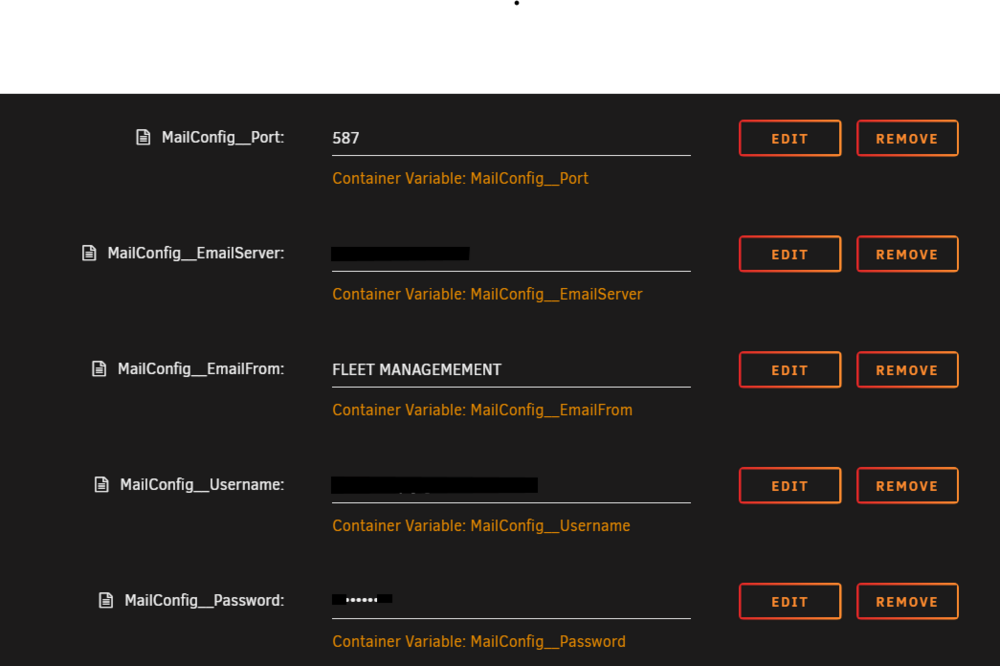
apparently i am basic.. i thought that was the label that projected to the email as who it was from and not the email address itself. thank you.
-
i am trying to get the email service working so i can create different users and also to send the reminder notices. i have tried a few different ways but i cannot seem to figure it out. 1. tried editing the items to the .Json file and updating it. - Did not work 2. i have tried adding the extra variables in the docker configuration page. variables are added as attached image, i get, which i cannot fail: Microsoft.AspNetCore.Diagnostics.ExceptionHandlerMiddleware[1] An unhandled exception has occurred while executing the request. MimeKit.ParseException: Invalid addr-spec token at offset 0 at MimeKit.InternetAddress.TryParseAddrspec(Byte[] text, Int32& index, Int32 endIndex, ReadOnlySpan`1 sentinels, RfcComplianceMode compliance, Boolean throwOnError, String& addrspec, Int32& at) at MimeKit.MailboxAddress.set_Address(String value) at MimeKit.MailboxAddress..ctor(Encoding encoding, String name, String address) at MimeKit.MailboxAddress..ctor(String name, String address) at CarCareTracker.Helper.MailHelper.SendEmail(List`1 emailTo, String emailSubject, String emailBody) in /App/Helper/MailHelper.cs:line 146 at CarCareTracker.Helper.MailHelper.NotifyUserForRegistration(String emailAddress, String token) in /App/Helper/MailHelper.cs:line 46 at CarCareTracker.Logic.LoginLogic.GenerateUserToken(String emailAddress, Boolean autoNotify) in /App/Logic/LoginLogic.cs:line 345 at CarCareTracker.Controllers.AdminController.GenerateNewToken(String emailAddress, Boolean autoNotify) in /App/Controllers/AdminController.cs:line 62 at lambda_method16(Closure, Object, Object[]) at Microsoft.AspNetCore.Mvc.Infrastructure.ActionMethodExecutor.SyncActionResultExecutor.Execute(ActionContext actionContext, IActionResultTypeMapper mapper, ObjectMethodExecutor executor, Object controller, Object[] arguments) at Microsoft.AspNetCore.Mvc.Infrastructure.ControllerActionInvoker.InvokeActionMethodAsync() at Microsoft.AspNetCore.Mvc.Infrastructure.ControllerActionInvoker.Next(State& next, Scope& scope, Object& state, Boolean& isCompleted) at Microsoft.AspNetCore.Mvc.Infrastructure.ControllerActionInvoker.InvokeNextActionFilterAsync() --- End of stack trace from previous location --- at Microsoft.AspNetCore.Mvc.Infrastructure.ControllerActionInvoker.Rethrow(ActionExecutedContextSealed context) at Microsoft.AspNetCore.Mvc.Infrastructure.ControllerActionInvoker.Next(State& next, Scope& scope, Object& state, Boolean& isCompleted) at Microsoft.AspNetCore.Mvc.Infrastructure.ControllerActionInvoker.InvokeInnerFilterAsync() --- End of stack trace from previous location --- at Microsoft.AspNetCore.Mvc.Infrastructure.ResourceInvoker.<InvokeNextResourceFilter>g__Awaited|25_0(ResourceInvoker invoker, Task lastTask, State next, Scope scope, Object state, Boolean isCompleted) at Microsoft.AspNetCore.Mvc.Infrastructure.ResourceInvoker.Rethrow(ResourceExecutedContextSealed context) at Microsoft.AspNetCore.Mvc.Infrastructure.ResourceInvoker.Next(State& next, Scope& scope, Object& state, Boolean& isCompleted) at Microsoft.AspNetCore.Mvc.Infrastructure.ResourceInvoker.InvokeFilterPipelineAsync() --- End of stack trace from previous location --- at Microsoft.AspNetCore.Mvc.Infrastructure.ResourceInvoker.<InvokeAsync>g__Awaited|17_0(ResourceInvoker invoker, Task task, IDisposable scope) at Microsoft.AspNetCore.Mvc.Infrastructure.ResourceInvoker.<InvokeAsync>g__Awaited|17_0(ResourceInvoker invoker, Task task, IDisposable scope) at Microsoft.AspNetCore.Authorization.AuthorizationMiddleware.Invoke(HttpContext context) at Microsoft.AspNetCore.Diagnostics.ExceptionHandlerMiddlewareImpl.<Invoke>g__Awaited|10_0(ExceptionHandlerMiddlewareImpl middleware, HttpContext context, Task task)