





Kantros
Members
-
Joined
-
Last visited
-
Thanks! I consolidated to a single USB input (other than flash) and stability has increased substantially.
-
carterhub-diagnostics-20250409-2039.zip One of my hard drives died a few days ago. The new one came in a I started the rebuild from parity process. I have tried twice and both times I have gotten this error at around 14% completion. Upon reboot, the flash drive is read from fine. This only occurs during the rebuild process. Am I doing something wrong?
-
I have resolved this. I saw a "power mode" section in the settings. Change power mode to "Best Performance" -> Everything was fixed. I'm not sure if maybe 7.0.1 introduced something that could effect power modes but I'm happy to be up and running again. Made my machine (which is a repurposed laptop. maybe this is related?) go from an unable craw to faster than ever.
-
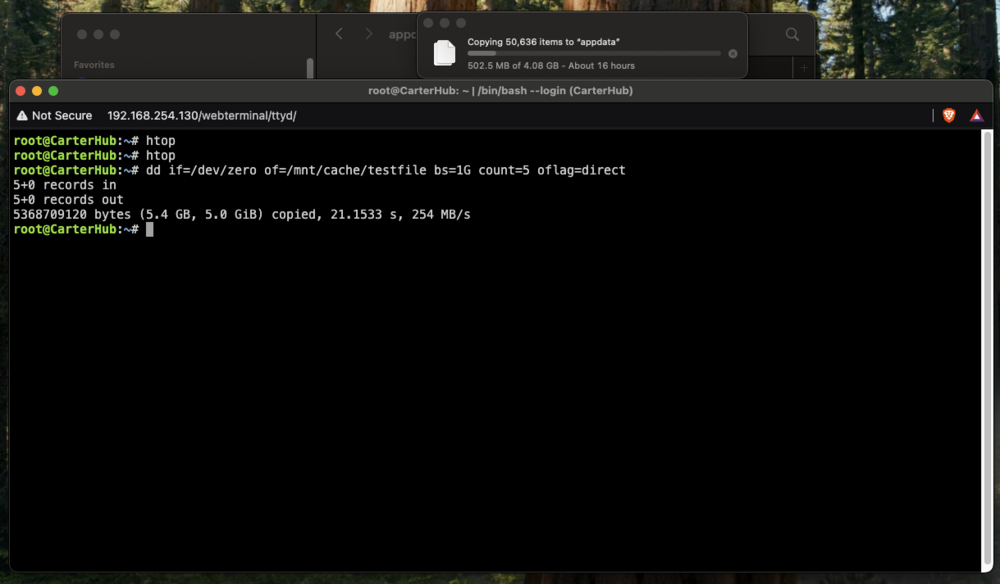
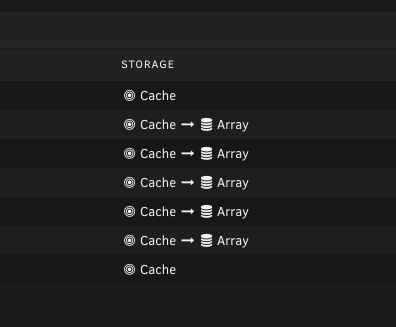
First of all, thank you so much for the help everyone! Okay I was able to go in an delete the vdisk. That did not resolve anything so I also erased the cache pool. I am still seeing extremely slow performance on decently powerful hardware. for example, I am transferring my appdata backup to the cache and it is saying it will take a full day. docker images take 10-30 minutes to fully install mainly hanging on the extracting phase (the download is quick) . However, when doing a write test in the terminal, the speeds are sufficiently fast. anyone have ideas? Not sure what else I could try but I am open to anything. carterhub-diagnostics-20250329-2043.zip
-
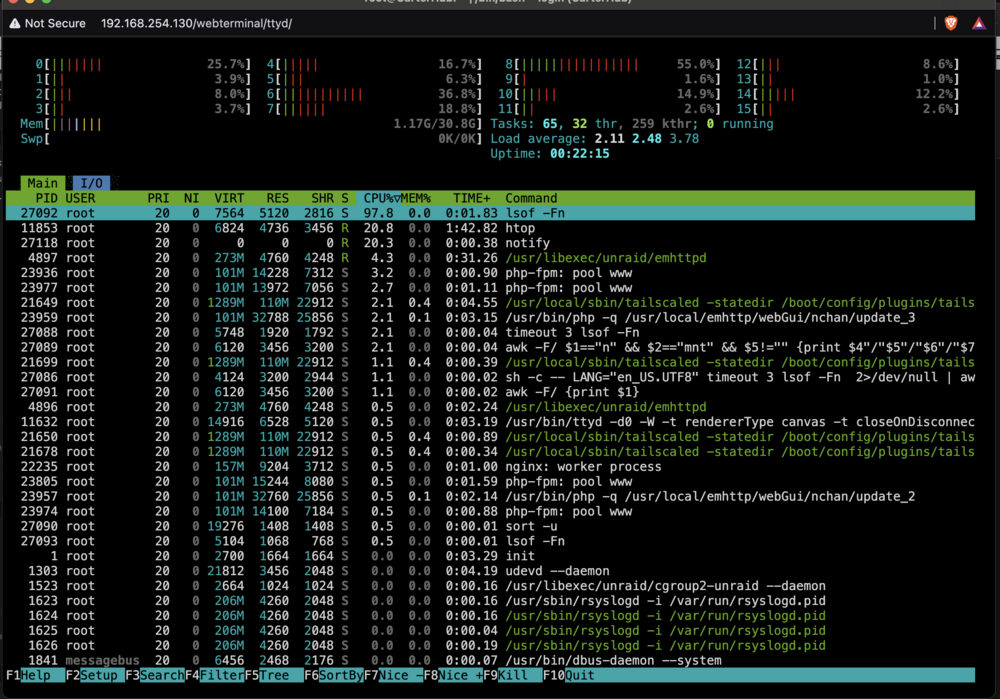
I think docker failing is a symptom of a deeper issue. I had htop up and saw "lsof -Fn" spiking the CPU. In this scenario my Array is stopped, no docker, and no VMs. Every 5 seconds, the command "lsof -Fn" hits the CPU for around 50%-102% CPU.
-
Here is a second diagnostics. If I disable and enable docker a few times, it will eventually work. The first diagnostics is on start up, the second is after docker finally starts.carterhub-diagnostics-20250321-2118.zip My CPU usage is also much higher. Even with docker disabled and no VMs, I'm still bouncing around 15-40% (with individual cores hitting 80-100) which seems odd. Disk speed is also way down. when transferring files, before I would get around 100 MB/s now I am getting around 13 MB/s.
-
sorry about that! carterhub-diagnostics-20250321-2038.zip
-
carterhub-smart-20250320-2216.zipI have attached the Diagnostics
-
I get the message "Docker Service failed to start." I have attached the logs but they do not seem to provide much insight into what is happening. Or I don't know what to look for. any direction where to look next would be greatly appreciated. I am happy to provide other information! Mar 20 23:41:05 CarterHub rc.samba: Samba server daemon... Started. Mar 20 23:41:07 CarterHub emhttpd: shcmd (67): /etc/rc.d/rc.avahidaemon reload Mar 20 23:41:07 CarterHub avahi-daemon[4781]: Got SIGHUP, reloading. Mar 20 23:41:09 CarterHub emhttpd: shcmd (77): /usr/local/sbin/mount_image '/mnt/user/system/docker/docker.img' /var/lib/docker 80 Mar 20 23:41:17 CarterHub kernel: loop2: detected capacity change from 0 to 209715200 Mar 20 23:41:17 CarterHub kernel: BTRFS: device fsid adf524f8-bb9c-48a4-b126-9c5075e11973 devid 1 transid 172714 /dev/loop2 scanned by udevd (6296) Mar 20 23:41:17 CarterHub kernel: BTRFS info (device loop2): first mount of filesystem adf524f8-bb9c-48a4-b126-9c5075e11973 Mar 20 23:41:17 CarterHub kernel: BTRFS info (device loop2): using crc32c (crc32c-intel) checksum algorithm Mar 20 23:41:17 CarterHub kernel: BTRFS info (device loop2): using free space tree Mar 20 23:41:17 CarterHub kernel: BTRFS info (device loop2): enabling ssd optimizations Mar 20 23:41:17 CarterHub kernel: BTRFS info (device loop2): auto enabling async discard Mar 20 23:41:17 CarterHub root: Resize device id 1 (/dev/loop2) from 100.00GiB to max Mar 20 23:41:17 CarterHub rc.nginx: Updating Nginx server daemon... Mar 20 23:41:18 CarterHub rc.nginx: Reloading Nginx server daemon... Mar 20 23:41:18 CarterHub emhttpd: shcmd (79): /etc/rc.d/rc.docker start Mar 20 23:41:18 CarterHub rc.docker: Starting Docker daemon... Mar 20 23:41:19 CarterHub rc.nginx: Checking configuration for correct syntax and then trying to open files referenced in configuration... Mar 20 23:41:19 CarterHub rc.nginx: /usr/sbin/nginx -t -c /etc/nginx/nginx.conf Mar 20 23:41:19 CarterHub rc.nginx: Reloading Nginx server daemon configuration... Mar 20 23:41:19 CarterHub nginx: 2025/03/20 23:41:19 [alert] 5319#5319: *121 open socket #30 left in connection 15 Mar 20 23:41:19 CarterHub nginx: 2025/03/20 23:41:19 [alert] 5319#5319: *110 open socket #31 left in connection 18 Mar 20 23:41:19 CarterHub nginx: 2025/03/20 23:41:19 [alert] 5319#5319: aborting Mar 20 23:41:25 CarterHub rc.samba: Updating Samba server daemon... Mar 20 23:41:25 CarterHub rc.samba: Restarting Samba server daemon... Mar 20 23:41:25 CarterHub rc.samba: Stopping Samba server daemon... Mar 20 23:41:26 CarterHub rc.samba: killall --ns 6563 smbd nmbd wsdd2 winbindd Mar 20 23:41:26 CarterHub wsdd2[5817]: 'Terminated' signal received. Mar 20 23:41:26 CarterHub winbindd[5841]: [2025/03/20 23:41:26.789372, 0, traceid=1] ../../source3/winbindd/winbindd_dual.c:1980(winbindd_sig_term_handler) Mar 20 23:41:26 CarterHub winbindd[5841]: Got sig[15] terminate (is_parent=1) Mar 20 23:41:26 CarterHub wsdd2[5817]: terminating. Mar 20 23:41:29 CarterHub rc.samba: Samba server daemon... Stopped. Mar 20 23:41:29 CarterHub rc.samba: Starting Samba server daemon... Mar 20 23:41:30 CarterHub rc.samba: /usr/sbin/smbd -D Mar 20 23:41:31 CarterHub rc.samba: /usr/sbin/wsdd2 -d -4 -6 Mar 20 23:41:33 CarterHub wsdd2[6836]: starting. Mar 20 23:41:33 CarterHub rc.samba: /usr/sbin/winbindd -D Mar 20 23:41:34 CarterHub rc.samba: Samba server daemon... Started. Mar 20 23:42:38 CarterHub rc.docker: Docker daemon... Failed. Mar 20 23:42:38 CarterHub rc.docker: Starting network... Mar 20 23:42:39 CarterHub rc.docker: Starting containers... Mar 20 23:42:40 CarterHub emhttpd: shcmd (81): umount /var/lib/docker Mar 20 23:42:40 CarterHub kernel: BTRFS info (device loop2): last unmount of filesystem adf524f8-bb9c-48a4-b126-9c5075e11973 Mar 20 23:42:41 CarterHub emhttpd: nothing to sync Mar 20 23:42:58 CarterHub sysDrivers: SysDrivers Build Complete



