





pastabatman
Members
-
Joined
-
Last visited
-
THANKS! I thought i'd lost my mind.
-
Hi all I have read the manual section on this over and over (followed instructions), searched the web and this forum. there is NO "use cache for new files" option on my share settings page. I turned off dockers (no VM). I just want to write to my cache first which is on a NVME drive. in the pics attached appdata is on SSD/cache not sure what I've done wrong here... Thanks!
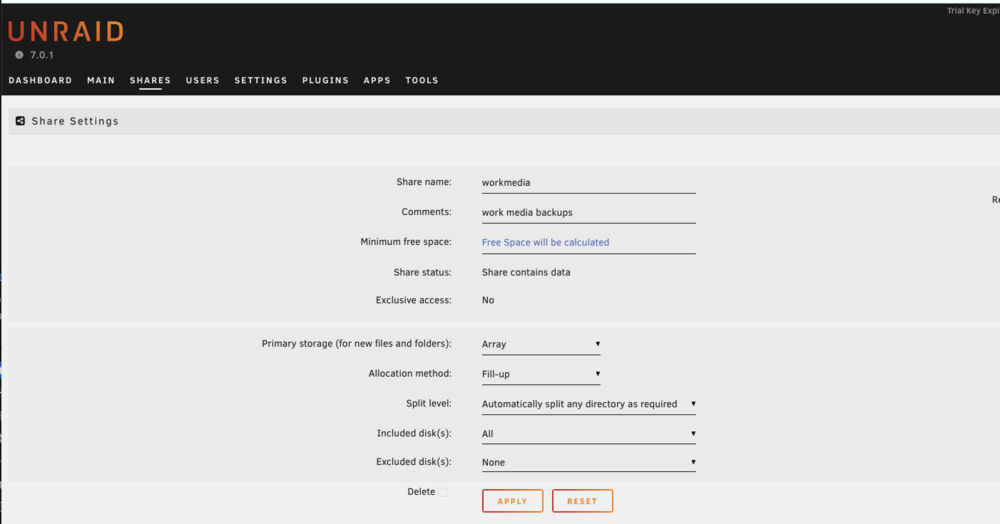
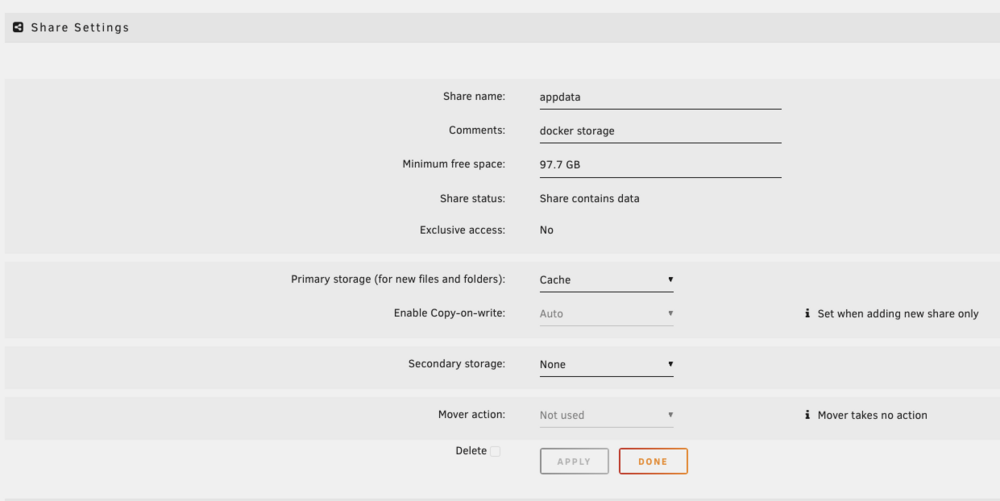
-
so far so good! I'm up for 7hours no issues. I'll prob replace this ram anyway
-
UPDATE - so, I guess I didnt realize that i was NOT able to log in as root. so i created a user and it all connected! made some shares! but then it froze up again. froze in regular and safe mode in both web gui and direct connect to dell machine server. Also did a Memtest overnight and got 16 errors in test 8. I have 4 sticks of 4gig ram. before pulling ram to retest I updated the BIOS (last update was 2018) and was up and running for 30 mins in web gui and then server dropped/crashed. (had enough time to set up appbackup!) I also did the dell provided hardware test and passed... for what thats worth.. Pulled 2 sticks of ram and and mem testing again. so far pass 2 of 4 no errors!! Better than last time. i think i had 16 in pass 1 thanks again
-
Thankyou! Attached. tower-diagnostics-20250326-1852.zip
-
Hi all. Just started. I followed the tutorials to a TEE getting this up and running. I have no data on the server yet, but created my first share as per tutorial and I'm stopped in my tracks... My apple mac cant connect on a finder level and the server also keeps losing connection from web GUI. I have the server on a Dell (specs below) and I'm interfacing via Mac Studio. I'm a video editor looking for parity drive storage and plex. Running the recommended unraid 7 i keep losing connection with server in the web GUI after say 5-10 minutes I reset Chrome to NOT block "insecure connection" (worked better for a bit but same issue) when up and running can NOT connect (found other mac users have the same) on the finder/server level. read many many many posts. - I enabled "export" in SMB the weirdest part: I have the Dell/Server with it's own keyboard/mouse AND monitor input (display port). When I lose web GUI connection completely (chrome white screen "can't find" server) the command line cursor coming straight from the server is gone (not blinking) and i dont seem to have keyboard control. so now I'm worried that my "old" but not well worn USB stick is "bad"? It's a sandisk 8tb. I also have a new HIGHLY recommended new usb samsung bar but it's 64g and usb 3. I did a first aid on the sandisk and all "ok". But i guess I start here? Before I get into my networking -which is VERY simple - I thought I'd start with what SEEMS like the server crashing? I did run diagnostic in the web GUI... not sure what it says though. I dont know how to properly share the info. server Gear: dell Precision Tower 3620 | i5-6600 | 16GB DDR4 just got used - boots windows fine - I've disconnected the windows drive completely. 16TB parity / 12TB + 6TB + 2tb in a separate super old 5 port hot swap enclosure that i gutted (it was port multiplier with tons of loud fans) and am using to hold the drives in a cheap cage with silent fan, and use the PSU. I have it running internal SATA cables to a SATA pcie card I added to the Dell. drives are all coming up fine and running well. I'll keep googling and THANKYOU!

