





antaeusdk
Members
-
Joined
-
Last visited
-
So, having 2 disks, in mirror, does not prevent data loss in the case where one of them dies? That goes beyond anything I have ever read or heard. Not replacing the defective drive, will in the end cause data loss, I know. I also know that it is not a backup. It is the 2 in the 3-2-1 rule.
-
Sorry. Stopping the storage pool made it possible for me to press Apply. Thank you!
-
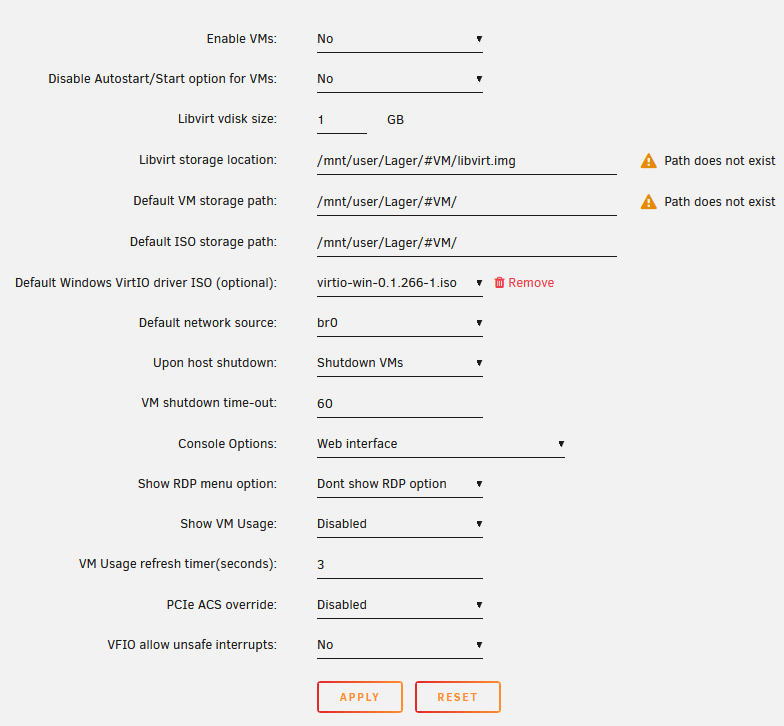
Hi. I have found a lot of messages regarding this topic, but most end up with asking for a diagnostics log, so I will start by doing so. New installation, and I am struggling to fathom how to create a virtual machine using the built-in tool. I hope someone can tell me where I am going wrong. Thank you in advance. Best regards Andreas srv-diagnostics-20250326-1717.zip
-
Thank you all for your feedback. I would wish this was described in the documentation, or I have to have new spectacles prescribed I have reached another issue, but in terms of keeping the forum clean, I will post another thread tomorrow. Again, thank you!
-
Hi all. I have been trying to find out, how storage management works on Unraid and ended up quite confused. I was hoping someone could assist in my understanding. I am migrating away from a Synology, where I have 2x6TB disks running essentially raid 1 (mirror). To avoid data loss, I have procured 2x6TB drives so the data could be migrated 1:1 over my local LAN. Here comes the bit I don't quite understand. If I choose array, then it looks like all data will be stored on one drive, with the option to enable a parity drive. This is probably safe, but seems to require immediate intervention for when the time comes that the drive will fail. It occurs to me, that data loss might be close to inevitable in this use case. If I choose storage pool, then how the data is stored, doesn't seem that obvious to me. Any advice as to how I can manage to have 2 drives mirrored to reflect 6TB of capacity? Thank you in advance. Best regards Andreas
