sawc
Members
-
Joined
-
Last visited
-
I appreciate the additional insight, I will look at all these settings this week and update once done.
-
Sure, here you are. Thank you. jarvis-diagnostics-20250330-1500.zip
-
I believe I was able to accomplish what I was looking to do with the assistance provided. Thank you so much for pointing me in the right direction.
-
Thank you, I will review the documents provided.
-
Here are the diagnostics as requested. Thank you. jarvis-diagnostics-20250329-1731.zip
-
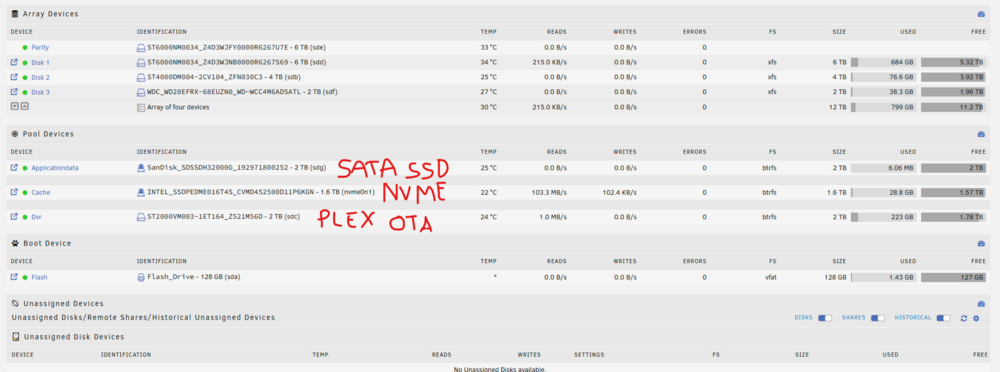
Hello, I am new to Unraid and just put together my first system recently mostly following the NAS Killer 6.0 guide on the Server Build Forums. Currently I just have pictures, videos, music, and some documents stored and am running a Plex and a bedrock Minecraft Docker. I have the attached disk layout and would like to move all app data from the cache NVME to a recently installed SATA SSD. One reason is I was told the metadata performance will be much better with Plex, which currently I do notice some things slow to load initially in Plex. What is the best way to do this? I assume from a high level it's copying the data to the new drive and changing some configuration to point things at the new location, as well as telling it to default there for new appdata. Let me know if there is any further information I can provide. I appreciate any guidance and insight provided.