zerickk
Members
-
Joined
-
Last visited
-
It appears this was an out of memory issue after all. I closed a VM to free up ram and everything was stable without issue for a week. Upon powering the VM back up and using it, there was a point it became sluggish and I saw the ram utilization at 99% before locking up in the same manner as before. Looks like i'll be purchasing some of that 2026 priced ram. Thank you
-
Additionally, I set Power Supply Idle Control to Typical Current Idle, but crashes continued afterward. Should I set Global C-State Control to Disabled? Thank you
-
Hi, I’m looking for help diagnosing a hard-freeze issue that started a few weeks ago. This server/configuration had been stable for years before this began. System: AMD Ryzen 7 3700X ASUS ROG STRIX B450-F GAMING II 24 GB DDR4 at 2133 MT/s Multiple HDDs + NVMe/SSD cache Docker-heavy system with Plex, Nextcloud, Frigate, *arrs, etc. Recently updated Unraid while troubleshooting Problem: The server will randomly become completely unresponsive. WebUI stops working, SSH won't respond, and I have to physically hard-reset it. There doesn't appear to be a graceful crash/reboot or obvious OOM event. Sometimes I can identify approximately when it begins because recordings and other activity stop. Interestingly, several occurrences have been around a :30 time boundary (e.g. ~5:30 AM and ~4:30 PM), although I haven't found a scheduled task that corresponds with this. So far I have: Updated Unraid Enabled/saved syslogging to capture the lockups Checked logs for NIC/link errors, kernel errors, OOM events, etc. Checked root cron and User Scripts for scheduled jobs Applied RAM/PID limits to heavier Docker containers Increased Frigate SHM/tmpfs and reduced its potential resource usage Confirmed the system isn't simply running out of RAM (~8 GB available during testing) Removed an unrelated network-mounted Mac Mini Confirmed multiple services appear to stop responding at approximately the same time Planning to run Memtest next One possible concern is RAM: I have 2×8 GB Corsair and 2×4 GB G.Skill DIMMs. They're all running conservatively at 2133 MT/s and this exact configuration has been stable for years, but I'll run Memtest in case a DIMM has developed a fault. I'm attaching my Unraid diagnostics from after the latest lockup/reboot. At this point I'm trying to determine whether I'm dealing with hardware (RAM/PSU/motherboard/storage), a kernel/driver issue, or something in Unraid/Docker causing a host-level lockup. I'd really appreciate someone taking a look at the diagnostics and suggesting what I should test next. Is there anything else I should enable that might capture the actual cause of a complete hard lock before I start swapping hardware? Thank you in advance! tower-diagnostics-20260821-1711.zip
-
Thank you so much for all the help!
-
tower-diagnostics-20250416-0912.zipThank you. I have finished the mover and checked the shares. It appears everything moved properly. Also the fix common issues plugin errors cleared up. Here are the diagnostics.
-
Excellent. The mover finished successfully. Here are the diagnostics. I imagine this will be the next issue I need to address? tower-diagnostics-20250415-1135.zip

-
Here is my new setup: 127G /mnt/cache/appdata 228G /mnt/cache/plex 9.4G /mnt/cache/downloads 0 /mnt/cache/domains 2.3M /mnt/cache/nextcloud 0 /mnt/cache/data 364G /mnt/cache Thank you

-
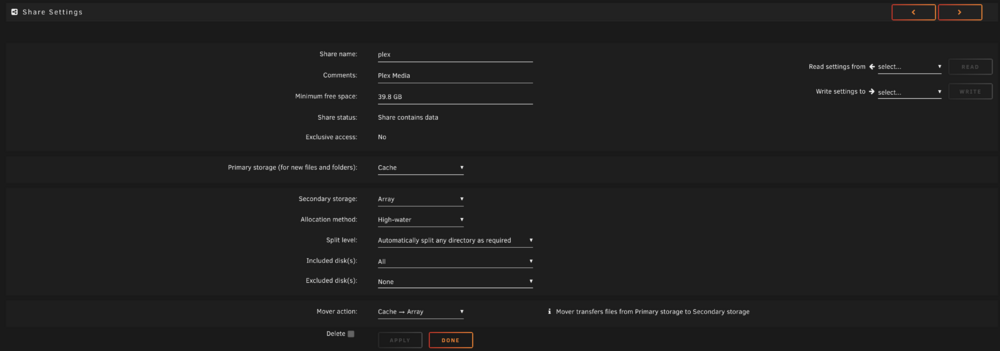
Ok I installed the Fix Common Problems plugin and see that there are some items needing attnetion. Ok the Plex.cfg issue makes sense to me now. I went in and deleted it and then reconfigured the plex user share to Primary:cache; Secondary:array; Mover action:cache->array. Here are the new diagnostics. Thank you again! tower-diagnostics-20250415-0741.zip
-
Ok both on cache I added the new diagnostics file. Thank you! tower-diagnostics-20250414-2054.zip

-
Looking at the link you provided, I should move my VM from a different SSD to this location and set it as cache only to properly use this share. I will fix that. I think I understand this now. I should have both on either cache or array not a mix like I do now? I can set both to cache when I can sort out the space issue. Thank you, yes I mean docker with lowercase Thank you, I didn't realize this either. You are pointing out many configuration issues I have here and I appreciate it. I see that the docker.img i have in the "docker" cache only share hasn't been modified for some time and is clearly not current. To rectify this, I would delete that "docker" share and move the "system" share to cache to align with the issue above where my "appdata" is on cache? You are right. Here is the full result: 60G /mnt/cache/docker 127G /mnt/cache/appdata 209G /mnt/cache/plex 396G /mnt/cache Is this not configured to write to cache and move to array? Will do. Thank you. Done. Thank you. They already are set this way. In the past this would move with mover and keep my cache from filling, but now mover isn't moving them. Thanks again! I have used unraid for 6 years now and see that I have a fair bit of configuration improvement opportunities.
-
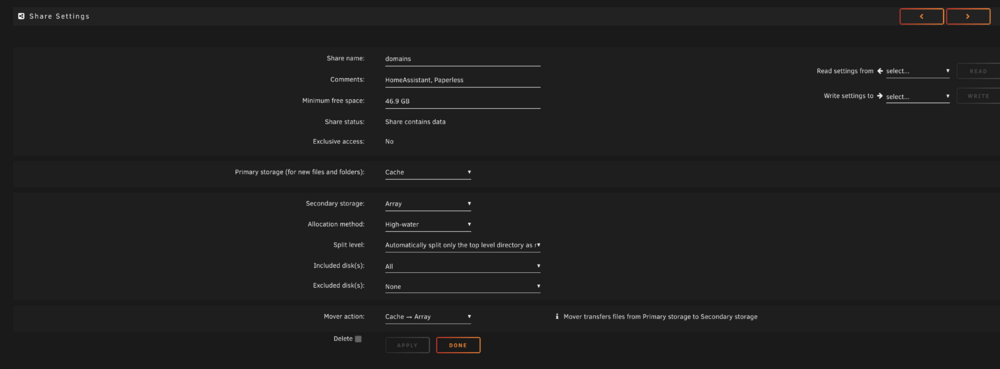
Thank you. Valid point for the shares setup. I don't actually have any VM's or docker data in domains so it should be ok as cache --> array. But i have set appdata as cache only and system as array only. I believe that should be ok? Docker is my docker image and is set to cache only. I have plex set for cache --> array to mitigate daily writes and speed write time every time new movies are added. I want plex to load to the array with mover nightly. du -h -d 1 /mnt/cache command provides this" 60G /mnt/cache/docker I have attached a photo of my current cache disk files. It is the plex data that is filling it with content that isn't moving to the array. Thanks again for your assistance.

-
tower-diagnostics-20250414-1640.zipThank you. here is the diagnostics
-
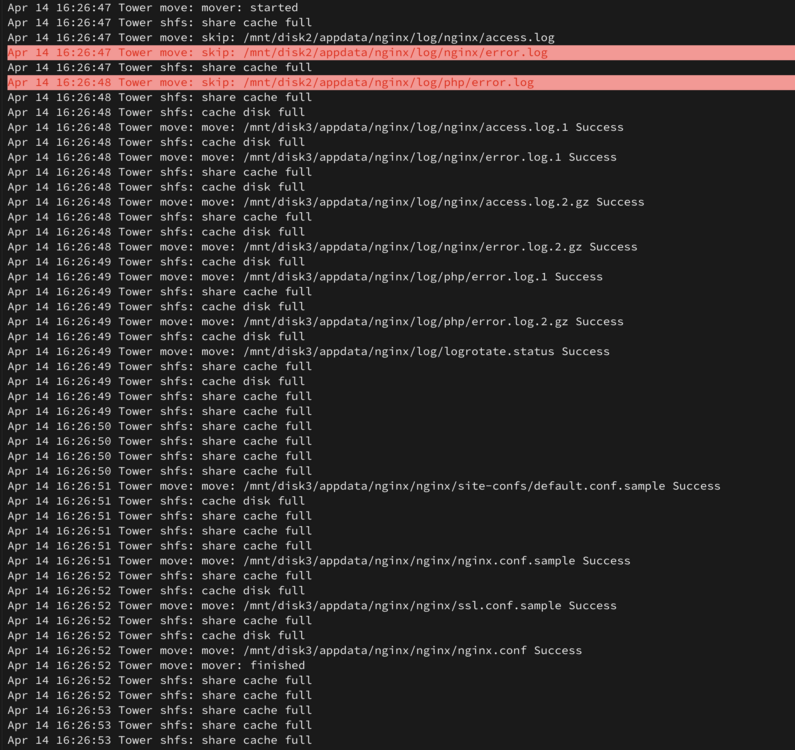
Hello, I have an issue where my cache is filling because the mover isn't moving as I believe I have it set to. I do not nor have I ever installed the mover tuning plugin. The cache has filled and is not being used per my settings to not exceed 90% capacity, but it will not move on my nightly schedule. I have attached how my shares are configured, and a copy of the logs. Any thoughts or ideas would be appreciated. Thank you