benny0689
Members
-
Joined
-
Last visited
-
same here, the problem is the update of the Italian language pack
-
tried to boot in safe mode but the problem is the same the menu of any app does not appear when i click on the app icon i managed to update them in apps tab, but im unable to unistall them or watch the log
-
How can i find that issue in safe mode?
-
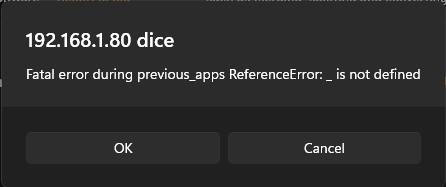
hello i have i problem with the ui of the docker tab when i click a docker icon app it does not appear the menu where i can stop, start or do all the stuff with any single app also i cant update the apps because when i click apply update it is unresponsive all the apps are working fine, and when i click the text of the app i can use the install menu but i cant stop or update a single app I'm able to stop or pause all the apps togheter with the button at the bottom, but it doesn't work with updates when I go on the apps tab im unable to search any app and when i go on installed apps it gives me a pop up (screen attached) i tried to stop and start the docker service or reboot, but i cant find any solution