ByeGames
Members
-
Joined
-
Last visited
Everything posted by ByeGames
-
Moral of the story, try everything you can think of
-
Ok, it works now. The problem was the GPU
-
The GPU has been swapped for a Geforce 7300LE, the flakiness has disappeared. But the SSDs are full for some reason so we are waiting for it to move some stuff to the HDDs.
-
We are having some trouble, seems like the GPU is messing with something. We have added both audio and video. For more context, the GPU is a Radeon HD 5450 (which in theory should work from what i've read)
-
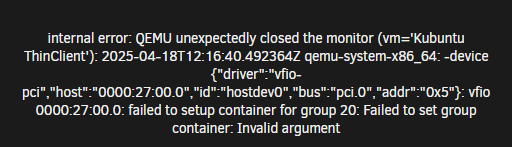
Hi guys, My dad and i built an unraid server with an HPE Proliant ML350p some time ago, and we have tried using the GPU Pass-through a couple of times. Every time we try it, it gives us this error when booting up the VM: We have the IOMMU group selected, so that's not the problem. Thanks in advance for the help.