Skip to content
View in the app

A better way to browse. Learn more.

Unraid

A full-screen app on your home screen with push notifications, badges and more.

To install this app on iOS and iPadOS
  1. Tap the Share icon in Safari
  2. Scroll the menu and tap Add to Home Screen.
  3. Tap Add in the top-right corner.
To install this app on Android
  1. Tap the 3-dot menu (⋮) in the top-right corner of the browser.
  2. Tap Add to Home screen or Install app.
  3. Confirm by tapping Install.

Roaming-Zigzagged-Clo7bber

Members
  • Joined

  • Last visited

  1. That beta version got corrupted, so I deleted it and reinstaled folderview from APP tab and now it's working as it should. So deleting and reinstalling should help.
  2. You can see version in my screenshot, I believe that it's beta version. For me it was hiding Nextcloud containers when I installed it first, but later on it stopped working. Maybe try to wait for the next update of the Nextcloud server, if it still works after that.
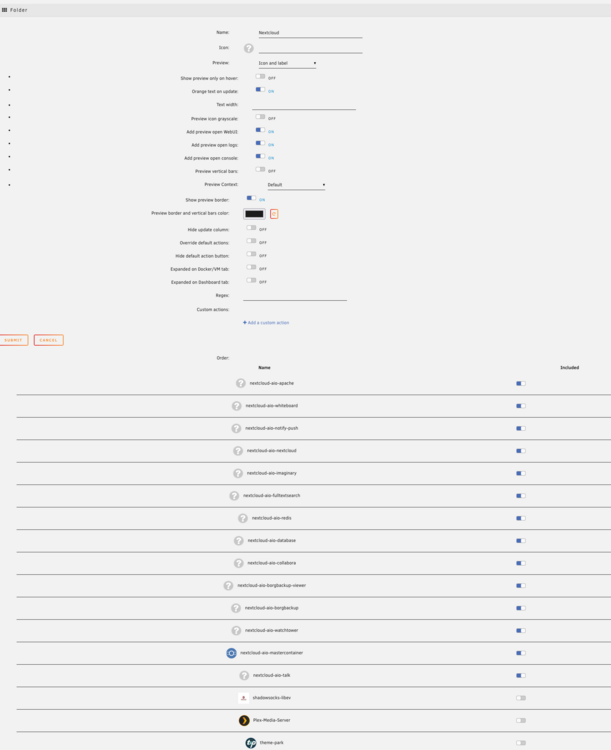
  3. Yes, all Nextcloud containers stay where they are and do not move into the folder.
  4. hi, I did try new version, but still not working with Nextcloud AIO, can you please have a look on it? For me it's main reason why I got this plugin.


Account

Navigation

Search

Search

Configure browser push notifications

Chrome (Android)
  1. Tap the lock icon next to the address bar.
  2. Tap Permissions → Notifications.
  3. Adjust your preference.
Chrome (Desktop)
  1. Click the padlock icon in the address bar.
  2. Select Site settings.
  3. Find Notifications and adjust your preference.