Skip to content
View in the app

A better way to browse. Learn more.

Unraid

A full-screen app on your home screen with push notifications, badges and more.

To install this app on iOS and iPadOS
  1. Tap the Share icon in Safari
  2. Scroll the menu and tap Add to Home Screen.
  3. Tap Add in the top-right corner.
To install this app on Android
  1. Tap the 3-dot menu (⋮) in the top-right corner of the browser.
  2. Tap Add to Home screen or Install app.
  3. Confirm by tapping Install.

CAVMOT

Members
  • Joined

  • Last visited

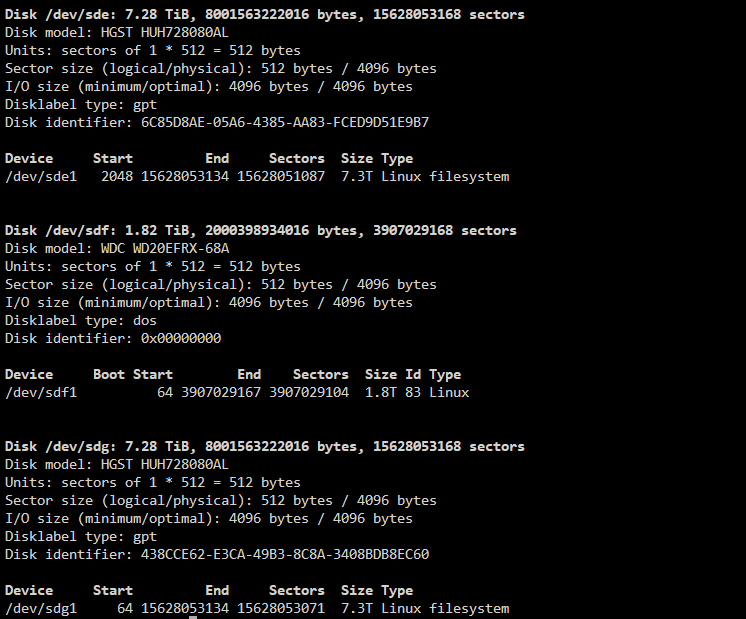
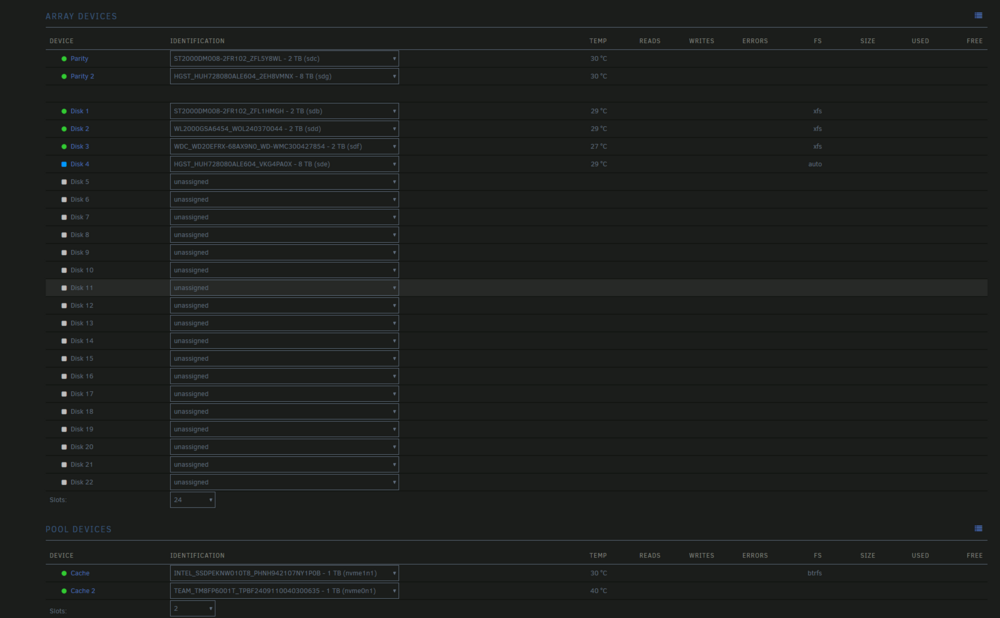
  1. As the title says, I added 2 new 8TB disks to my array, and made one a parity drive. Upon adding the second one to the storage pool, I cannot start the array due to the largest disk not being in parity. They are both the same model of 8TB disk. This post seems to have a similar issue, but I tried using the solution provided and it did not work, and I don't know what to do from there. I looked at the sector info for both disks and it looks like the parity drive has less sectors than the one I'm trying to add, but I don't know how to fix that. Any help would be greatly appreciated.

Account

Navigation

Search

Search

Configure browser push notifications

Chrome (Android)
  1. Tap the lock icon next to the address bar.
  2. Tap Permissions → Notifications.
  3. Adjust your preference.
Chrome (Desktop)
  1. Click the padlock icon in the address bar.
  2. Select Site settings.
  3. Find Notifications and adjust your preference.