





snowskidan
Members
-
Joined
-
Last visited
-
xfs_repair status: Phase 1 - find and verify superblock... Phase 2 - using internal log - zero log... Log inconsistent or not a log (last==0, first!=1) empty log check failed zero_log: cannot find log head/tail (xlog_find_tail=22) ERROR: The log head and/or tail cannot be discovered. Attempt to mount the filesystem to replay the log or use the -L option to destroy the log and attempt a repair. followed by xfs_repair status: Phase 1 - find and verify superblock... Phase 2 - using internal log - zero log... Log inconsistent or not a log (last==0, first!=1) empty log check failed zero_log: cannot find log head/tail (xlog_find_tail=22) - scan filesystem freespace and inode maps... clearing needsrepair flag and regenerating metadata - found root inode chunk Phase 3 - for each AG... - scan and clear agi unlinked lists... - process known inodes and perform inode discovery... - agno = 0 - agno = 1 - agno = 2 - agno = 3 - agno = 4 - agno = 5 - agno = 6 - agno = 7 - agno = 8 - agno = 9 - agno = 10 - process newly discovered inodes... Phase 4 - check for duplicate blocks... - setting up duplicate extent list... - check for inodes claiming duplicate blocks... - agno = 0 - agno = 1 - agno = 4 - agno = 7 - agno = 5 - agno = 3 - agno = 6 - agno = 2 - agno = 8 - agno = 9 - agno = 10 clearing reflink flag on inodes when possible Phase 5 - rebuild AG headers and trees... - reset superblock... Phase 6 - check inode connectivity... - resetting contents of realtime bitmap and summary inodes - traversing filesystem ... - traversal finished ... - moving disconnected inodes to lost+found ... Phase 7 - verify and correct link counts... Maximum metadata LSN (3:4) is ahead of log (1:2). Format log to cycle 6. done reboot and all working again Thanks for the help
-
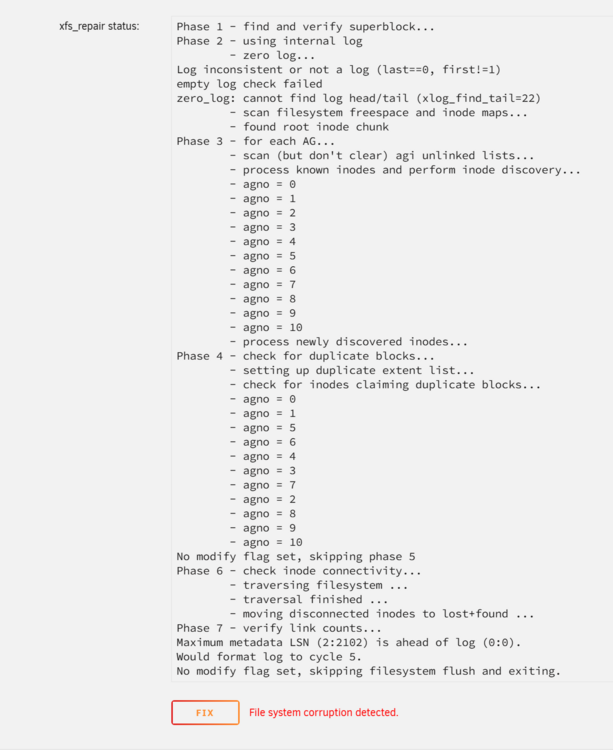
xfs_repair status: Phase 1 - find and verify superblock... Phase 2 - using internal log - zero log... Log inconsistent or not a log (last==0, first!=1) empty log check failed zero_log: cannot find log head/tail (xlog_find_tail=22) - scan filesystem freespace and inode maps... - found root inode chunk Phase 3 - for each AG... - scan (but don't clear) agi unlinked lists... - process known inodes and perform inode discovery... - agno = 0 - agno = 1 - agno = 2 - agno = 3 - agno = 4 - agno = 5 - agno = 6 - agno = 7 - agno = 8 - agno = 9 - agno = 10 - process newly discovered inodes... Phase 4 - check for duplicate blocks... - setting up duplicate extent list... - check for inodes claiming duplicate blocks... - agno = 0 - agno = 1 - agno = 5 - agno = 6 - agno = 4 - agno = 3 - agno = 7 - agno = 2 - agno = 8 - agno = 9 - agno = 10 No modify flag set, skipping phase 5 Phase 6 - check inode connectivity... - traversing filesystem ... - traversal finished ... - moving disconnected inodes to lost+found ... Phase 7 - verify link counts... Maximum metadata LSN (2:2102) is ahead of log (0:0). Would format log to cycle 5. No modify flag set, skipping filesystem flush and exiting. It then gives the option to fix
-
tower-diagnostics-20250507-2132.zip
-
at some point one of my 12tb HDD failed, i didnt notice as everything was still working. Once i realized i go a new drive turned off the server and swapped out the drive Unraid then wouldn't boot, but managed by booting to safe mode form the server its self. Once unraid started it rebuilt the dirve (i cant remember if this was automatic or what the steps were as they seemed self explanatory) I then restarted to exit safe mode and everything booted- seemingly normally. in the tower.local/main section there is a green dot next to each of the drives but next to the new drive it has Unmountable: wrong or no file system Also nothing Plex, immich, calibre all dont work (media unavailable) and if i try and explore the files on the drives they are empty (sorry one folder labeled books that is empty. I have not formatted the drive though i am worried that is my only choice to get the server working again but at the cost of all my data.
