SnarkBe
Members
-
Joined
-
Last visited
Everything posted by SnarkBe
-
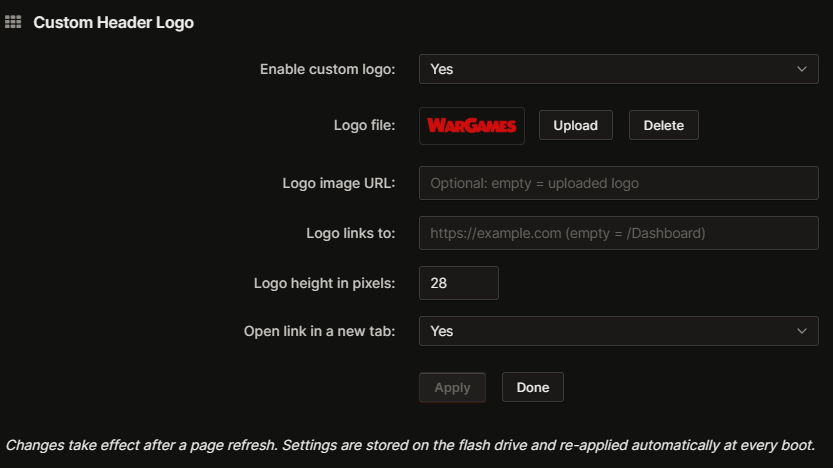
# Custom Header Logo Replace the Unraid logo in the top banner with your own image, and choose where it links to. Handy for homelabs, businesses or anyone who wants to brand their server. No Unraid OS files are patched: the plugin uses the standard webGUI page hook, so it survives OS updates. ## Screenshot ## Features - Upload your logo from the browser: PNG, SVG, WebP, JPG or GIF (max 512 KB), with preview and delete - Logo stored on the flash drive: survives reboots and plugin updates - Or use any http(s) image URL instead - Custom link when clicking the logo (defaults to the Dashboard), optionally in a new tab - Adjustable height (default 28 px, like the stock logo) - Keeps the native Unraid version and update indicator next to your logo - Works with Unraid 7.0 to 7.4 header layouts - Enable/disable without uninstalling ## Installation Not in Community Applications yet. Go to Plugins → Install Plugin, paste the URL below and click Install: https://raw.githubusercontent.com/snarkbe/unraid-custom-header-logo/main/custom.header.logo.plg ## Setup 1. Go to Settings → User Preferences → Custom Header Logo 2. Set Enable custom logo to Yes and click Apply 3. Click Upload and pick your image (it is applied immediately) 4. Optional: set the link URL, the height and whether to open in a new tab, then Apply 5. Refresh the page Suggested image: 320 × 56 px with a transparent background, displayed at 160 × 28 px (≈ 5.7:1 ratio). ## Requirements - Unraid 7.0.0 or newer ## Good to know - Settings and logo live in /boot/config/plugins/custom.header.logo/. - Uninstalling the plugin deletes that folder, logo included. Keep a copy of your image. - If the webGUI is served over HTTPS, an external image URL must be HTTPS too, or the browser blocks it. ## Changes 2026.11.20c - New: upload the logo from your computer in the settings page, with preview and delete 2026.11.20 - Fix: works on Unraid 7.0 to 7.4 (the stock logo is now targeted directly) - The native version and update indicator are kept - Plugin updates now really replace the installed files - Files are cached on the flash drive: installs at boot without network access 2026.06.10 - Initial release ## Links - GitHub: https://github.com/snarkbe/unraid-custom-header-logo - Bug reports and feature requests: https://github.com/snarkbe/unraid-custom-header-logo/issues Feedback welcome, especially from users on sidebar themes or with custom banners.