





Wintermute1987
Members
-
Joined
-
Last visited
-
Thanks! So I turned off the server, switched out all the SATA cables for new ones to see if that would fix it. I started it again and its back. But I don't think for long. Should I check the file system again ?
-
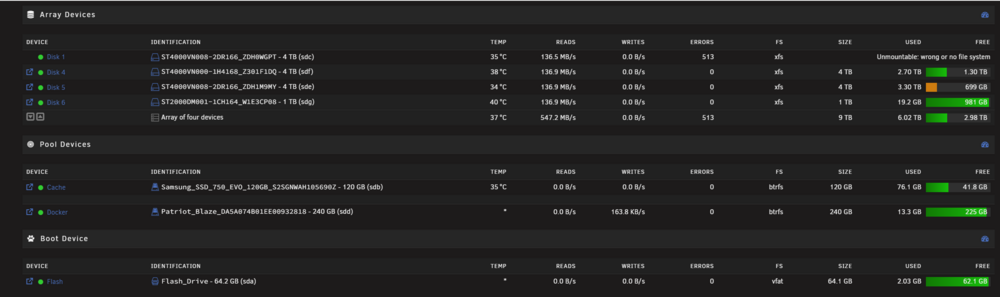
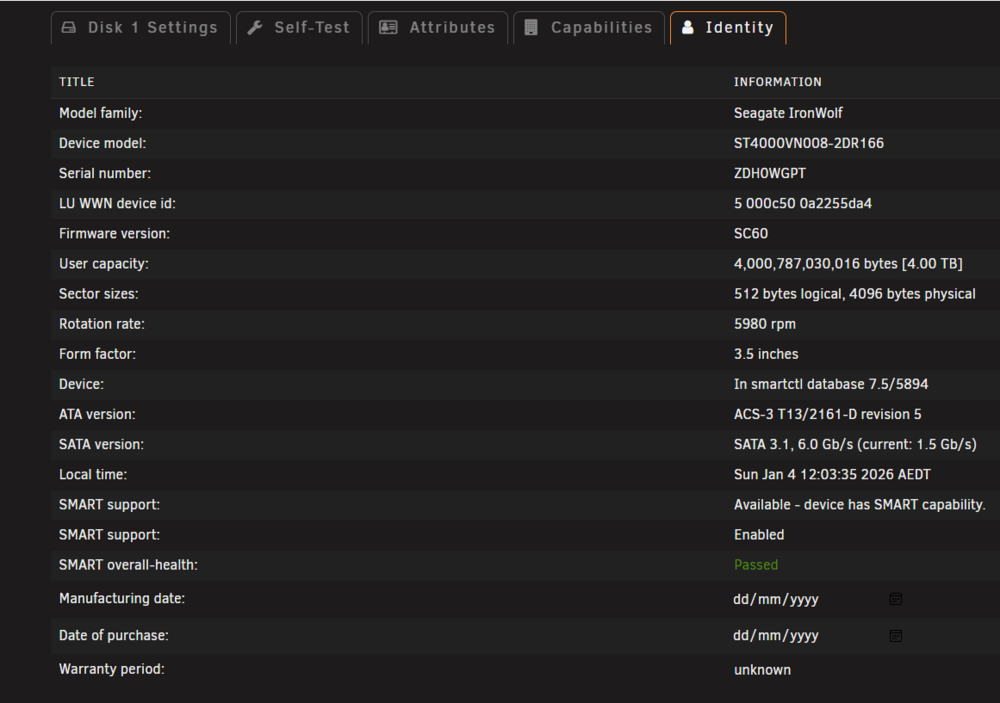
Hey everyone, I noticed that none of my shares were showing up in Unraid this morning, but I could still play files (the ones I checked). I restarted the server and now Disk 1 is saying: “Unmountable: wrong or no file system” It’s also showing 513 errors. For context, my server became unresponsive a few times over the Christmas break while I was away, and a restart fixed it each time (see this post). This is also the second time I’ve received “Unmountable: wrong or no file system” on a disk (see this post). Last time I chalked it up to a failing drive and just got rid of it and started again (as I don’t have parity). These drives are second‑hand but have been running pretty well except for a few UDMA CRC errors, which I’ve been ignoring. Am I doing something wrong? Are my disks just broken, and is there anything I can do? I might just have to bite the bullet and get new drives across the board. I’m running an extended SMART test on the drive, which seems to take ages! I’ve also attached the logs. Any help would be great. tower-diagnostics-20260104-1302.zip
-
I'm such a moron. Thank you! I forgot I called it docker and thought that was some default setting I did not understand. Thanks again !
-
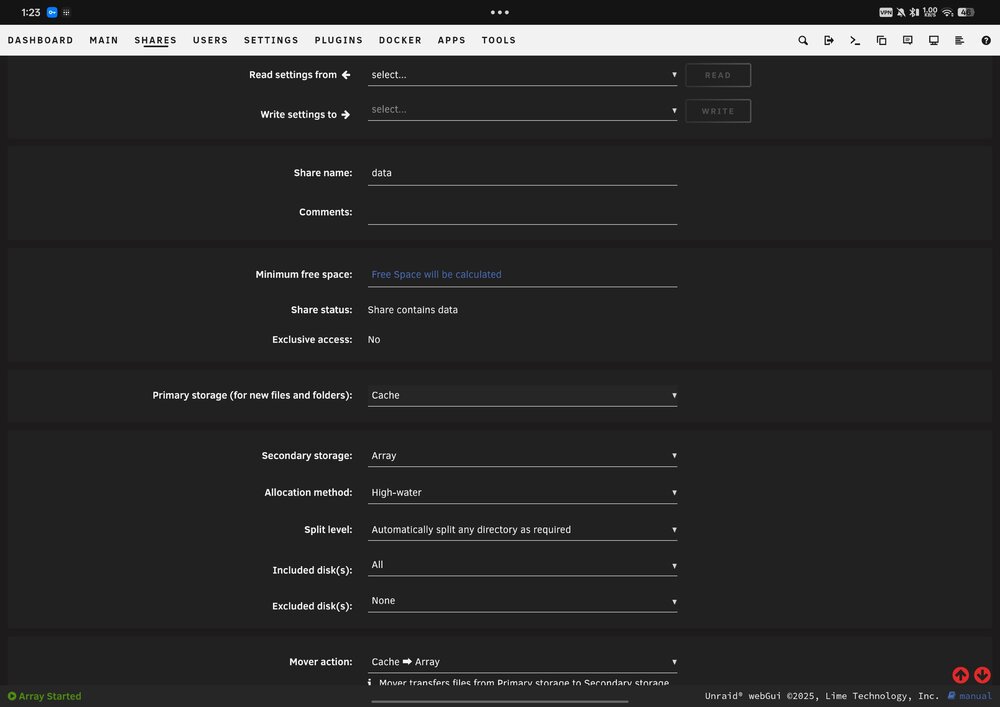
Hey everyone, I have two small SSDs (120 GB and 240 GB) that I’ve set up as separate pools. I want to assign one to my appdata share and the other to my data share. However, when I go into the Data share settings and set it to Cache: Only/Prefer, I don’t get an option to choose which pool it should use. Am I doing something wrong? Pictures attached and I'm on 7.2 Thanks!

-
I have not. I will give it a try when I get back.
-
I don't. I'm going to install one in my next round of upgrades.
-
Hey everyone, I’ve been running Unraid for a bit over a year now and overall it’s been a great experience, aside from one USB failure early on. I’ve just gone on holidays and was looking forward to accessing my server remotely, but the day before I left it started acting up — I had to reboot it several times just to get the UI to load. One day into my trip, it became completely unresponsive. I can still ping the server through Tailscale, but I can’t access the web UI at all. I asked my housemate to do a hard reboot and I was able to get back in immediately afterward. I’m starting to worry that the USB boot device might be failing again. I also have multiple SMART errors across a few drives, but I’ve already taken the ones with serious issues offline. For context, I’m based in Australia and it’s been extremely hot lately (around 40°C), so I’m wondering if heat could be contributing to the instability. I’ve attached my diagnostic logs in the hope that someone can help point me in the right direction. Thanks in advance! tower-diagnostics-20251221-0929.zip
-
I did. Clicked extended test. Came back next morning and clicked download smart test. I'll do it again and see. At this point, I think I will just formatt the drive. Could it be an Unraid issue ?
-
Strange. I ran it again. Pressed download. Is that not the correct process ?
-
Most recent. I think the drive is done. tower-smart-20250524-1908.zip
-
That is what I mean. 5 drives off sata rail. So, I swapped out all the data cables, added another power rail for the affected drive. Still the same issue. Attached is the new smart report. I think the drive is cooked. tower-smart-20250524-0109.zip
-
Thanks. I'll give it a shot. I have all the hard drives running of one sata power rail, so that might be the issue.
-
Sorry, the full test too a while. tower-smart-20250522-0307.zip
-
Yep, pulling it out did not fix it. Running an extended one now but attached is the short one. I think it is cooked. tower-smart-20250521-0435.zip
-
I will give it a wiggle. It was just media which I can download again. I'm not thrilled but its not dire. If i do check the cables and it does not fix, if I formatt it and itw orks again, should i not trust it ?




