loganlaporte
Members
-
Joined
-
Last visited
-
Could I be chasing a pcie lane issue or something else? I just have reservations the ironwolf drive just randomly went bad. Should i look into a rebuild?
-
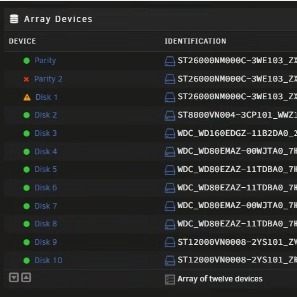
@JorgeB or @trurl I think I am chasing something os related. Still cant replace the parity 2 drive as it gets someway through and falls off, and now a disk in the array has fallen off but is passing smart tests and communicating temps and everything. I went ahead and replaced the controller and cables for a sanity check and nothing. Let me know if something stands out. With a single usable parity drive and an array disk offline this is getting sketchy. server-diagnostics-20250628-2043.zip server-smart-20250628-2026.zip
-
tried re-sync and parity rebuild and only made it 4% before it dropped again. Diagnostics attached. server-diagnostics-20250623-1641.zip
-
ok i was able to get disk 1 to reubuild. parity 2 is still dead even through its passing a smart test. Can someone tell me more? Diagnostics attached, server-diagnostics-20250620-1518.zip
-
Diagnostics attached. Normal did trigger the data rebuild but parity 2 still down. server-diagnostics-20250618-1059.zip
-
Help! Panicking inside. I was replacing an array drive the normal way and all seemed well as it was rebuilding. Went to bed and woke up to drive being replaced disabled and unresponsive. Self test is good. Started the "rebuilding the a drive onto itself" process and at step 7 into 8 i am now showing a parity drive disabled. I am scared to proceed for fear of data loss. Right now I am sitting with array started in maintenance mode while i figure this out.