




Skip to content
View in the app

A better way to browse. Learn more.

Unraid

A full-screen app on your home screen with push notifications, badges and more.

To install this app on iOS and iPadOS
  1. Tap the Share icon in Safari
  2. Scroll the menu and tap Add to Home Screen.
  3. Tap Add in the top-right corner.
To install this app on Android
  1. Tap the 3-dot menu (⋮) in the top-right corner of the browser.
  2. Tap Add to Home screen or Install app.
  3. Confirm by tapping Install.

digitalstarfall

Members
  • Joined

  • Last visited

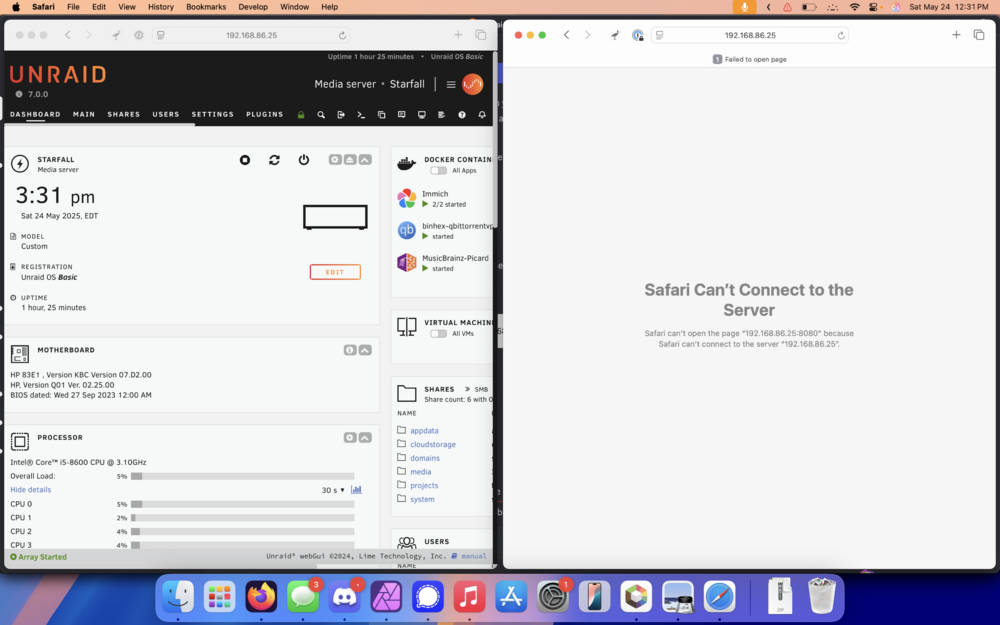
  1. Hello all. I just recently moved, and as such I have a new ISP and router - and thus, a new IP. Everything seems to mostly be working fine, but I cannot connect to my web apps/Docker containers at all. The Unraid GUI (including Community Apps section) loads via both local IP and via Tailscale. However, when attempting to connect to any web UI for a Docker container, it fails. This is despite the fact that the container logs don't show any problems, and all seem to otherwise be working just fine. I have tested this on two separate devices, one with and one without Tailscale installed - same problem. (o All of my containers are set to Bridge (minus one, which is set to Host). I would appreciate any advice you can give! starfall-diagnostics-20250524-1234.zip
Account

Navigation

Search

Search

Configure browser push notifications

Chrome (Android)
  1. Tap the lock icon next to the address bar.
  2. Tap Permissions → Notifications.
  3. Adjust your preference.
Chrome (Desktop)
  1. Click the padlock icon in the address bar.
  2. Select Site settings.
  3. Find Notifications and adjust your preference.