





kilfrg7864
Members
-
Joined
-
Last visited
-
Wait... are you saying I should get better RAM would fix it or does not not matter what RAM i get it would still have that issue and i would need to underclock?
-
Just To update and document. Ran memtest while I was at work, came back to the server on the main login screen/prompt and being unaccesible from the web gui. Looks like somehow my computer reset during the memtest... which doesn't sound good.... I've replaced my ram and will start running another parity check snd try to preclear my drive again and see if it fails again somewhere.
-
Will do and report back!
-
The motherboard only has one RAM slot, have a replacement coming in. Hopefully that will fix things. When I get the replacement in should I run the same processes I did before ex) parity check, PLEX docker and preclearing? Or just do the bare minimum like PLEX or something? Did logs or diagnostics provide anything helpful/useful?
-
Is there any easy way to pin point which it could be? Since I don't really have a gpu its integrated with the N305 card/mother board And using the unraid memory tester it has passed 7 passes so far?
-
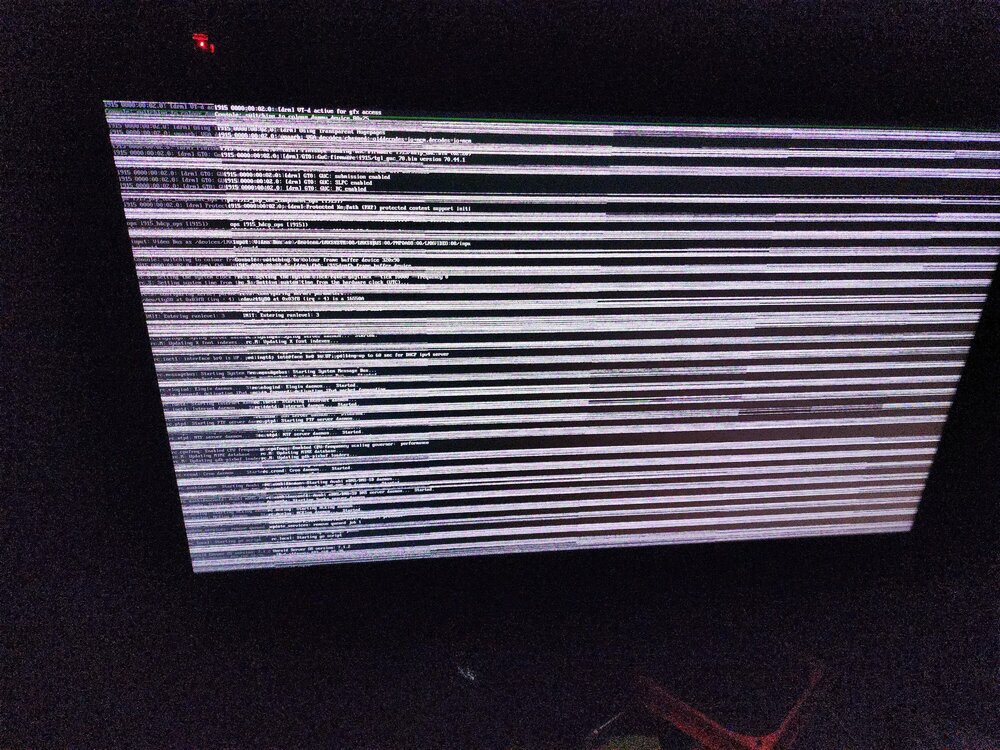
I have a new system ~1 week old, that has been having nothing but issues. My server just kind of out of no where crashes and becomes unresponsive. I am unable to access it via the webGUI and must unclean shut it down. These freezes usually happen overnight some time. I can usually run the server during the day with no issues. Previously I thought it was due to the system being more at idle, but this last crash happened during a parity check ~14 hours in. Last freeze happened between 3-6am two nights ago (parity check was complete at this time and the only thing that the system was doing was completing a preclear [zeroing] of a unassigned disk). I am completely new to linux and the unraid system, so I really am at a loss and not sure where to even begin troubleshooting this. Since the only way to regain access to the server is by hard restarting i don't know how useful the diagnostic files are. I had persistent syslogs recording but i don't think that it really caught anything?? The server crashed between 1:15-1:50am and it doesn't seem like there is anything during that time in the system logs. The processes being done at time of crash was: PLEX docker running (but nothing was being streamed/used at the time), Parity check (~14 hours in, due to last crash), and Pre-clearing unassigned drive (still in preread phase). Attached I have: 1)what the screen looked like when i noticed the freeze. 2) Persistent syslogssyslog-127.0.0.1.log 3) diagnostics post hard restart centoria-diagnostics-20250611-0218.zip Build info at the time of latest crash: -N305 motherboard (https://www.amazon.com/Industrial-Motherboard-Threads-Processor-Network/dp/B0DDXZLJQJ?crid=17SUOMSIL8E5H&sprefix=n305+industrial+motherboar%2Caps%2C117&sr=8-1) -Crucial 16Gb DDR5 4800mhz RAM -corsair SF450 psu -2 HDDs (Exos) in parity in an array doing a parity check -1 HDD (Western Digital) pre-clearing Currently, I am running the memory test in the UNraid start up menu, which has currently completed a first pass. Like I said before i dont even know where to begin... if its a hard wear issue I have no idea what I would even replace or what would be the cause. I am not very tech savvy, especially with linux and the terminologies, so I appreciate your patience. If any other information is needed please let me know and I will try to provide it, but if anything can be done if you could please explain instructions very clearly it would be greatly appreciated. Thanks all
-
Yea i believe that one was before the change. the 2 from 5/30 are the most recent ones with the change
-
/: Bus 001.Port 001: Dev 001, Class=root_hub, Driver=xhci_hcd/12p, 480M ID 1d6b:0002 Linux Foundation 2.0 root hub |__ Port 001: Dev 002, If 0, Class=Hub, Driver=hub/4p, 480M ID 0bda:5420 Realtek Semiconductor Corp. |__ Port 003: Dev 003, If 0, Class=Hub, Driver=hub/4p, 480M ID 0bda:5420 Realtek Semiconductor Corp. /: Bus 002.Port 001: Dev 001, Class=root_hub, Driver=xhci_hcd/4p, 10000M ID 1d6b:0003 Linux Foundation 3.0 root hub |__ Port 001: Dev 002, If 0, Class=Hub, Driver=hub/4p, 10000M ID 0bda:0420 Realtek Semiconductor Corp. |__ Port 003: Dev 004, If 0, Class=Hub, Driver=hub/4p, 10000M ID 0bda:0420 Realtek Semiconductor Corp. |__ Port 001: Dev 006, If 0, Class=Mass Storage, Driver=usb-storage, 10000M ID 174c:235c ASMedia Technology Inc. |__ Port 002: Dev 005, If 0, Class=Mass Storage, Driver=usb-storage, 10000M ID 174c:235c ASMedia Technology Inc. |__ Port 003: Dev 003, If 0, Class=Mass Storage, Driver=usb-storage, 5000M ID 0781:cfcb SanDisk Corp. When the drivers was the UAS, I had other issues with the parity not even starting.
-
Hi all, Im having some issues with setting up my new unraid server. Some background, When i first set it up with fresh drives and my DAS everything was working fine. I was able to get the two drivers Pre-cleared with no issues, then assigned and array was started and parity was created. I took the array down and restarted my machine, and then i ran into a lot of issues. My system would no longer boot up and had a bunch of USB issues, so i saw in another post to try to use the usb_storage.quirks=174c:55aa:u in my syslinux config. Which allowed it to boot up and start rebuilding my parity. I ran a short SMART test on both of my drives and found no issues. I feel like every time i try to build the parity or try something new i get new errors every time. However maybe 8min in to the rebuild i get a TON of disk read errors. Not sure if those are due to the HD or if they are due to the USB. Any ways... im trying to figure out if its just one component or everything that is having issues. That way i know if my drives are bad i can RMA them. I have tried multiple USB cables, and one of the only ones that seemed to maybe work was a cheap phone charging one but my speeds were super slow. anyways im not sure what kind of other information i need to include for troubleshooting. I know a DAS is not ideal, and now i know why... but it was just what was in my budget. here are various diagnostics and syslogs from various errors and times ive tried. centoria-syslog-20250530-0606.zipcentoria-diagnostics-20250530-0149.zipcentoria-diagnostics-20250529-1636.zip
