



Skip to content
View in the app

A better way to browse. Learn more.

Unraid

A full-screen app on your home screen with push notifications, badges and more.

To install this app on iOS and iPadOS
  1. Tap the Share icon in Safari
  2. Scroll the menu and tap Add to Home Screen.
  3. Tap Add in the top-right corner.
To install this app on Android
  1. Tap the 3-dot menu (⋮) in the top-right corner of the browser.
  2. Tap Add to Home screen or Install app.
  3. Confirm by tapping Install.

bbryant

Members
  • Joined

  • Last visited

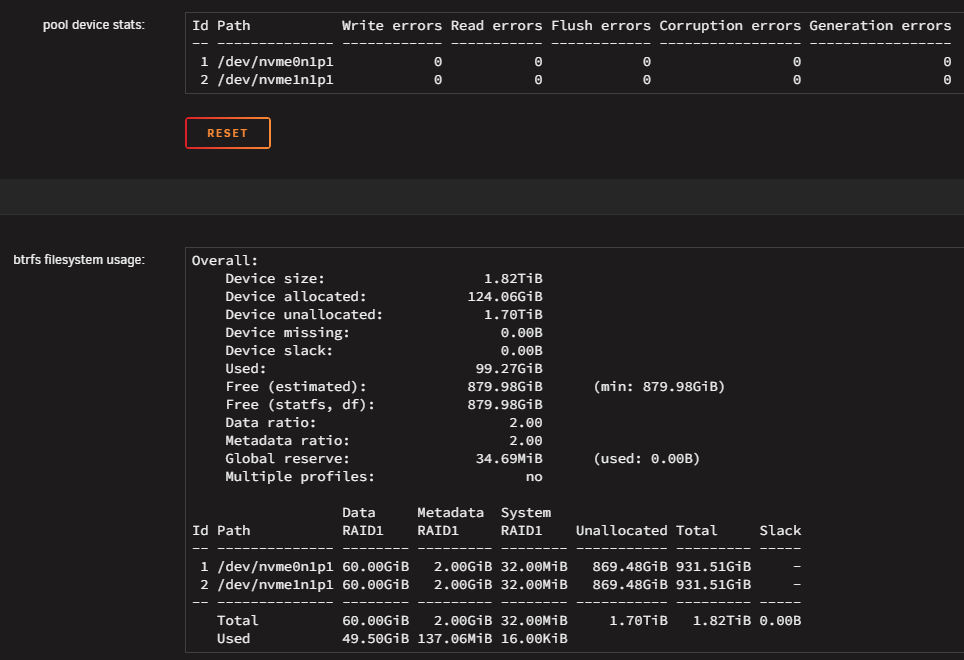
  1. Thanks for your response. So - "pool name" - if you mean "cache" - I see the below. Looks like I'm good then? - My kind thanks
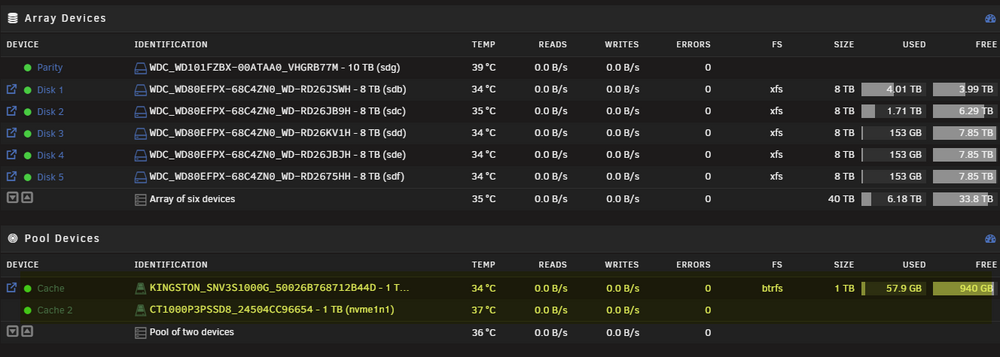
  2. New Unraid user here. Been running for about a month and I'm on version 7.1.4. My 'plan' was to set up my cache pool with 2 - 1TB SSDs in RAID 1. I thought that's what I did, but what I see in the 'Pool Devices' panel confuses me. I see cache and cache 2 (which to me suggests I have 2 cache pools) - However I also see 'Pool of two devices' below. The SSD associated with Cache 2 doesn't list the filesystem, or size info. So basically, my question is - based on my display below - am I running a 2 SSD cache pool? or do I have 2 pools - each with a 1TB SSD?
Account

Navigation

Search

Search

Configure browser push notifications

Chrome (Android)
  1. Tap the lock icon next to the address bar.
  2. Tap Permissions → Notifications.
  3. Adjust your preference.
Chrome (Desktop)
  1. Click the padlock icon in the address bar.
  2. Select Site settings.
  3. Find Notifications and adjust your preference.