Harri
Members
-
Joined
-
Last visited
-
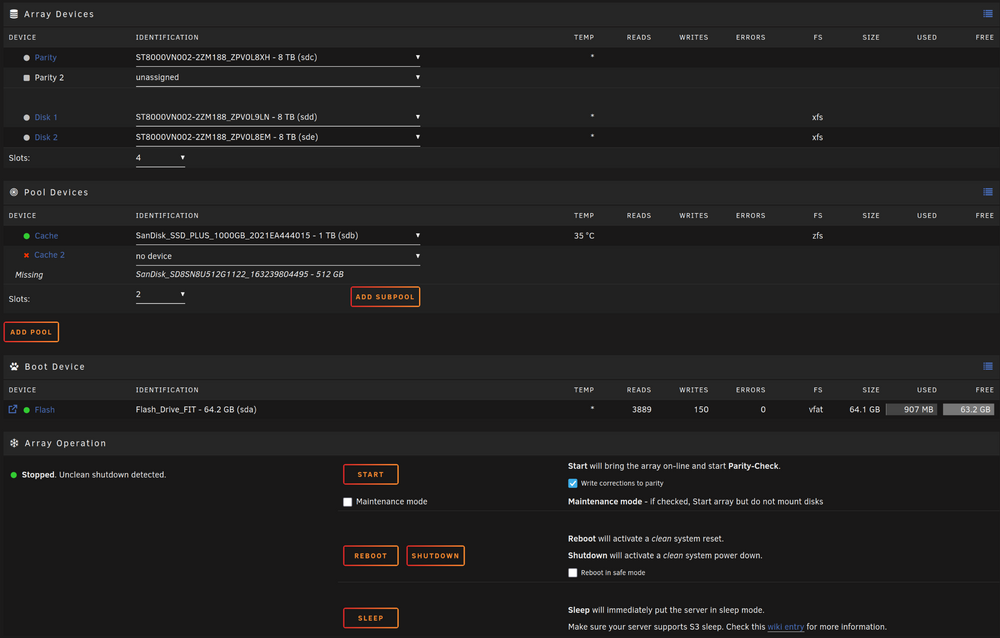
Ok thanks that is good news. Can I "remove pool" and then create a new pool with only the 1TB disc?
-
What does that mean for my data on the array? is everything lost? how to start it again? sorry for that many questions but i am fairly new to the topic. On Saturday morning I will be on vacation and would need my unraid running before that :S ideally with my data recovered
-
zpool import pool: cache id: 1431073983519848378 state: UNAVAIL status: One or more devices contains corrupted data. action: The pool cannot be imported due to damaged devices or data. see: https://openzfs.github.io/openzfs-docs/msg/ZFS-8000-5E config: cache UNAVAIL insufficient replicas sdb1 ONLINE sdf1 UNAVAIL I hope that is what you meant as zfs import wasn't a recognized command.
-
alparslan-diagnostics-20250609-2034.zip Oh of course. My mistake.
-
Hello together, first of that is my first unraid setup second I tried to find a solution in the forums and could not. I did setup up everything roughly half a year ago and can't really remember my setup. Idk if the pool was/is a raid or not. I tried to start the array but it would not start. I could use my shared folders normally before stopping the array but could not reach the GUI to shut down the system. I had lost my PW so I needed the USB drive. I checked the bios and the m.2 is not showing as connected. I opened the case and it sits normally so I assume it is dead. I have a lot of backups and important stuff on my shared folders so I need the array back running. I plan to replace the dead m.2 in future with another SSD as the one I am already using. What can I do know to get the filesystem back running. I have just a handfull of dockers but the files are important. Any help appreciated. Where it says Slots: 2 i can not change it to 1. Cheers