Grogu55
Members
-
Joined
-
Last visited
-
Little update. I cancelled moving files earlier then I ran some xfs repair commands in the terminal. It repaired it and also it didn't put any lost+found files in a folder so that looks good. I am going to keep an eye on this. Some info. I have this Seagate Exos recertified drive that i got from serverpartdeals thats used but i precleared it for 3 days and it passed. It's on a LSI HBA card currently. I might reseat the card and cables.
-
I haven't ran mem test yet. I have files moving from one share to another but I was going to do that later when it's done. Here's my disagnostics zip. grogu-diagnostics-20250714-1146.zip
-
Hi, yesterday I was moving some data from one share to a different share and then I found this in my logs. Today I ran xfs repair via the GUI in maintenance mode but the errors came back after I ended up moving more data around on different shares. I ran the xfs repair without -n and it said it fixed it but the errors came back. Here's my logs for the xfs error: Jul 14 11:16:13 Grogu kernel: XFS (md6p1): Internal error xfs_acl_from_disk at line 43 of file fs/xfs/xfs_acl.c. Caller xfs_get_acl+0x10f/0x160 Jul 14 11:16:13 Grogu kernel: CPU: 10 UID: 0 PID: 2707029 Comm: shfs Tainted: P O 6.12.24-Unraid #1 Jul 14 11:16:13 Grogu kernel: Tainted: [P]=PROPRIETARY_MODULE, [O]=OOT_MODULE Jul 14 11:16:13 Grogu kernel: Hardware name: ASUS System Product Name/ROG MAXIMUS X CODE, BIOS 2701 07/13/2021 Jul 14 11:16:13 Grogu kernel: Call Trace: Jul 14 11:16:13 Grogu kernel: <TASK> Jul 14 11:16:13 Grogu kernel: dump_stack_lvl+0x47/0x70 Jul 14 11:16:13 Grogu kernel: xfs_corruption_error+0x63/0x90 Jul 14 11:16:13 Grogu kernel: ? xfs_get_acl+0x10f/0x160 Jul 14 11:16:13 Grogu kernel: xfs_acl_from_disk+0x66/0x160 Jul 14 11:16:13 Grogu kernel: ? xfs_get_acl+0x10f/0x160 Jul 14 11:16:13 Grogu kernel: xfs_get_acl+0x10f/0x160 Jul 14 11:16:13 Grogu kernel: __get_acl+0x9f/0x100 Jul 14 11:16:13 Grogu kernel: posix_acl_chmod+0x5b/0xf0 Jul 14 11:16:13 Grogu kernel: xfs_setattr_nonsize+0x1c4/0x1f0 Jul 14 11:16:13 Grogu kernel: notify_change+0x29b/0x3b0 Jul 14 11:16:13 Grogu kernel: ? chmod_common+0x86/0xf0 Jul 14 11:16:13 Grogu kernel: chmod_common+0x86/0xf0 Jul 14 11:16:13 Grogu kernel: do_fchmodat+0x6c/0xc0 Jul 14 11:16:13 Grogu kernel: __x64_sys_chmod+0x19/0x20 Jul 14 11:16:13 Grogu kernel: do_syscall_64+0x68/0xe0 Jul 14 11:16:13 Grogu kernel: entry_SYSCALL_64_after_hwframe+0x76/0x7e Jul 14 11:16:13 Grogu kernel: RIP: 0033:0x153aa7d74af7 Jul 14 11:16:13 Grogu kernel: Code: 73 01 c3 48 8b 0d f1 d2 0e 00 f7 d8 64 89 01 48 83 c8 ff c3 66 2e 0f 1f 84 00 00 00 00 00 0f 1f 44 00 00 b8 5a 00 00 00 0f 05 <48> 3d 00 f0 ff ff 77 01 c3 48 8b 15 c1 d2 0e 00 f7 d8 64 89 02 b8 Jul 14 11:16:13 Grogu kernel: RSP: 002b:0000153aa7c5ea58 EFLAGS: 00000213 ORIG_RAX: 000000000000005a Jul 14 11:16:13 Grogu kernel: RAX: ffffffffffffffda RBX: 0000000000000001 RCX: 0000153aa7d74af7 Jul 14 11:16:13 Grogu kernel: RDX: 00000000000001b6 RSI: 00000000000001b6 RDI: 0000153aa001f7c0 Jul 14 11:16:13 Grogu kernel: RBP: 0000153aa7c5eb40 R08: 0000153aa7c5ea90 R09: 0000153aa7c5ea8c Jul 14 11:16:13 Grogu kernel: R10: 0000000000000100 R11: 0000000000000213 R12: 0000000000000000 Jul 14 11:16:13 Grogu kernel: R13: 000000000041c9e0 R14: 0000153aa7c5ecd0 R15: 0000153aa7c5ebd0 Jul 14 11:16:13 Grogu kernel: </TASK> Jul 14 11:16:13 Grogu kernel: XFS (md6p1): Corruption detected. Unmount and run xfs_repair
-
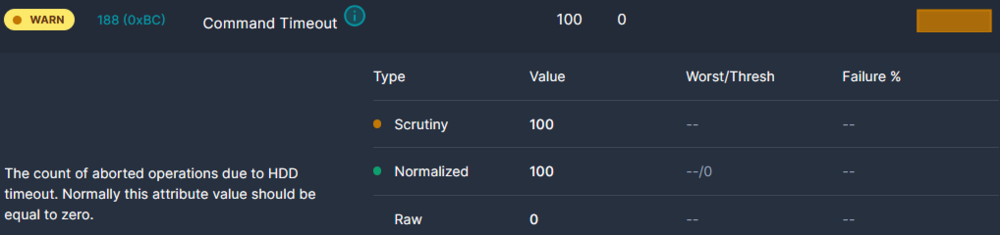
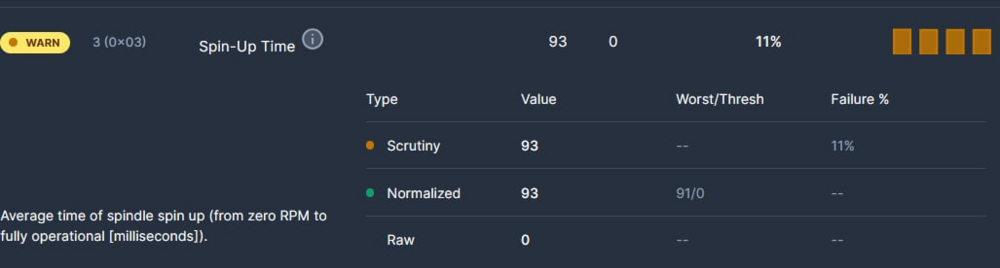
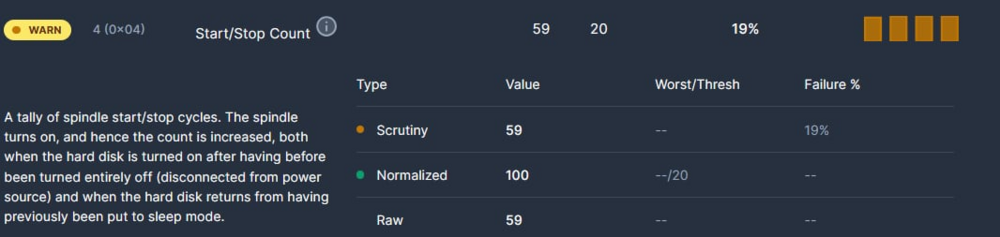
This is my parity drive by the way. I ended up getting this from the diagnostics. I noticed on Scrutiny that the hdd is showing that the drive is spinning down at midnight for the last 3 nights. SMART Attributes Data Structure revision number: 10 Vendor Specific SMART Attributes with Thresholds: ID# ATTRIBUTE_NAME FLAGS VALUE WORST THRESH FAIL RAW_VALUE 1 Raw_Read_Error_Rate POSR-- 081 064 044 - 0/128038448 3 Spin_Up_Time PO---- 093 091 000 - 0 4 Start_Stop_Count -O--CK 100 100 020 - 59 5 Reallocated_Sector_Ct PO--CK 100 100 010 - 0 7 Seek_Error_Rate POSR-- 087 060 045 - 0/472078484 9 Power_On_Hours -O--CK 091 091 000 - 7903 10 Spin_Retry_Count PO--C- 100 100 097 - 0 12 Power_Cycle_Count -O--CK 100 100 020 - 42 18 Head_Health PO-R-- 100 100 050 - 0 187 Reported_Uncorrect -O--CK 100 100 000 - 0 188 Command_Timeout -O--CK 100 100 000 - 0 0 0 190 Airflow_Temperature_Cel -O---K 061 048 000 - 39 (Min/Max 37/46) 192 Power-Off_Retract_Count -O--CK 100 100 000 - 20 193 Load_Cycle_Count -O--CK 100 100 000 - 377 194 Temperature_Celsius -O---K 039 048 000 - 39 (0 20 0 0 0) 197 Current_Pending_Sector -O--C- 100 100 000 - 0 198 Offline_Uncorrectable ----C- 100 100 000 - 0 199 UDMA_CRC_Error_Count -OSRCK 200 200 000 - 0 200 Pressure_Limit PO---K 100 100 001 - 0 240 Head_Flying_Hours ------ 100 100 000 - 7898h+58m+43.870s 241 Total_LBAs_Written ------ 100 253 000 - 280694782118 242 Total_LBAs_Read ------ 100 253 000 - 337806418023 Uploading Attachment...
-
Hi. I noticed some noises coming from my Unraid server the other day using the mover from my cache drive. Today I noticed a louder noise when I had my cache drive in use but not using the mover. I installed Scrutiny to check the SMART results on my hdds. I have this warning for my parity drive. I swapped cables then switched SATA ports and the warning persists. I wonder if I should just keep an eye on this drive for now. My SMART results: 1 Raw read error rate 0x000f 100 064 044 Pre-fail Always Never 0/1045849 3 Spin up time 0x0003 093 091 000 Pre-fail Always Never 0 4 Start stop count 0x0032 100 100 020 Old age Always Never 59 5 Reallocated sector count 0x0033 100 100 010 Pre-fail Always Never 0 7 Seek error rate 0x000f 087 060 045 Pre-fail Always Never 0/462317316 9 Power on hours 0x0032 092 092 000 Old age Always Never 7832 (10m, 22d, 8h) 10 Spin retry count 0x0013 100 100 097 Pre-fail Always Never 0 12 Power cycle count 0x0032 100 100 020 Old age Always Never 42 18 Head health 0x000b 100 100 050 Pre-fail Always Never 0 187 Reported uncorrect 0x0032 100 100 000 Old age Always Never 0 188 Command timeout 0x0032 100 100 000 Old age Always Never 0 0 0 190 Airflow temperature cel 0x0022 060 048 000 Old age Always Never 40 (min/max 37/40) 192 Power-off retract count 0x0032 100 100 000 Old age Always Never 20 193 Load cycle count 0x0032 100 100 000 Old age Always Never 375 194 Temperature celsius 0x0022 040 048 000 Old age Always Never 40 (0 20 0 0 0) 197 Current pending sector 0x0012 100 100 000 Old age Always Never 0 198 Offline uncorrectable 0x0010 100 100 000 Old age Offline Never 0 199 UDMA CRC error count 0x003e 200 200 000 Old age Always Never 0 200 Pressure limit 0x0023 100 100 001 Pre-fail Always Never 0 240 Head flying hours 0x0000 100 100 000 Old age Offline Never 7827h+24m+56.713s 241 Total lbas written 0x0000 100 253 000 Old age Offline Never 269283127598 (138 TB) 242 Total lbas read 0x0000 100 253 000 Old age Offline Never 337609295919 (173 TB)