hcookie
Members
-
Joined
-
Last visited
Everything posted by hcookie
-
I do believe it is the same issue as https://forums.unraid.net/topic/129333-unraid-fuse-dies-during-docker-container-operation-whole-os-gets-stuck/
-
As I run a number of important containers on this system, I can’t quite do that. I’m looking at buying a second system atm. Here is what little is logged, https://pastebin.com/ThAe4HF3
-
So further debugging during an event, revealed the true cause of this behaviour is a lock of /mnt/user. As the containers mounted that for appdata, they froze. I tried moving them directly to /mnt/cache to prevent over use of the shfs, but that merely kept some containers alive when it happened again. What are some troubleshooting steps I could take? I have already updated to the latest release of unraid
-
An event finally reoccured, trying to run diagnostics during it hung for a while (maybe I'm not patient enough?), and no information seems present in the syslog About 22:20 is when I noticed, and restarted the server ``` Sep 5 19:47:01 Tower crond[2013]: failed parsing crontab for user root: Invalid frequency setting of /usr/local/emhttp/plugins/ca.update.applications/scripts/updateApplications.php >/dev/null 2>&1 Sep 5 20:07:01 Tower crond[2013]: failed parsing crontab for user root: Invalid frequency setting of /usr/local/emhttp/plugins/ca.update.applications/scripts/updateApplications.php >/dev/null 2>&1 Sep 5 20:20:32 Tower bluetoothd[7554]: src/device.c:set_wake_allowed_complete() Set device flags return status: Invalid Parameters Sep 5 20:20:32 Tower kernel: Bluetooth: hci2: No such LE device 70:91:f3:9e:38:ea (0x0) Sep 5 20:28:01 Tower crond[2013]: failed parsing crontab for user root: Invalid frequency setting of /usr/local/emhttp/plugins/ca.update.applications/scripts/updateApplications.php >/dev/null 2>&1 Sep 5 22:19:30 Tower rc.rsyslogd: Syslog server daemon... Started. Sep 5 22:19:30 Tower root: Delaying execution of fix common problems scan for 10 minutes Sep 5 22:19:30 Tower unassigned.devices: Mounting 'Auto Mount' Devices... Sep 5 22:19:30 Tower emhttpd: Starting services... Sep 5 22:19:30 Tower emhttpd: shcmd (70): /etc/rc.d/rc.samba reload ```
-
@JorgeB I presume that will be most useful during an event, as I restarted it since last time, I shall respond next once it reoccurs.
-
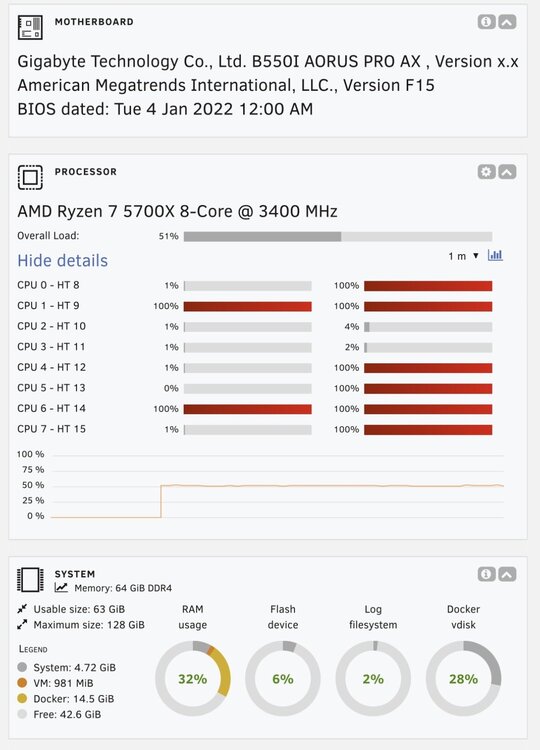
This is an incomplete issue, I’m asking for help to further troubleshoot the problem. Recently my server has been having some intermittent issues where the dashboard reports 50% cpu utilisation, and all docker containers become unresponsive , even the shutdown commands do too. The only temporary method to resolve is to hard shutdown it down. Sometimes this will reoccur within a day, but sometime longer, I had a steak recently of 2 months, it fooled me into thinking all my problems were over. When sshd into the server, top reports normal utilisation, showing no major processes, with total utilisation no where near 50%. The kernel log also shows no messages related to this. Where can I look next to debug?