





AetherCollective
Members
-
Joined
-
Last visited
-
You could log in on other device using the login command at: https://docs.openclaw.ai/concepts/model-providers#google-vertex-antigravity-and-gemini-cli, then copy the .openclaw/credentials/google-antigravity.token.json file to your Unraid OpenClaw Installation.
-
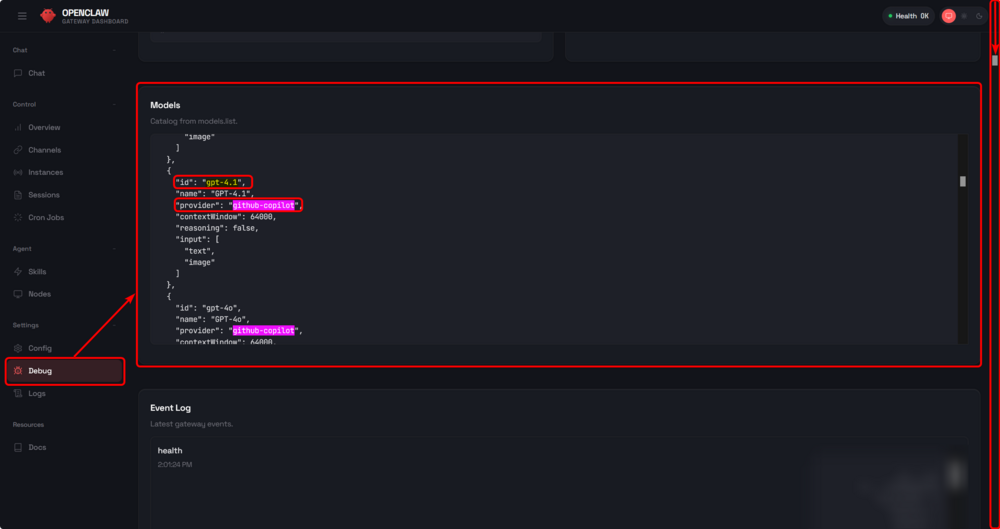
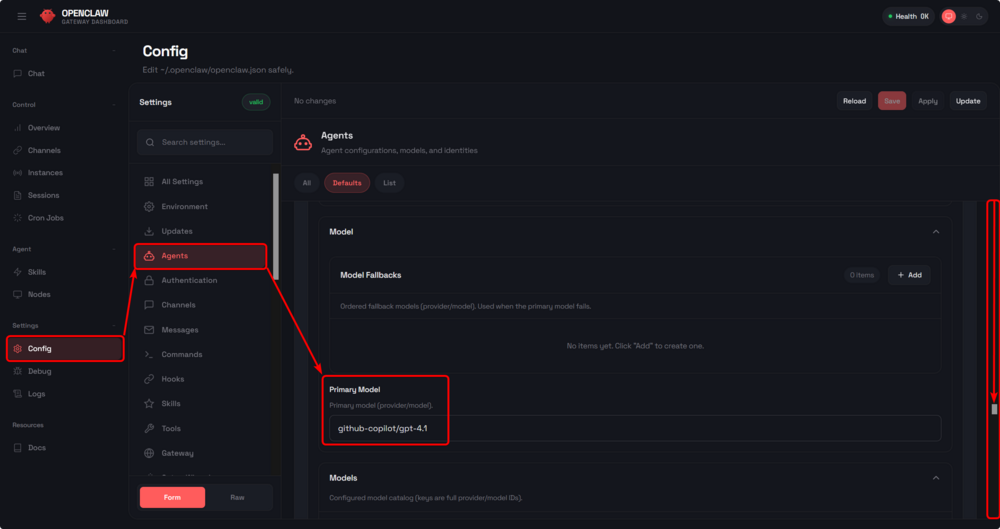
I wanted to pass down some info for anyone who might need it. The documentation for OpenClaw is very heavily written for the CLI and there is very little info on the Gateway UI. How to set up your default LLM To do this, start by looking to see which models you have access to. Under Settings, click Debug. You will see a list of Models. Look for your provider by searching (Ctrl+F) for it's provider ID. Mine was github-copilot (you can look yours up here: https://docs.openclaw.ai/concepts/model-providers). Find a model you would like to use and make a note of it's ID. For mine, it was gpt-4.1 Now you can go to Config > Agents and look for Primary Model. Input the two values you got earlier like this: <provider>/<id> Now you can click save in the top right and give the model a test in chat. If you get a reply from your LLM, then its working!
-
AetherCollective changed their profile photo
-
When setting up the Tailscale Sidecar, it needed me to authorize twice and needed a restart before it would work correctly. The first authorization set up the funnel, then asked me to authorize again because it said I was logged out, so I used the new link it gave me and after authorizing that one and giving the sidecar a restart, its working now. This doesn't seem to be the intended behavior with this so I'm wondering if I've done something wrong.




