





slam23
Members
-
Joined
-
Last visited
-
That worked great, thank you so much!
-
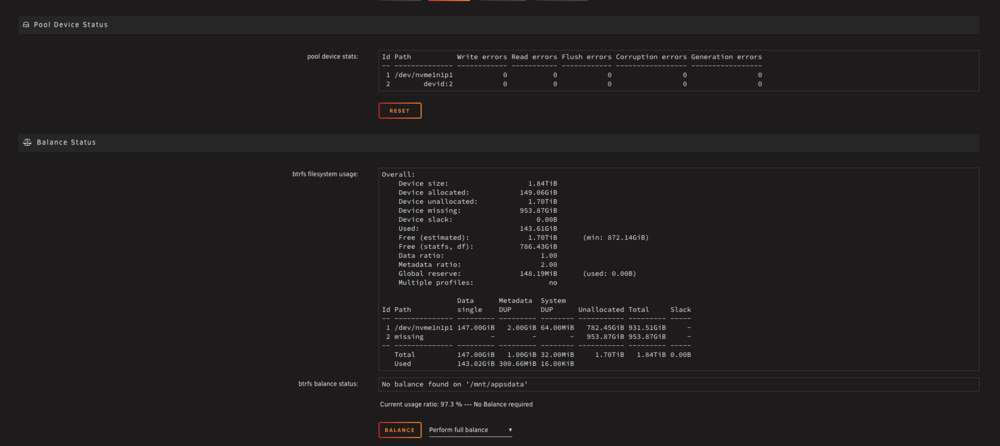
I tried converting to raid1 but it didn't seem to work. Seems like my second drive is "missing"?
-
Hi, I have a mirrored cache pool set up to store my app data. However, now that I have set up CA appdata backup, I am comfortable removing one of these disks from the mirrored pool and using it as a Time Machine backup location instead. I tried clicking on the first drive in the pool and converting to single mode. I stopped the array, attempted to unassign the second drive, but when I tried to restart the array, I received a prompt stating that the pool contained too many missing or wrong devices. Please help! tower-diagnostics-20250822-1030.zip

-
Hi, after I unmounted the disk and remounted the pool again, the drive copied data to the other drive. It seems to be operational now? I noticed that under the Dockers tab, I have no more docker containers intstalled (edit: and VMs are gone as well). At this point, is it possible to restore the containers from the pool somehow? I do have the Appdata Backup plugin setup so I can potentially restore from a previous backup but it is slightly less ideal because it's one week old. Thank you for the help so far. attaching diagnostics tower-diagnostics-20250820-1407.zip edit: I quickly installed all dockers again and the templates were saved. Although after some time, I got a notification that the docker image returned to normal so maybe I could have just waited? Anyways I consider this solved! Thanks so much
-
Output from btrfs fi show root@tower:~# btrfs fi show Label: none uuid: ee35825c-5743-4d4c-96da-f8cf30cec007 Total devices 2 FS bytes used 137.65GiB devid 1 size 931.51GiB used 145.03GiB path /dev/nvme1n1p1 devid 2 size 953.87GiB used 145.03GiB path /dev/nvme0n1p1 Label: none uuid: 29f54f96-23b1-4f36-b5bd-f37f070ecb95 Total devices 1 FS bytes used 41.69GiB devid 1 size 1.86TiB used 46.02GiB path /dev/nvme2n1p1 Label: none uuid: 6f3ca181-9210-4942-aaad-eef8487ae2ea Total devices 1 FS bytes used 372.00KiB devid 1 size 40.00GiB used 536.00MiB path /dev/loop2 Label: none uuid: dfc5688a-f673-4b69-90b7-b982c1059842 Total devices 1 FS bytes used 416.00KiB devid 1 size 1.00GiB used 126.38MiB path /dev/loop3 So I typed the first part: root@tower:~# btrfs-select-super -s 1 /dev/nvme0n1p1 btrfs-select-super -s 1 /dev/nvme1n1p1 warning, device 1 is missing using SB copy 1, bytenr 67108864 ERROR: /dev/nvme1n1p1 is currently mounted, aborting root@tower:~#
-
Output from first step: root@tower:~# blkid /dev/nvme0n1p1 root@tower:~# blkid /dev/nvme1n1p1 blkid /dev/nvme0n1p1 /dev/nvme1n1p1: PARTUUID="39f940ee-01" root@tower:~# Output from second step: root@tower:~# mkdir /x mount -t btrfs /dev/nvme1n1p1 /x mount: /x: wrong fs type, bad option, bad superblock on /dev/nvme1n1p1, missing codepage or helper program, or other error. dmesg(1) may have more information after failed mount system call. root@tower:~#
-
Thank you for the response. I followed the instructions in your post. Once I started the array, I see that the file system is "auto" and I am still presented with the message " unmountable: unsupported or no file system." Attaching the diagnostics: tower-diagnostics-20250820-1243.zip
-
Hello, I'm copying the output here: root@tower:~# btrfs fi show Label: none uuid: ee35825c-5743-4d4c-96da-f8cf30cec007 Total devices 2 FS bytes used 137.65GiB devid 1 size 931.51GiB used 145.03GiB path /dev/nvme1n1p1 devid 2 size 953.87GiB used 145.03GiB path /dev/nvme0n1p1 Label: none uuid: 29f54f96-23b1-4f36-b5bd-f37f070ecb95 Total devices 1 FS bytes used 41.69GiB devid 1 size 1.86TiB used 46.02GiB path /dev/nvme2n1p1 Label: none uuid: 6f3ca181-9210-4942-aaad-eef8487ae2ea Total devices 1 FS bytes used 372.00KiB devid 1 size 40.00GiB used 536.00MiB path /dev/loop2 Label: none uuid: dfc5688a-f673-4b69-90b7-b982c1059842 Total devices 1 FS bytes used 416.00KiB devid 1 size 1.00GiB used 126.38MiB path /dev/loop3
-
Sorry about that! Trying again: tower-diagnostics-20250820-1121.zip
-
Hi all, I was trying to remove one drive from a mirrrored cache pool that stored my app data and VMs. I stopped my array, unassigned the disk, then started my array again. I got an error: unmountable: wrong or no file system. I tried re-adding the drive to the cache pool, formatting the drive, etc. I can't fix the error to start my array with docker containers again. Please help! attaching diagnostics EDIT: Reattaching diagnostics zip file tower-diagnostics-20250820-1121.zip


