



Skip to content
View in the app

A better way to browse. Learn more.

Unraid

A full-screen app on your home screen with push notifications, badges and more.

To install this app on iOS and iPadOS
  1. Tap the Share icon in Safari
  2. Scroll the menu and tap Add to Home Screen.
  3. Tap Add in the top-right corner.
To install this app on Android
  1. Tap the 3-dot menu (⋮) in the top-right corner of the browser.
  2. Tap Add to Home screen or Install app.
  3. Confirm by tapping Install.

Topogan

Members
  • Joined

  • Last visited

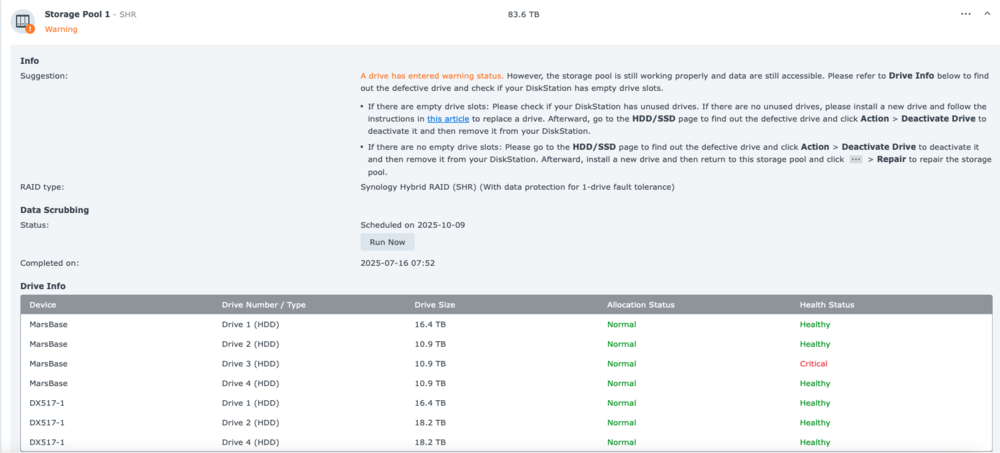
  1. Hi Unraid community I am transitioning from Synology to Unraid. I am transferring all the data now from Synology SHR storage pool to Unraid and still have 16Tb to go. Unfortunately don't have any space left in Unraid. I don't really care if I loose the remaining 16Tb so I don't want to buy a new HDD for this. My question is, in this Synology SHR state (see picture below - 1 drive parity) can I remove the 18.2 Tb HDD without loosing the whole pool? Theoretically the 10.9 HDD drive did not fail completely and I can remove 1 drive and leave the pool "unprotected", right? Then I copy the rest of 16Tb and move the rest of the drives to Unraid (except the critical one). Any advice would be appreciated! Cheers!
Account

Navigation

Search

Search

Configure browser push notifications

Chrome (Android)
  1. Tap the lock icon next to the address bar.
  2. Tap Permissions → Notifications.
  3. Adjust your preference.
Chrome (Desktop)
  1. Click the padlock icon in the address bar.
  2. Select Site settings.
  3. Find Notifications and adjust your preference.