mufasa510
Members
-
Joined
-
Last visited
Everything posted by mufasa510
-
So I went digging, and found that firmware versions could be causing the difference in sector counts, but all drives are on the same version (G006). I then read through the Seagate product manual, only thing interesting is section 2.2, where it states GUARANTEED sectors would be 23,437,770,752, implying that the sector counts could be greater. The product manual also states that "Accessible capacity may vary depending on operating environment and formatting." so it's possible I just got lucky with an extra 1.2GB of storage Woo Hoo! But I'm doubtful that it's a drive with only ~60 power-on hours, with 55 of those hours from the pre-clear. I'll just keep an eye out for health degradation signals.
-
Thanks guys, I appreciate you digging into this for me. The only difference I could think between the drives is the first 5 I bought were "refurbished" and the newer one I bought was "renewed". Since I've already pre-cleared the new drive, I'll go ahead and start the party swap asap. Thanks!
-
alright, thanks! I'll sleep on it tonight, if no solution arises by tomorrow, I'll go ahead and start the parity swap procedure.
-
root@Tower:~# lsblk NAME MAJ:MIN RM SIZE RO TYPE MOUNTPOINTS loop0 7:0 0 579.8M 1 loop /usr loop1 7:1 0 169.8M 1 loop /lib loop2 7:2 0 60G 0 loop /var/lib/docker/btrfs /var/lib/docker sda 8:0 1 14.5G 0 disk └─sda1 8:1 1 14.5G 0 part /boot sdb 8:16 0 10.9T 0 disk └─sdb1 8:17 0 2T 0 part sdc 8:32 0 10.9T 0 disk └─sdc1 8:33 0 10.9T 0 part sdd 8:48 0 10.9T 0 disk └─sdd1 8:49 0 10.9T 0 part sde 8:64 0 10.9T 0 disk └─sde1 8:65 0 10.9T 0 part sdf 8:80 0 10.9T 0 disk └─sdf1 8:81 0 10.9T 0 part md1p1 9:1 0 10.9T 0 md /mnt/disk1 md2p1 9:2 0 10.9T 0 md /mnt/disk2 md3p1 9:3 0 10.9T 0 md /mnt/disk3 md4p1 9:4 0 10.9T 0 md /mnt/disk4 nvme0n1 259:0 0 465.8G 0 disk └─nvme0n1p1 259:1 0 465.8G 0 part /mnt/cache tower-diagnostics-20260328-2234.zip
-
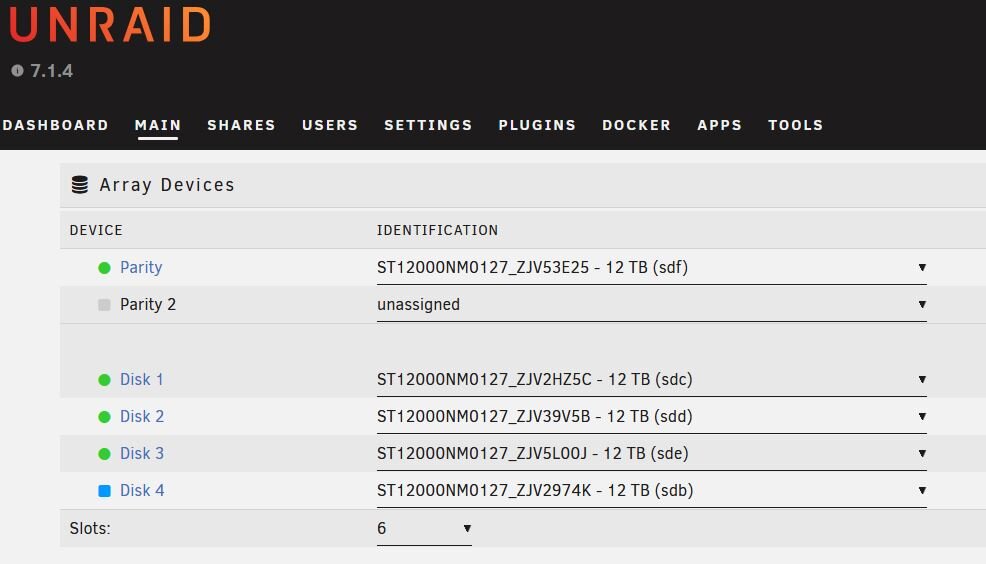
Hi all, I’m looking for some help with my first drive replacement in Unraid. I had a drive start failing, so I wanted to replace it. My array consists of 5 x 12 TB drives total: 1 parity drive and 4 data drives. Disk 4 was the failing drive, and I bought an exact replacement. I tried following the Unraid docs for “Replacing disks in an array”, but I’m not sure where I went wrong. What I did was: Powered the server down. Physically replaced the failing drive with the new one. Powered the server back up. Started the pre-clear process on the new drive. Started the array in the meantime so disk 4 would be emulated through parity. Ater the pre-clear finished, I tried assigning the new drive to disk 4, but I can’t start the array to begin the rebuild. The error I get is: “Stopped. Disk in parity slot is not biggest." “If this is a new array, move the largest disk into the parity slot. If you are adding a new disk or replacing a disabled disk, try Parity-Swap.” All of my drives are 12 TB and the same make/model, so I assumed they would all be the same size. I’m wondering if Unraid is seeing a small size difference between the drives and treating parity as smaller somehow. At this point, would I be better off using the parity-swap process? Reading through the docs, it seems like that may solve the issue if I assign the new drive to parity and move the old parity drive to disk 4. The new drive has 0 reallocated sectors, so I’m wondering if it’s being seen as slightly “bigger” and causing the error. Is there any way to bypass this, or should I just go ahead with parity-swap? Thanks!